Kaufland Marketplace as a Growth Channel for Shopify Stores
Kaufland Global Marketplace is a familiar retail brand in Europe, and its marketplace builds on that trust. This German platform has already established itself as a well-known European retailer that has built a large online marketplace on top of an established offline brand.
Kaufland also frames its marketplace as an international network rather than a single-country platform. With one seller account, you can access seven Kaufland marketplaces: Germany (DE), the Czech Republic (CZ), Slovakia (SK), Poland (PL), Austria (AT), France (FR), and Italy (IT). If you are planning EU expansion, this setup can be attractive because it lets you treat Kaufland as one growth channel across markets, not a separate project for each country.
To understand why Shopify sellers pay attention to Kaufland, look at the scale.
The Kaufland Marketplace in Numbers
- Up to 32M online visitors per month
- 45M items offered on the marketplace
- 6,400+ categories
- 13,000+ online sellers
- 7 marketplaces in one: DE, CZ, SK, PL, AT, FR, IT
- Potential reach: up to 139M online customers
Why Shopify-Kaufland Integration Changes Your Workflow
When you start selling on Kaufland alongside Shopify, you end up with two places where the same things exist: products, prices, stock, and orders. If you manage it manually, mistakes happen very quickly. Somewhere, the stock hasn’t been updated, and overselling has occurred, the price on the marketplace differs from Shopify, or the order is processed late because it has to be manually transferred between systems. The larger the catalog and the more orders, the harder it is to keep everything under control.
Integrating Shopify with Kaufland eliminates duplication of work and keeps everything in sync: products and their data, warehouse inventory, order imports, and statuses. Therefore, choosing the right Shopify Kaufland app is not a “nice to have,” but a way to reduce errors and scale without chaos.
Top 3 Shopify Kaufland Apps for Your Store
M2E Kaufland Global Connect

If Kaufland is your main target marketplace, M2E Kaufland Global Connect is the most focused option in this comparison. It is built specifically around Shopify to Kaufland workflows: listing and linking products, syncing stock to prevent overselling, and keeping orders in one place for fulfillment. It also supports multiple Kaufland marketplaces, including Germany, Slovakia, the Czech Republic, Austria, France, Italy, and Poland.
Best For
M2E Kaufland Global Connect fits Shopify sellers who want a Kaufland-first setup and prefer a focused workflow for listing, inventory sync, and order management without running a broader multichannel stack.
Key Features and Benefits of M2E Kaufland Global Connect
- Manage Shopify + Kaufland from one place. Instead of switching between systems, you manage your Shopify store and Kaufland accounts from a single central platform. Therefore, the core workflow remains within Shopify.
- Real-time inventory sync to reduce overselling. The app supports near real-time inventory synchronization with Kaufland. The goal is simple: when stock changes in Shopify, Kaufland updates fast enough to avoid selling unavailable items.
- Link products one-by-one or in bulk. You can link items directly from the admin panel, either individually or in bulk. This helps when you need to match a large Shopify catalog to Kaufland marketplace offers faster, without doing manual mapping SKU by SKU.
- Consolidate Kaufland orders in one area. All Kaufland orders are consolidated into a single area for streamlined order fulfillment and more efficient management.
- Validate Kaufland listings before publishing (Listing Validator Assistant). The Kaufland Listing Validator Assistant in M2E is a great advantage that helps you to post orders faster. It allows you to check whether your product data meets Kaufland’s listing requirements before publishing. It highlights missing or invalid data and shows you what needs to be fixed so that your ads run smoothly. Read more here.
- Faster onboarding for your team. A clear interface reduces training time. That matters when you have multiple people touching listings, operations, or support, and you want everyone to follow the same process.
- M2E expertise and support. M2E is based on 18+ years of marketplace integration experience, including. That background matters when you rely on the tool for daily marketplace operations, not a one-time setup. Also you get reliable support, which is staying responsive when you need help.
- The product evolves with merchant feedback. The platform is improved in collaboration with customers. In practice, this means your Kaufland-related needs and friction points can influence what gets refined next.
Ready to connect your store? Watch How to connect Kaufland Global Marketplace to Shopify in 2025 to link your account, configure sync, and get your first products moving.
Pricing
M2E Kaufland Global Connect is free to install and includes a free tier for up to $600 in monthly order sales. Once you exceed the $600 threshold, a $19 payment is required. You can find more information here.
What Merchants Say (Reviews Snapshot)
This app hasn’t received enough reviews yet, but there’s still more to come!
M2E Multichannel Connect
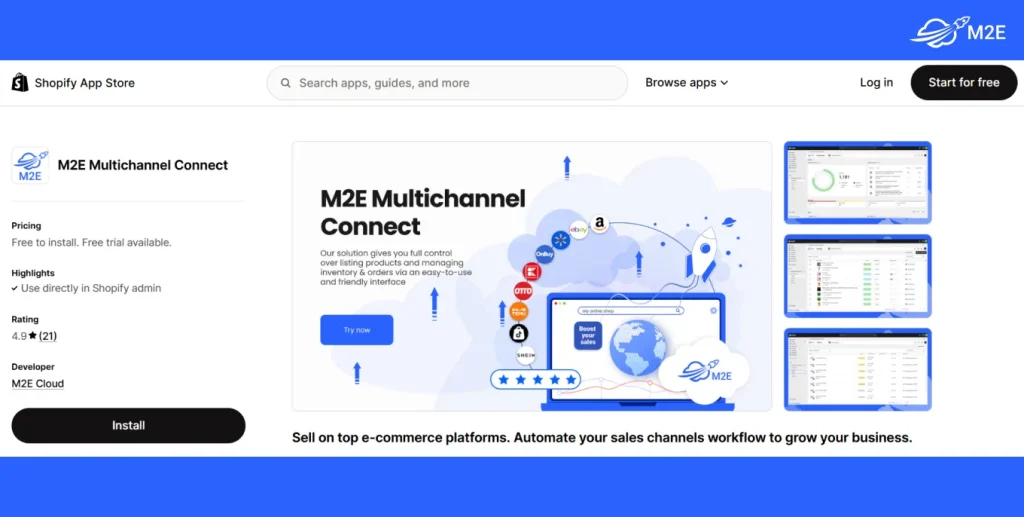
M2E Multichannel Connect is the “one hub for many marketplaces” option. If you sell on more than one channel, this approach can reduce operational duplication because you run product listings, inventory sync, and order flows from one system. The app integrates Shopify with Kaufland and with other marketplaces such as TikTok Shop, Temu, Amazon, eBay, Shein, and eBay Motors, and supports FBA.
Best for
M2E Multichannel Connect fits Shopify sellers who treat Kaufland as part of a broader marketplace stack and want one operational workflow rather than separate single-market connectors.
Key Features and Benefits of M2E Multichannel Connect
- Create listings and connect inventory fast. Create marketplace listings and link your Shopify inventory without rebuilding your catalog in each channel.
- Real-time price and quantity updates across channels. Keep pricing and stock aligned across all connected marketplaces. When something changes in Shopify, the app applies automatic price and quantity updates in real time, so you do not maintain each marketplace separately. This helps keep inventory consistent across locations after purchases happen and is positioned specifically to avoid overselling.
- Manage multiple marketplaces from one workflow. Use one multichannel solution for marketplaces listed on the app page: eBay, Amazon, TikTok Shop, Temu, Shein, Kaufland Global Marketplace, and OTTO.
- Listing management tools for large catalogs. Use the listing management capabilities listed in the app: feed automation, product feed, product sync, product selection, offer sync, local currency, bulk upload, custom listings, and listing analytics. This set is meant to support ongoing catalog maintenance at scale.
- Order workflow with tracking synchronization. Run order operations with the listed order management set: multi-location fulfillment, bulk orders, order sync, tracking sync, unified dashboard, inventory sync, and custom rules. This keeps order data and tracking aligned between Shopify and Kaufland or other connected marketplaces.
- Use Amazon logistics to fulfill Kaufland orders (MCF). If you already run Amazon FBA, you can use a separate solution – Amazon Multi-Channel Fulfillment (MCF) to ship your Kaufland orders through Amazon’s fulfillment network instead of building a separate warehouse flow for Kaufland.
- Validate Kaufland listings before publishing (Listing Validator Assistant). The Kaufland Listing Validator Assistant in M2E Multichannel Connect lets you check that your product data matches Kaufland’s listing requirements before publishing. It highlights missing or invalid details and shows what to fix so your listings can go live smoothly. You can learn more from our documentation.
- M2E expertise and support. M2E is based on 18+ years of marketplace integration experience, including. That background matters when you rely on the tool for daily marketplace operations, not a one-time setup. Also, you get reliable support that stays responsive when you need help.
- Product development shaped with real sellers. M2E Cloud is continuously improved together with customers. Client needs and requirements are treated as a priority, which means feedback can influence what gets refined next.
Pricing
M2E Multichannel Connect is free to install and includes a 30-day free trial. You can use the entry tier for free up to $1,000 in monthly order sales (GMV). More information about pricing can be found here.
What Merchants Say (Reviews Snapshot)
Most positive feedback clusters around two themes: responsive support (fast replies, issues resolved quickly) and a stable day-to-day flow once the integration is configured, especially for order and shipping synchronization. So this is something you can definitely count on. Several merchants also mention that the team implements fixes or improvements when edge cases show up.
There are also a small number of negative reviews, but they tend to come from early-stage usage where the merchant did not fully configure the app or understand a setting yet. In those cases, M2E typically responds quickly, explains what happened, and offers a clear path to fix the setup.
CedCommerce Kaufland Channel

The CedCommerce Kaufland channel is positioned as a direct intermediary for sales on Kaufland. Here you can also manage inventory and orders from one place and avoid overselling. It synchronizes data between Shopify and Kaufland marketplace in real time. An important element here is also the individual pricing of products. This allows you to confidently manage your store and stay ahead of the competition.
Best For
CedCommerce Kaufland Channel fits Shopify sellers who want a Kaufland.de-focused connector with a CedCommerce dashboard and prefer tiered plans that scale by SKU and order volume.
Key Features of CedCommerce Kaufland Channel
- Manage everything from profile setup to live listings in one dashboard. The app centers around an “advanced dashboard” where you handle the full flow from creating your profile to preparing and managing listings. The idea is to keep setup and listing work inside one interface instead of juggling multiple screens.
- Automate product syncing to keep inventory aligned. CedCommerce positions the app around near real-time synchronization between Shopify and Kaufland.de. When you update inventory in Shopify, the integration syncs that information to the marketplace so your catalog stays consistent.
- Manage orders in the app, from fulfillment to cancellation. Orders can be handled directly in the app. CedCommerce docs also state that you can manage orders and ship in-stock items, and shipping details get synced back to Kaufland
- Upload high-resolution images without losing quality. The listing explicitly calls out high-resolution image import without compromising quality, which matters if your product pages rely on strong visuals (fashion, home, electronics).
- Bulk actions for faster catalog work. You can select products and upload them “in one go” and also map categories in bulk. This is useful when you need to push a larger catalog without handling each SKU manually.
- Languages and supported services. The Shopify listing shows the app supports English and German, and it “works with” ShipStation, ShipWorks, and Kaufland.de
- Lower risk when the stock runs low. Beyond “inventory sync”, the docs mention an Inventory Threshold setting that can mark an item as out of stock on the marketplace once inventory drops below a limit. This is meant to help avoid overselling when quantities get tight.
- Better operational visibility for order handling. You get email notifications for marketplace orders and can use the dashboard to check inventory status, which helps teams react faster without constantly monitoring the Kaufland Seller Center manually.
Pricing
CedCommerce Kaufland Channel offers a tiered monthly subscription with a 14-day free trial. Plans scale based on the number of SKUs you want to list and the number of orders in the marketplace. The basic plan will cost $29/month and allows you to list up to 500 (+ 100 Extra) SKUs. You are also limited to 100 (+ 50 Extra) orders per month.
What Merchants Say (Reviews Snapshot)
In positive reviews, merchants typically mention that the app covers the core needs for selling on Kaufland.de and appreciate support when they need help with setup or ongoing operations. Some reviews also indicate that results can depend on the store’s setup and how the integration is configured, so merchants often benefit from going through the onboarding steps carefully and reaching out to support early if anything looks off.
Overall, the app can deliver real value and work well for Shopify sellers, especially if you manage a larger catalog and need a structured way to run Kaufland operations. Reviews suggest the outcome depends a lot on the correct setup and on staying in touch with support during the launch phase.
Quick Comparison: Shopify Kaufland Apps at Glance
| Aspect | M2E Kaufland Global Connect | M2E Multichannel Connect | CedCommerce Kaufland |
| Best for | Shopify sellers who want a Kaufland-first workflow | Sellers who run Kaufland plus other marketplaces and want one control center | Sellers who prefer SKU/order-based tiers for Kaufland.de |
| Interface languages | German, English, French, Italian, Spanish, Portuguese (Portugal), Polish, Czech, and Dutch | English, Italian, Spanish, German, French, Portuguese (Portugal), Polish, and Czech | English and German |
| Inventory sync | Near real-time inventory sync to help reduce overselling | Real-time price and quantity updates across connected channels | Product sync automation for inventory management |
| Orders + fulfillment | Centralized Kaufland order management in one area | Centralized order management with order sync + tracking sync and multi-location fulfillment options | Manage orders in-app, order handling via the app dashboard |
| Key Features | – Listing Validator Assistant – Centralized management in Shopify admin – Bulk product linking – Inventory sync – Consolidated orders | – Listing Validator Assistant – Multi-marketplace listing and sync – Bulk tools – Order + tracking sync | – Dashboard-based workflow – Product profiles and categorization – Order handling in-app |
| GPSR support | Yes | Yes | Yes |
Conclusion
Connecting Shopify to Kaufland is an operations decision. The practical goal is simple: make Kaufland Global Marketplace behave like a controlled extension of your Shopify store.
Your choice depends on your setup and how you plan to sell. If you sell on one marketplace only, you will likely pick a Kaufland-focused connector like M2E Kaufland Global Connect or CedCommerce Kaufland Channel. If you already sell, or plan to sell, across multiple marketplaces, M2E Multichannel Connect is the better fit because it helps you run several channels in one operational workflow instead of managing separate tools.
Whatever you choose, our team at M2E is ready to help with consultation and onboarding for selling on the Kaufland marketplace. Contact us to discuss your setup, confirm the best app for your goals, and get the connection running correctly from day one.