
Shein is expanding its presence in the US and EU. Sellers bear the burden of delivery speed and tracking. When orders spike, manual pick, pack, and ship breaks. Ratings slip. Penalties follow.
If your inventory is already stored in Fulfillment by Amazon (FBA), Amazon Multi-Channel Fulfillment (MCF) is a practical solution. You ship Shein orders from the same FBA stock, keep reliable tracking, and avoid rebuilding your warehouse stack. Shipments run seven days a week and stay predictable.
Crucially, Shein lets you choose your fulfillment method. You can use your own warehouse, a 3PL, or MCF – so long as you hit Shein’s timelines and upload tracking on time. For example, in the U.S., that means processing the order within 48 hours, delivering within seven business days, and ensuring tracking information is updated in Seller Hub.
Shein Amazon MCF vs Shein Amazon FBA – What’s the Difference
Let’s make it simple:
- Amazon FBA stores inventory and fulfills orders placed on Amazon.
- Amazon MCF uses that same FBA inventory to fulfill orders from other channels – including Shein. For off-Amazon orders, MCF ships in unbranded packaging to prevent buyers from seeing Amazon boxes.
| Program | What it fulfills | Where inventory lives | Packaging for Shein orders |
| Amazon FBA | Orders on Amazon | FBA network | Amazon-branded |
| Amazon MCF | Orders from other channels (e.g., Shein) | Same FBA network | Unbranded by default (‘blank box’) |
The packaging point matters on Shein. It protects the buyer experience and keeps your brand neutral when you sell across multiple marketplaces. If you need to enforce ‘blank box only,’ MCF lets you do that – enable ‘blank-box’ in the fulfillment center.
What Changed in 2025: Improvements That Matter
Here is the main updates you need to consider in 2025:
MCF expansion now includes Shein
Amazon announced that MCF is expanding support to Shein, Walmart, TikTok Shop, and your own website (e.g., Shopify). For Shein sellers, this means clearer pathways, reduced manual routing, and dedicated surfaces being rolled out to simplify setup. The trade press echoed the same message the week of the announcement.
But you don’t have to wait. In this blog, you can find how to connect Shein to Amazon MCF with M2E Cloud and start gaining fulfilling orders today.


7-day-a-week delivery and cleaner speed mapping
Off-Amazon orders fulfilled by MCF benefit from steady service levels. You can map Shein shipping options to Standard / Expedited once and reuse those rules across your catalog and regions.
Unbranded boxes by default
MCF ships off-Amazon orders in unbranded packaging at no extra fee. If a SKU must never ship with Amazon branding, select Only ship with blank boxes; MCF will verify that your inventory sits in a blank-box FC (transfer if not).
How to Fulfill Shein Orders by Amazon MCF with M2E
Want a simple way to ship Shein orders fast without rebuilding your ops? Connect M2E Cloud to Amazon MCF and let FBA do the heavy lifting. Orders import to your store, route to MCF, and tracking flows back to Shein – no manual work.

Step #1. Install the M2E Amazon MCF app for your store
Add M2E Amazon MCF and link Amazon Seller Central. We support Shopify, WooCommerce, Ecwid, Adobe Commerce (Magento 2 via M2E Pro), Shopware, and BigCommerce, allowing orders to route to Amazon MCF and ship from your FBA stock.
MCF only fulfills items that sit in FBA. If a SKU is not in FBA, it will not ship with MCF. Set that expectation before you switch automation on.
For a quick walkthrough, see our Amazon MCF setup guides.
Step #2. Connect your Shein seller account
Add Shein to your M2E hub using the M2E Shein Integration. This pulls your Shein catalog and orders into the same workspace as your Amazon/FBA data, allowing M2E to match SKUs, sync stock, and prevent overselling across your store and other marketplaces.
New to Shein? Apply first to have your credentials ready, then connect in minutes. For prerequisites and a quick checklist, see our Shein seller registration guide for US or EU sellers.
Step #3. Enable order management for Shein
Turn on Order Management for your Shein account in M2E Multichannel Connect. Shein orders appear in your store with the correct SKU, quantity, totals, and taxes.
From then on, every Shein order lands in your store’s admin with the correct SKU, quantity, totals, and taxes – so you work from one familiar screen.
What you get:
- Centralized orders. Shein sales import to your store automatically.
- Two-way status sync. Shipped, Cancelled, Refunded, and more stay aligned between your store and Shein.
Step #4. Turn on automatic MCF order creation
Open the M2E Amazon MCF app and enable automatic order creation. When a Shein order imports and the item exists in FBA, M2E creates the matching MCF order in Seller Central.
After Amazon ships, M2E automatically pulls tracking information back to your store and pushes it to the Shein order – all on time and without manual copy-paste.

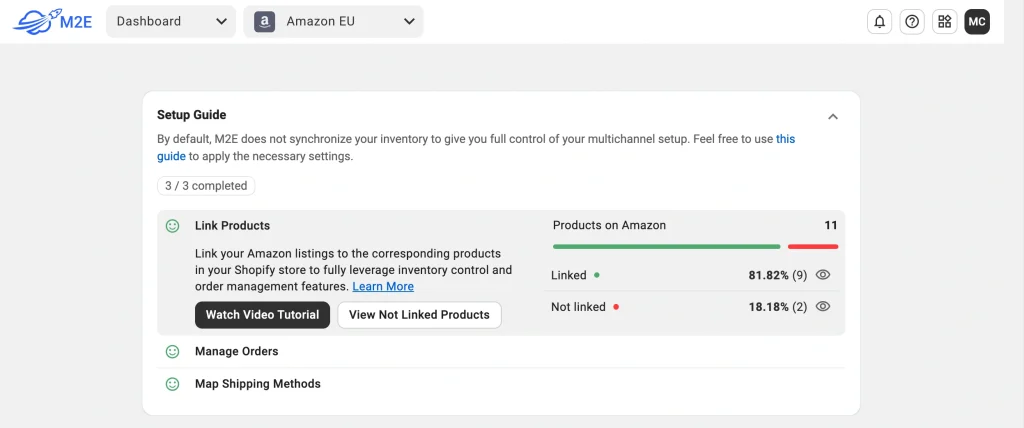
For example, if you use Shopify, also enable the FBA stock sync so your storefront always shows the real quantity Amazon can ship:
- In Settings → Orders, toggle Sync quantity from Amazon Fulfillment to Shopify.
- Choose Fulfillment warehouse mode.
- Pick the Inventory Source for your Shopify Location and Save.
How the flow looks with auto-create (and Shopify stock sync on):
- Order placed on Shein.
- M2E imports the order and routes it to Amazon MCF.
- Amazon ships from FBA.
- FBA quantity decreases automatically.
- M2E updates your store stock (Shopify sync shows the new FBA quantity), and tracking posts back to the Shein order.
Result: fewer cancellations, no overselling, and on-time tracking – managed from one hub.
Here is more information on Shopify Multi-Channel Fulfilment with M2E.
Pitfalls You May Face Using Shein Amazon MCF and How to Fix Them
Even a clean setup can encounter snags once real orders start flowing. The good news – most issues are simple and fast to fix inside M2E. Use the checklist below to identify the cause, apply the fix, and ensure Shein orders continue to move through Amazon MCF smoothly.
SKU mismatch = orders don’t auto-route to MCF
The SKU on Shein (or your store) doesn’t match what Amazon/FBA knows. M2E can’t map the order to inventory, so no MCF order gets created.
How to fix it fast: Link catalogs first. Ensure each product points to the same SKU/ASIN across Shein, your store/M2E, and Amazon. Once matched, M2E can auto-create the MCF order and send tracking back.
Not in FBA = item can’t ship with MCF
MCF only ships units that physically sit in Amazon fulfillment centers. If the stock is still inbound or stored elsewhere, MCF won’t pick it.
How to fix it fast: Send the SKU to FBA (or route the order via your backup 3PL). MCF orders can only be placed against available FBA inventory in Seller Central.
‘Blank box’ required, but the fulfilment center (FC) isn’t eligible
MCF ships off-Amazon orders in unbranded packaging by default – no Amazon logos on boxes, labels, or tape. But when you enforce ‘only ship with blank boxes,’ Amazon checks whether your stock is in a blank-box-enabled FC. If it isn’t, that option won’t apply.
How to fix it fast: Move inventory to a blank-box FC or relax the rule per SKU. Double-check your packaging settings and inventory placement before you scale.
Expedited shipping is killing profit
You set an aggressive delivery promise. To hit Shein’s SLA (process within 48 hours, deliver within seven business days, upload tracking), you keep upgrading to Expedited. It works – but costs mount. MCF operates 7 days a week with both Standard/Expedited speeds, making Standard the default option.
How to fix it fast: Increase handling time slightly and keep Standard as your default. Use Expedited only for remote zones, peaks, or valid exceptions. Re-map methods once week-one data proves you need the faster lane.
Wrap Up
Of course, Amazon MCF is a paid service – you’ll pay Amazon’s fulfillment fees – but you get something valuable in return: a simple, reliable way to ship fast from the FBA stock you already own. That convenience means fewer handoffs, clean tracking, and less time firefighting.
With M2E Cloud, you plug this into most marketplaces (Shein, Walmart, eBay, TikTok Shop, Temu, and more) and manage everything from one screen. Orders are imported to your store. Eligible items route to MCF. Tracking flows back on time. Your team works from a single screen, focusing on exceptions rather than copy and paste.
If you prefer a guided setup, talk to our team or use the detailed guides. You will meet Shein SLAs and keep margin under control without adding headcount.