TikTok Shop is now live in the Netherlands, giving brands, retailers, and marketplace sellers a new way to reach buyers in one of Europe’s strongest e-commerce markets.
The Netherlands may be a compact market, but it is highly digital:
- 18 million people
- €36.5 billion in online sales
- Over 98% internet penetration
- 4.2 million active TikTok users
- 18% year-on-year TikTok user growth
TikTok does more than show products – it creates demand. 67% of users say the app makes them shop, even when buying was not part of the plan.
For sellers with large catalogs, this is a chance to reach buyers earlier – before they search on Amazon, eBay, or other marketplaces.
What Products Are Likely to Sell Well in the Netherlands?
Let’s face it – TikTok Shop is a discovery-first platform. It means that people don’t open the app with a shopping list – they get pulled in by content.
What Dutch consumers shop for online:
- Clothing & footwear – 59% of Dutch consumers buy this category online; leads cross-border purchases at 40%
- Home & garden – second most popular, 22% of cross-border orders
- Personal care products – 15% of cross-border purchases
What works on TikTok Shop across Europe:
- Fashion & apparel
- Beauty & skincare
- Home lifestyle products
- Health & wellness
- Accessories & jewellery
What makes the Dutch buyer different:
- Dutch consumers are pragmatic. They value clear information and honest product claims over polished marketing. Dutch shoppers rely heavily on peer reviews and creator opinions rather than brand advertising – which actually makes TikTok’s creator-driven commerce model a natural fit.
- Sustainability matters. 64% dislike excessive packaging, 60% actively recycle. Eco-friendly credentials are a real advantage.
- Higher spend per order. 38% of orders exceed €50 – quality over cheap impulse buys.
- Mobile-first. Most Dutch purchases happen on smartphones – exactly where TikTok Shop lives.
Steps to Start Selling on TikTok Shop in the Netherlands
TikTok Shop Netherlands follows the same EU seller framework already running in Germany, France, and Italy.
If you haven’t opened a TikTok Shop account yet, start with registration. New sellers can get 20 free days to prepare their shop before selling.
Step 1. Register through the TikTok Shop seller center
Go to the TikTok Shop Seller Center and create your account:
- Sign up with your email, Dutch mobile number, or existing TikTok account
- Each account requires a unique contact method – one email or phone number per seller
- Enter the verification code sent to your contact to complete sign-up
Check TikTok Shop guide for the full instructions.
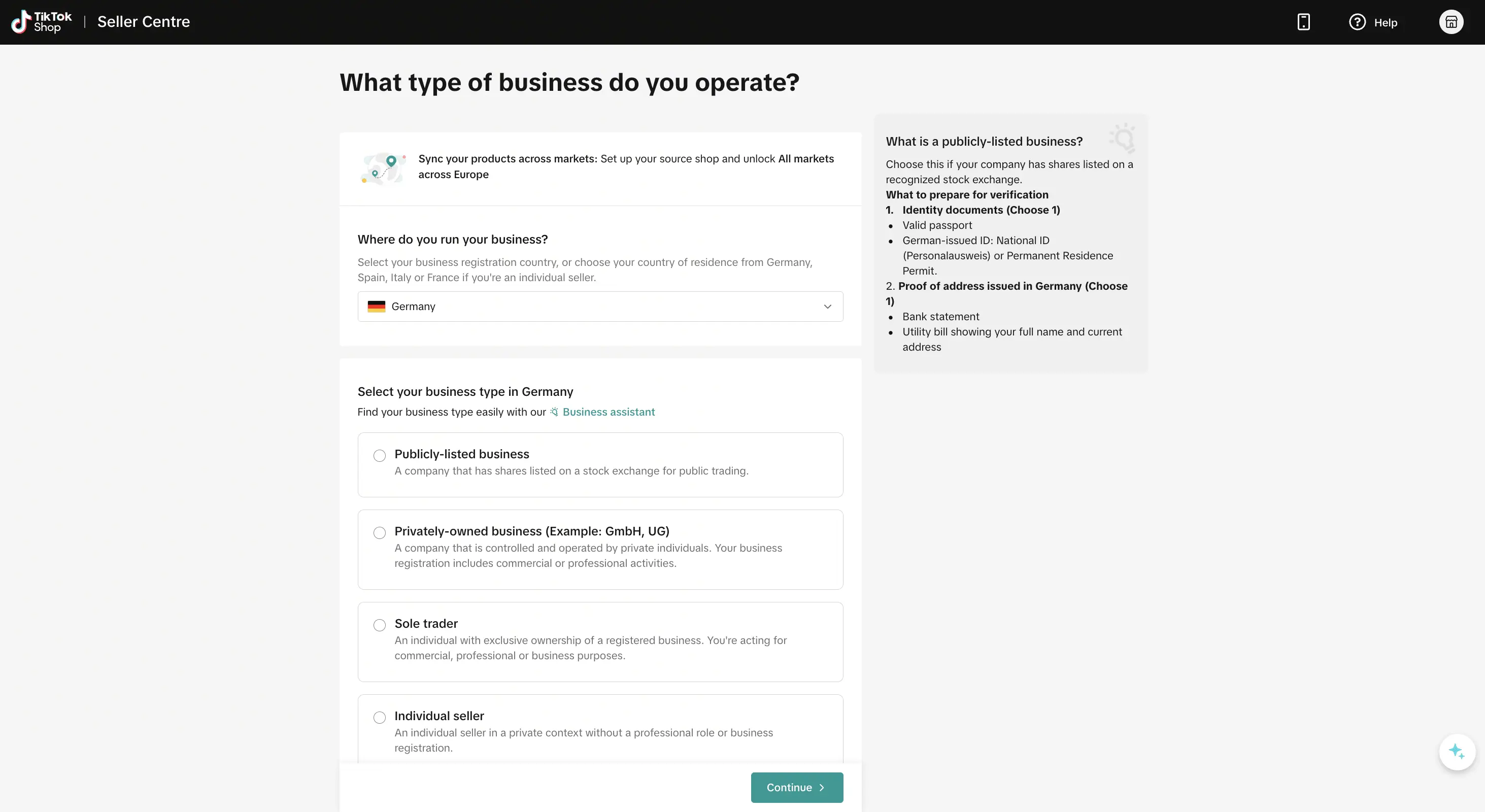
Step 2. Choose your business type
TikTok Shop structures its registration around your legal entity type. For Dutch sellers, the most common options:
- Sole Trader (Eenmanszaak / ZZP) if you are an independent entrepreneur registered with the Kamer van Koophandel (KVK)
- Privately-Owned Business (BV) if you are private individuals who own companies
- Publicly-Listed Business (NV) – for publicly traded companies
Your selection here determines what docs you’ll need to provide, so choose carefully. Switching business types after the fact is usually impossible.
Step 3. Verify your identity and submit the required docs
That’s the step where TikTok performs its KYC (Know Your Customer) checks. What you’ll need depends on your business type.
For legal entities (BV, NV):
- Company info. KVK registration number, official company name (exactly as registered), and registered business address.
- Business representative. Full name, role (Director or Authorized User), and – if delegating registration – a signed authorization letter from the active company director.
- ID verification. Valid passport, national ID card, driving license, or permanent residence permit; plus front/back scans and a short selfie video.
- Proof of address. Utility bill, bank statement, or Uittreksel BRP (official extract from the Basisregistratie Personen) – dated within 3 months.
- UBO information. Anyone owning 25%+ of the company directly or indirectly.
For Sole Traders (Eenmanszaak):
- KVK registration number and registered business name
- Same ID verification and proof of address as above
Use clear, up-to-date documents with matching business details. Blurry files or different names across documents can delay registration.
Step 4. Add business details
Enter your legal business name and KVK number exactly as shown in your trade documents.
Your company name should match your KVK registration. Your trade name is the public-facing brand name. If both names are the same, confirm this in the setup.
You also need to provide a public complaint address. It must be a valid physical address in the EU.
TikTok accepts:
- Utility bills
- Bank statements
- Government letters from the last 3 months
Step 5. Create your shop profile
Set up the main details buyers will see:
- Shop name: make it clear and consistent with your brand. Changes are limited, so choose carefully.
- Logo: upload a clean image that looks good on mobile.
- Contact details: verify your email and phone number.
- Customer support: add a dedicated email and phone number.
- Return address: add a Netherlands-based return address.
- Warehouse address: update it in Seller Center → My Account → Account Settings → Warehouse Settings.
Once everything is correct, submit your application. TikTok usually reviews it within 2 to 3 business days.
Step 6. Provide UBO information
Legal entities must submit details for all Ultimate Beneficial Owners.
This usually includes anyone who owns or controls at least 25% of the business. If there is no such person, TikTok may request details about senior managers or directors.
Prepare the following for each UBO:
- Legal name
- Nationality and date of birth
- Home address
- ID details
- Proof of ownership or control
New shop probation period
New TikTok Shops don’t get full seller access right away. First, they enter a probation period. This applies to all new shops, including Legal Entity shops and extra shops under one seller account.
During probation, TikTok sets limits on:
- Daily orders
- Daily product submissions
- Linked marketing or channel accounts
For Legal Entity shops, the daily order limit is up to 100 orders.
Sellers can check order limits, product limits, fulfilled orders, performance, and remaining probation time in Seller Center → Shop Trial Period.
To complete probation, sellers need:
- At least 60 calendar days of active sales
- At least 150 fulfilled orders in 60 days
- SFCR below 2.5%
- SFRR below 1.5%
- ONRR below 1.5%
In the EU, TikTok reviews probation at the account level. If you run several EU shops, your limits and performance metrics are grouped together.
💡Learn more about TikTok Shop EU Seller Registration Policy in the official guide.
Step 7. Set Up Shipping on TikTok Shop
Your shipping setup can affect delivery speed, buyer confidence, and account health. Choose the model that fits your operations.
Main fulfillment options:
- Shipped via Platform (4PL). You store and pack products. TikTok manages delivery. This is the default option for EU sellers.
- Fulfilled by TikTok (FBT). TikTok handles storage, packing, delivery, and returns. It is now available from Germany and Spain.
- Shipped by Seller (3PL). You handle the full fulfillment process. This option suits sellers with their own logistics setup.
For Dutch sellers:
- Local Dutch orders can use 4PL or 3PL.
- Sell Across EU supports 4PL and 3PL.
- Cross-border 3PL requires Account Manager approval.
- FBT is available only through German or Spanish warehouses.
With 4PL, sellers can use:
- Parcel shop drop-off
- Warehouse pickup after reaching the required order volume
You also need to add:
- Warehouse address: where products are stored
- Return address: where buyers send returns
A Dutch return address can help build trust.
Shipping expectations are high in the Netherlands. Many buyers prefer free delivery or product prices that already include shipping costs.
To stay in good standing:
- Dispatch orders fast
- Add valid tracking
- Use TikTok-approved carriers
- Keep fulfillment statuses updated
Step 8. Use M2E Cloud to list products
Manual listing can work for a small catalog. But for larger sellers, it creates too much risk. TikTok Shop has its own category structure, required fields, and compliance rules. Missing data can stop products from going live.
M2E Cloud connects your online store to TikTok Shop, so you can manage listings, stock, orders, and pricing from one system.
It supports stores built on Shopify, WooCommerce, BigCommerce, Ecwid, and Shopware.
Key features include:
- Real-time inventory sync to reduce overselling
- Centralized product data for easier category and attribute mapping
- Order and tracking sync to keep fulfillment data updated
- Channel-specific pricing rules for TikTok Shop and other marketplaces
- Multi-market support for sellers expanding across Europe
For growing sellers, M2E Cloud turns TikTok Shop into part of a connected marketplace workflow, not a separate manual task.


TikTok Shop Listing Validator Assistant
Before products go live, M2E checks them for common listing issues.
This includes missing GPSR data, incorrect category mapping, incomplete compliance attributes, and unmatched records.
The Assistant shows:
- Which products are compliant
- What needs to be fixed
- Where the issue comes from
- How to correct it
Unresolved items can be saved as Incomplete, so your team can return to them later without starting over.
Amazon MCF support
If you use Amazon Multi-Channel Fulfillment, M2E Cloud helps connect it to your multichannel workflow. This lets you fulfill TikTok Shop orders through Amazon’s logistics network instead of managing a separate fulfillment process.

Step 9. Link your TikTok account and start selling
Now it is time to link your TikTok account to Seller Center. This can be your brand profile or a personal account used for your business.
Open Seller Center → Linked TikTok Account and complete the authorization process.
After that, your shop can use the features that make TikTok different from traditional marketplaces:
- Shoppable videos let buyers purchase products directly from your content.
- LIVE Shopping helps you present products, answer questions, and guide buyers in real time.
- Store Page gives your TikTok profile a dedicated place for your catalog.
- Creator Affiliate Program lets Dutch creators promote your products and earn commission from the sales they generate.
This step should not be treated as a small technical task. On TikTok Shop, content is part of the sales flow. When your account is linked early, your products can appear where buyers already spend their time.
Things to Keep in Mind When Selling in the Netherlands
Selling on TikTok Shop Netherlands is not only about listing products. You also need to prepare your pricing, compliance, and content for the local market.
Platform commission fee
TikTok Shop charges a commission fee on completed orders. The fee is taken from your order settlement and is based on the final order value after refunds.
For EU sellers, the main rates are:
- 9% standard commission
- 7% for selected product categories
- 4% for eligible new sellers during the first 60 days
Commission rates include applicable taxes, such as VAT. If a customer returns the full order, TikTok refunds the full commission.
To avoid pricing mistakes, check the latest category rates on the official TikTok Shop commission fee page in Seller Center.
💡For the full commission breakdown with calculation examples, see the M2E guide to TikTok Shop commission fees for EU sellers.
Compliance
Dutch and EU rules can affect your setup.
Check these areas before launch:
- BTW / VAT: required for Dutch sellers.
- OSS: useful for EU cross-border sales.
- DAC7: TikTok may report seller income after certain limits.
- GDPR: customer data must be protected.
- Labels: product information should be in Dutch where required.
- Returns: buyers must have a clear 14-day return option.
- EPR: packaging may need registration.
- GPSR: product safety data must be complete.
- Seller details: your business identity and EU-compliant address must be visible.
M2E Cloud can help sellers map GPSR fields and listing attributes for TikTok Shop.
Localization
Dutch buyers prefer simple, direct communication. Clear facts usually work better than heavy marketing claims.
Keep your shop localized by using:
- Dutch titles and descriptions where possible
- Clear product benefits
- Transparent pricing
- Local seasonal campaigns
- No hidden fees at checkout
Ready to Sell? Start Preparing Now
TikTok Shop is live in the Netherlands. The registration framework, compliance requirements, and shipping infrastructure are operational – which means there’s no reason to wait.
The sellers who will have an advantage are the ones who move now: sort your BTW and EPR, get your legal entity verified, build your TikTok content presence, and connect your store before the market gets crowded.
The Netherlands has a digitally mature audience with high purchase intent, a creator ecosystem that fits the platform’s model, and – for now – a competition window that’s still open.
Get your setup right from day one.