Waarom staat het product van uw concurrent wel in de ranglijst en dat van u niet? Dat komt vaak door SEO. Zichtbaarheid op eBay (en zelfs Google) begint met Cassini, en hoewel de officiële richtlijnen van eBay u de basisprincipes geven, zijn die slechts het begin.
Om echt op te vallen, moet je verder gaan dan de standaardpraktijken. Laten we verder gaan dan de basis met M2E Insights – inclusief praktische SEO-tips voor categorieën zoals auto-onderdelen, elektronica, horloges en meer.
Wat is het Cassini-algoritme op eBay?
Hoe werkt eBay SEO? Om deze vraag te beantwoorden, moet u de Cassini-tool begrijpen.
Cassini is de zoekmachine van eBay die advertenties rangschikt op basis van relevantie en kwaliteit, niet alleen op basis van trefwoorden. Het houdt rekening met uw titel, itemspecificaties, verkopersprestaties, verzending en hoe vaak uw advertentie tot een verkoop leidt. Algemene of vage advertenties worden waarschijnlijk ondergesneeuwd.
Laten we eens kijken hoe u zoekmachineoptimalisatie op eBay kunt gebruiken.

7 praktische eBay SEO-tips
Veel verkopers onderschatten hoe krachtig zoekmachineoptimalisatie op eBay kan zijn om de zichtbaarheid en verkoop te stimuleren. Deze eBay SEO-tips kunnen ervoor zorgen dat uw producten als eerste worden weergegeven wanneer kopers zoeken. U kunt ook meer lezen over de basisprincipes van SEO op eBay in de officiële marktplaatsgids.
#1: Gebruik trefwoorden vanuit het perspectief van de koper
De Cassini-engine van eBay scant uw titels, beschrijvingen en items. Zorg er dus voor dat uw trefwoorden tellen. Waarom? Zelfs geweldige producten kunnen in de zoekresultaten ondergesneeuwd raken zonder de juiste titeloptimalisatie op eBay.
Denk als een koper
Vraag jezelf af: Wat zou ik typen als ik op zoek was naar dit item?
Een advertentie met de titel “vintage zilveren oorbellen” is duidelijk en goed vindbaar. Maar “mooie glanzende sieraden” zegt niets over het type, het materiaal of het tijdperk.
Waar moet je zoekwoorden plaatsen?
Titeloptimalisatie op eBay is essentieel. Cassini en Google richten zich op uw eerste 5-6 woorden, itemspecificaties en een duidelijke beschrijving.
Gebruik precieze termen zoals “Dell Inspiron 15-batterij” in plaats van vage uitdrukkingen zoals “Hoogwaardige batterij.”
Stop niet te veel zoekwoorden erin
Zoekmachines zijn slim. Uw vermelding kan worden gefilterd of bestraft als deze vol staat met onhandige zinnen of herhaalde termen.
- Slecht: “batterij Dell batterij laptopbatterij Dell 15 batterij nieuwe batterij”
- Beter: “Originele OEM-batterij voor Dell Inspiron 15 – Type 357F9. Compatibel met laptops uit de Dell 5000-serie.”
Weet u niet waar u gratis ideeën voor zoekwoorden kunt vinden? Bekijk dan deze tabel.
| Gereedschap | Bron | Gratis? | Opmerkingen |
| Zoeksuggesties van eBay | eBay | Ja | Direct in de zoekbalk |
| Google Trends | Ja | Voor trends en seizoensgebondenheid | |
| Ahrefs-zoekwoordgenerator | Ahrefs | Ja* | Beperkte gratis toegang |
| Google Zoekwoordplanner | Google Ads | Ja | Registratie vereist |
| Terapeak | eBay Seller Hub | Ja* | Alleen voor eBay-winkelabonnees |
| Keywordtool.io | keywordtool.io | Ja* | Beperkte gegevens in de gratis versie |
“Ja*” – betekent dat voor volledige toegang mogelijk een accountregistratie of abonnement vereist is.

#2: Unieke identificatiecodes = betere ranking
Sterke zoekwoorden zijn belangrijk, maar in drukke categorieën geven unieke productidentificaties zoals modelnummers je een voorsprong. Ze vergroten de zichtbaarheid op zowel eBay als Google.
Dit moet u opnemen, afhankelijk van wat u verkoopt:
| Categorie | Verplichte identificatiegegevens |
| Auto- en motoronderdelen | OEM-nummer (voor de originele reserveonderdelen), MPN (voor de aftermarket-onderdelen) Het is mogelijk om compatibele onderdelen voor verschillende automerken onder één origineel onderdeelnummer te vermelden. |
| Telefoons en onderdelen | Modelnummer (bijv. SM-G991B), onderdeelnummer |
| Computerhardware | MPN, SKU, CPU/GPU-ID (bijv. Intel BX807…) |
| Printerbenodigdheden | Cartridge/Toner Code (e.g., CF244A, 302XL) |
| Elektronica | OEM-code, onderdeelnummer |
| Horloges | Referentienummer (essentieel voor merken zoals Rolex) |
| Industriële apparatuur | Fabrikantcode, serienummer (bijv. Siemens 6ES7…) |
Deze codes verbeteren de zoeknauwkeurigheid en helpen Cassini om u hoger te rangschikken. Ken uw publiek, het begrijpen van hun zoekgewoonten is de sleutel tot slimmere vermeldingen.
Lees meer over de unieke productidentificatiecodes op de webpagina van eBay.
#3: Productafbeeldingen: laat zien, vertel niet alleen
Foto’s zijn niet alleen beeldmateriaal, ze zijn ook essentieel voor eBay SEO. Cassini geeft de voorkeur aan advertenties met kwaliteitsfoto’s, waardoor zowel de zichtbaarheid als het vertrouwen van kopers wordt vergroot. Streef naar 5 tot 7 foto’s per advertentie om concurrerend te blijven.
Gebruik afbeeldingen met een hoge resolutie
Wazige of korrelige foto’s schrikken kopers af, en Cassini ook. Upload duidelijke afbeeldingen met een hoge resolutie (minimaal 800 px aan de langste zijde; 1600 px aanbevolen).

Afbeeldingsbron: eBay-tipsgids voor foto’s
Sla de grenzen over
Voeg geen randen of kaders toe aan je foto’s. De enige uitzondering is als er van nature een zichtbare rand in de afbeelding voorkomt, zoals een wit kader rond een rechthoekig product dat op een neutrale achtergrond is geplaatst.
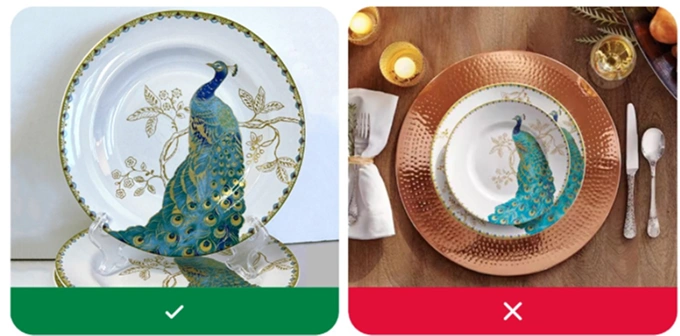
Laat duidelijk zien wat u verkoopt
Kopers moeten precies zien wat ze kopen, zonder trucjes. Vermijd misleidende afbeeldingen zoals:
- Afbeeldingen die niet het daadwerkelijke product tonen;
- Generieke pictogrammen of afbeeldingen in plaats van echte foto’s;
- Stockfoto’s voor gebruikte items (behalve boeken, films, muziek of videogames).
Afbeeldingsbron: eBay-gids met fototips
Toon meerdere hoeken
Voeg foto’s toe vanuit elk relevant perspectief:
- Voorkant, achterkant, zijkanten en onderkant;
- Close-ups van belangrijke details (logo’s, labels, texturen);
- Eventuele gebreken of slijtage (vooral bij gebruikte items);
Dit helpt het aantal retourzendingen te verminderen en het vertrouwen van kopers te vergroten.
Houd afbeeldingen schoon – geen tekst of afbeeldingen
Foto’s moeten schoon zijn, zonder tekst, logo’s of promotie-elementen zoals ‘Gratis verzending’ of kortingsbadges. Houd de beelden gericht op het product en vermeld eventuele aanbiedingen in de titel of beschrijving.

Afbeeldingsbron: eBay-fototipsgids
Geef een gevoel van schaal
Help kopers om de grootte van het item te begrijpen zonder te hoeven gissen.
Gebruik visuele referenties:
- Houd het item in uw hand;
- Plaats het naast een liniaal, telefoon of een ander alledaags voorwerp.
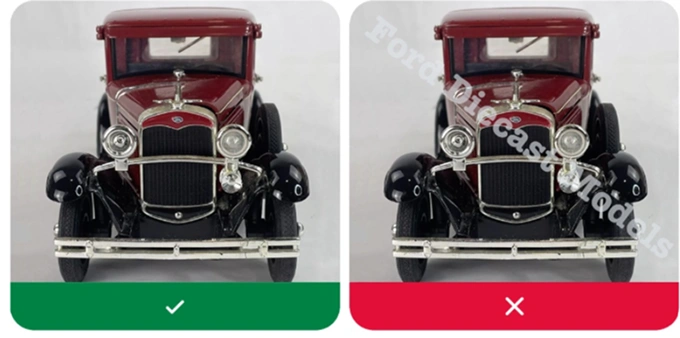
Geen watermerken
Alle watermerken zijn verboden, zelfs als u ze gebruikt om eigendom aan te tonen of inhoud te beschermen.
Afbeeldingsbron: eBay-gids met fototips
Toon het item in gebruik (indien van toepassing)
Lifestylefoto’s werken goed voor specifieke categorieën zoals kleding, woondecoratie of accessoires. Bijvoorbeeld:
- Een horloge om de pols;
- Een telefoonhoesje op de telefoon zelf;
- Fiets pedalen worden op een fiets geïnstalleerd.
#4: Toegankelijkheid verbetert SEO
Voeg Alt tekst toe aan afbeeldingen
Alt-attributen helpen schermlezers om afbeeldingen te beschrijven aan visueel gehandicapte gebruikers en helpen zoekmachines om uw vermelding te begrijpen.
Gebruik duidelijke beschrijvingen met veel trefwoorden (bijvoorbeeld alt=”Rolex Submariner-horloge met zwarte wijzerplaat en roestvrijstalen armband“) en vermijd het om ze leeg te laten of algemene labels zoals “image1.jpg” te gebruiken.
Gebruik leesbare lettertypen en lay-outs
- Gebruik standaard, gemakkelijk leesbare lettertypen zoals Arial of Verdana.
- Gebruik lettergroottes tussen 12px en 16px voor optimale leesbaarheid.
- Vermijd het gebruik van hoofdletters of cursivering voor grote stukken tekst.
Kies contrastvriendelijke kleuren
Een hoog contrast verbetert de leesbaarheid voor iedereen, vooral voor gebruikers met een slecht gezichtsvermogen.
- Gebruik: zwart op wit, marineblauw op lichtgrijs;
- Vermijd: geel op wit, rood op roze of alles wat te weinig contrast heeft.
#5: Kies de juiste categorie
Cassini gebruikt categoriegegevens om uw aanbieding te matchen met kopersfilters. Zelfs met geweldige trefwoorden kan een verkeerde categorie uw item verbergen, dus controleer altijd de door eBay voorgestelde categorie.
- Verkoopt u een zakhorloge? Wijzig dan ‘Polshorloges’ in ‘Zakhorloges’.
- Printercartridges aanbieden? Plaats ze niet onder ‘Printers’, maar kies in plaats daarvan voor ‘Inktcartridges’ of ‘Toner cartridges’.
Precisie helpt zowel kopers als het algoritme.
#6: Precisie helpt zowel kopers als het algoritme.
Itemdetails zijn een belangrijke SEO-factor op eBay, en niet alleen optioneel. Cassini gebruikt ze om aanbiedingen te matchen met filters van kopers, dus als je ze overslaat, kan je product onzichtbaar worden in de zoekresultaten.
Wat opnemen
Vul altijd deze kernvelden in (indien van toepassing):
- Merk (bijv. Apple, Bosch, Nike);
- Modelnummer (bijv. SM-G991B, LC3219XL, CMK16GX4M2B3200C16);
- Type of subtype (bijv. inkjetcartridge, gamingheadset);
- Compatibele producten of voertuigen (bijvoorbeeld: “Geschikt voor Toyota Corolla 2012–2018”);
- Kleur, maat, materiaal (vooral voor mode- en woonartikelen);
- MPN / OEM-nummer / referentiecode, indien van toepassing.
Elk veld helpt Cassini om uw product beter te begrijpen en af te stemmen op kopers. Daarom is elk detail met betrekking tot het optimaliseren van eBay-advertenties belangrijk, van titels tot itemkenmerken.

#7: De prestaties van de verkoper zijn belangrijk
Zelfs topvermeldingen kunnen dalen als uw service slecht is. Cassini rangschikt ook verkopers en beloont snelle afhandeling, tracking, lage defectpercentages, snelle reacties en sterke feedback. Als deze verslechteren, zal ook uw zichtbaarheid dalen.
Extra tip: Maak gebruik van stilstaande aanbiedingen
Advertenties die langer dan 90 dagen zonder enige activiteit staan, worden vaak door eBay gemarkeerd als stagnerend. Longtail-items kunnen na verloop van tijd worden verkocht, maar te veel inactieve advertenties kunnen de algehele prestaties van uw winkel schaden.
eBay raadt aan om het aantal stilstaande aanbiedingen onder de 25% te houden. Voor items die in één exemplaar worden aangeboden, kunt u ze beëindigen en opnieuw aanbieden met bijgewerkte titels, prijzen of specificaties. Kleine aanpassingen kunnen Cassini helpen om uw aanbieding opnieuw te rangschikken.
SEO-optimalisatie voor eBay-advertenties met M2E Cloud
Nu u de belangrijkste SEO-tips voor het optimaliseren van eBay-advertenties kent, gaan we het hebben over hoe M2E Cloud hierbij past. Hoewel we geen klassieke SEO-tool zijn, hebben we al verschillende optimalisatiefuncties ingebouwd – en we breiden deze verder uit om aan de behoeften van onze groeiende verkopersgemeenschap te voldoen.

Categorisering av items
M2E Cloud kan u helpen met het nauwkeurig categoriseren van eBay-items – een cruciale stap om uw aanbiedingen onder de aandacht te brengen van de juiste kopers. Elke eBay-aanbieding vereist een eerste itemcategorie, en dat is waar wij om de hoek komen kijken.

M2E Cloud stelt een categorie voor op basis van uw product, maar u kunt deze eenvoudig wijzigen of een eerdere categorie hergebruiken. Blader, zoek en sla de meest geschikte categorie voor elke aanbieding op met volledige flexibiliteit.

Aangepaste producttitels
Op eBay zoeken kopers met behulp van specifieke termen zoals merk, maat of model. Als uw titel niet overeenkomt, kan uw productvermelding gemist worden. Met M2E Cloud kunt u SEO-vriendelijke titels maken door belangrijke kenmerken uit uw productgegevens te halen. Gebruik standaardwaarden, specifieke velden of combineer meerdere kenmerken om aangepaste titels te maken en voeg eventueel een ondertitel toe (let op: eBay kan hiervoor kosten in rekening brengen).

Als uw oorspronkelijke titel te vaag is, kunt u deze met M2E Cloud verbeteren door automatisch belangrijke productdetails toe te voegen, waardoor ‘Jas’ verandert in ‘Waterdichte winterjas voor heren – Zwart, maat L, Columbia’.
U kunt bepalen hoe uw eBay-titels worden gegenereerd door een titelbeleid te kiezen: uw winkelnaam weerspiegelen, uit een aangepast veld halen of attributen combineren voor een meer gerichte titel.
Bovendien ondersteunt M2E Cloud voor auto-onderdelen eBay Motors-compatibiliteit, zodat u gemakkelijk meerdere bijpassende onderdelen onder één onderdeelnummer kunt vermelden.
Productbeschrijving
Voor uw productbeschrijving kunt u met M2E Cloud een winkelklare versie gebruiken, inhoud uit een aangepast veld halen of een geavanceerde HTML-lay-out maken met dynamische plaatshouders zoals titel, prijs of afbeeldingen. U kunt direct een voorbeeld bekijken om te zien hoe het er precies op eBay uit zal zien.


Geoptimaliseerde itemspecificaties = Meer zichtbaarheid
De filters van eBay zijn afhankelijk van specifieke itemkenmerken. Als uw advertentie deze niet bevat, wordt deze mogelijk niet weergegeven in de gefilterde zoekresultaten. Met M2E Cloud kunt u automatisch belangrijke itemkenmerken zoals merk of model invullen en zelfs aangepaste kenmerken toevoegen om unieke itemkenmerken te laten zien die niet worden gedekt door de standaardvelden van eBay.

Veelgestelde vragen over het optimaliseren van eBay-advertenties
Verbeteren productidentificatiecodes de SEO?
Ja. Identificatiegegevens zoals MPN, GTIN, OEM-nummer en referentienummer helpen Cassini en Google om uw productvermelding te koppelen aan exacte productzoekopdrachten. Ze zijn essentieel in de categorieën auto-onderdelen, elektronica en industriële apparatuur.
Nuttige bronnen
Als je op Amazon verkoopt en minder klanten hebt, is het tijd om je SEO te verbeteren. Lees hier meer over in onze blogs:
- Waarom verkoopt uw product niet op Amazon? 10 belangrijke redenen.
- Hoe u de zichtbaarheid van uw product op Amazon kunt vergroten | 10 SEO-tips van M2E Pro.
Laatste opmerkingen over eBay SEO-tips
Goede SEO draait niet om trucs, maar om duidelijkheid, structuur en vertrouwen. Effectieve zoekmachineoptimalisatie op eBay zorgt ervoor dat uw productvermeldingen hoger in de zoekresultaten van zowel eBay als Google verschijnen, waardoor uw producten meer bezoekers trekken.
Marketingmanager van SetTime voegt hieraan toe: “De retentie verbetert wanneer je de inspanning van de klant bij elke stap vermindert, duidelijke volgende acties, voorspelbare serviceniveaus en selfservice-opties voor veelvoorkomende taken biedt. Meet de wrijving met de Customer Effort Score en de tijd die nodig is om een oplossing te vinden, en los vervolgens eerst de momenten op die de meeste inspanning vergen; kleine overwinningen (bijvoorbeeld transparante statusupdates, gestroomlijnde herbestellingen) stapelen zich op. Deze focus loont: zelfs bescheiden winst in retentie kan een buitenproportionele winstimpact opleveren, en onderzoek toont aan dat ‘moeiteloze’ ervaringen sterk verband houden met loyaliteit.”
Je hebt al een voorsprong dankzij eBay-inzichten en M2E-tips. We verbeteren onze tools om je SEO te verbeteren, dus houd ons in de gaten en zorg dat je aanbiedingen blijven stijgen.
Lees meer over inzichten en tips op het gebied van e-commerce in onze blog.