



This year, Black Friday lands on November 29 — just around the corner! That means it’s time to gear up for one of the year’s biggest shopping events and avoid the dreaded overselling. Your first step? Fine-tune your inventory management! It’s easier than it sounds, and with M2E Cloud, you’ll have everything you need to stay on top of stock levels across platforms in real-time. How? Let’s discover this in our blog.
Why Inventory Management Matters
Mastering inventory management is the secret to keeping customers happy and profits high.
Here’s a quick example: suppose you have a stock of 200 units of a popular product, selling across your main website, Amazon, eBay, and TikTok Shop. Sales spike during peak seasons like Black Friday, so balancing stock across platforms becomes essential to avoid shortages and maximize sales. Manual tracking in spreadsheets can lead to errors and inefficiency, so a dedicated inventory management tool like M2E Cloud becomes essential.


M2E Cloud: Unlock Smooth, Stress-Free Inventory Across Platforms
Say goodbye to manual updates and inventory hassles—M2E Cloud keeps your stock seamlessly synced across your e-commerce platform (Shopify, WooCommerce, BigCommerce, Salesforce, Ecwid, Shopware, etc.) and major marketplaces (eBay, Amazon, Walmart, TikTok Shop, Kaufland), so you can focus on growth.
M2E Cloud makes inventory management simple and powerful, helping you stay in sync, prevent overselling, and reduce stock errors. Here’s how it supports your business:
- Unified Inventory Oversight: Manage and monitor your entire inventory across your store and Amazon, eBay, and Walmart from one intuitive interface. With your store as the primary source of quantity data, stock control is streamlined for quick and reliable updates.
- Real-Time Stock Synchronization: Keep your stock levels accurate across all platforms with automatic, real-time updates, preventing stockouts and overselling.
- Platform-Specific Quantity Rules: Customize stock quantities per marketplace, enabling precise control tailored to each audience.
- Quick Inventory Updates: Update and track stock levels across channels instantly with one-click monitoring, giving you full visibility over inventory availability.
- Quantity Reservation: Reserve quantities for pending marketplace orders, ensuring you have enough stock to fulfill confirmed orders.
Follow a few steps in M2E Cloud to optimize inventory management and keep your business running smoothly.
Step 1. Link Channel’s Items with M2E Cloud.
Linking your store inventory with marketplace listings is essential for smooth product and order management. This quick guide shows you how to link Channel listings to your store in M2E Multichannel Connect. Linking connects marketplace listings to your store inventory directly, ensuring:
- Accurate Syncing: Keeps stock updated across all platforms.
- Overselling Protection: Maintains stock consistency.
- Correct Orders: Matches marketplace orders with the right store items.
- Duplicate-Free Listings: Avoids duplicate listings when adding products to Channels.
Automatic Linking: M2E Multichannel Connect auto-links items by SKU or Product ID (EAN, UPC, GTIN, etc.) Unmatched items can be linked manually, one by one, or in bulk.
Manual Linking (Small Inventories):
- Go to Listings, select your Channel, and filter unlinked items.

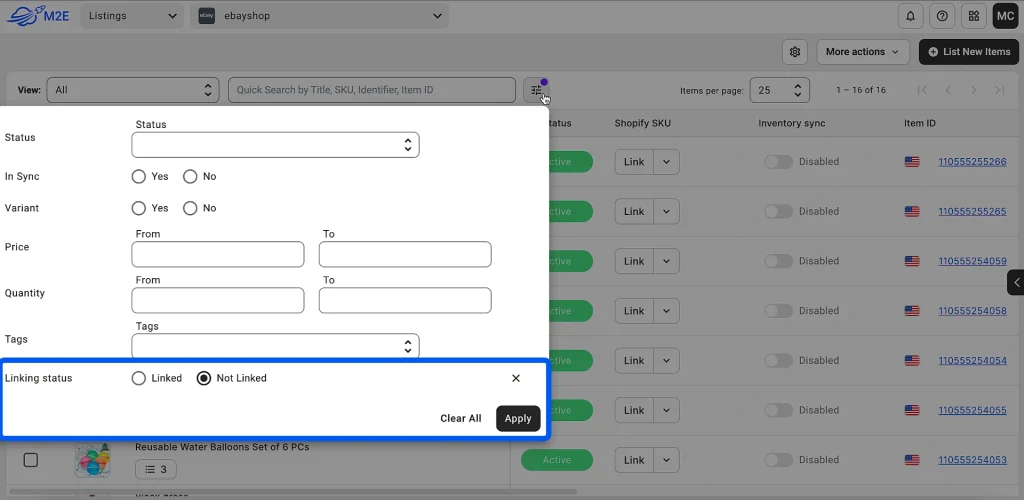
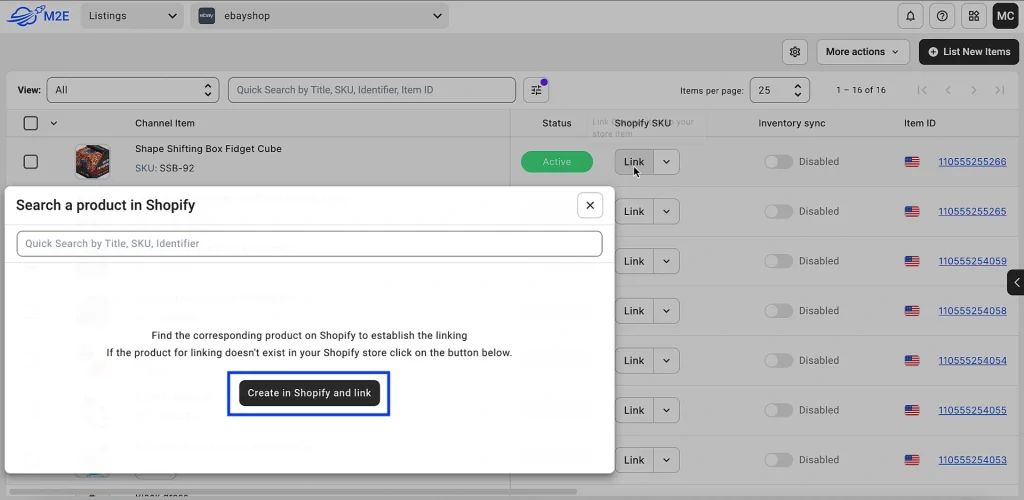
- Click Link, search for a match by title, SKU, or ID, and select Link & Sync for instant sync or Just Link for later.


For products without a store match, choose Link > Create in Store to add and link a new item.
Bulk Linking (Large Inventories)
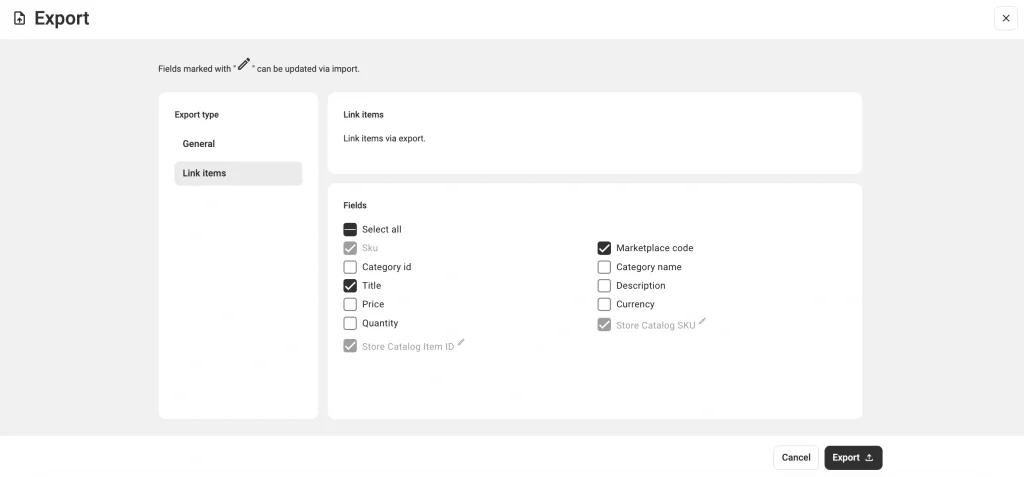
- In the Listings tab, select your Channel account, and go to More Actions > Export.


- In the Link items tab, choose relevant fields and export the file.
By default, the fields required for linking are pre-selected. To make it easier to identify each product, you can also select extra fields like the product name, marketplace code, and more.

- Match the SKUs or Item IDs from your store to their respective items on marketplaces. Then, import the CSV file back to the app to finish the bulk linking.

For extra guidance, check out the video tutorial on how to link your Channel items via CSV export/import.
Step 2. Enable Inventory Synchronization with M2E Cloud.
You might use different platforms to sell your items, but M2E Cloud still has a similar and straightforward inventory sync process to them all. Thus, here are the main steps to sync your inventory between your e-commerce platform (Shopify, WooCommerce, BigCommerce, Salesforce, Ecwid, Shopware, etc.) and the marketplace.
1. Locate Unsynced Products: Go to the Listings tab, select your Channel account, and use filters to find linked products that are not yet synchronized.

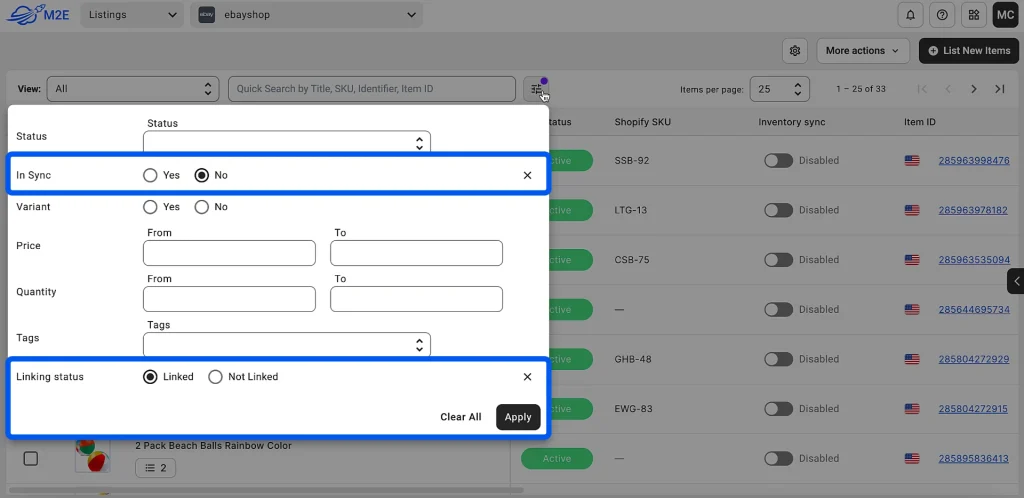
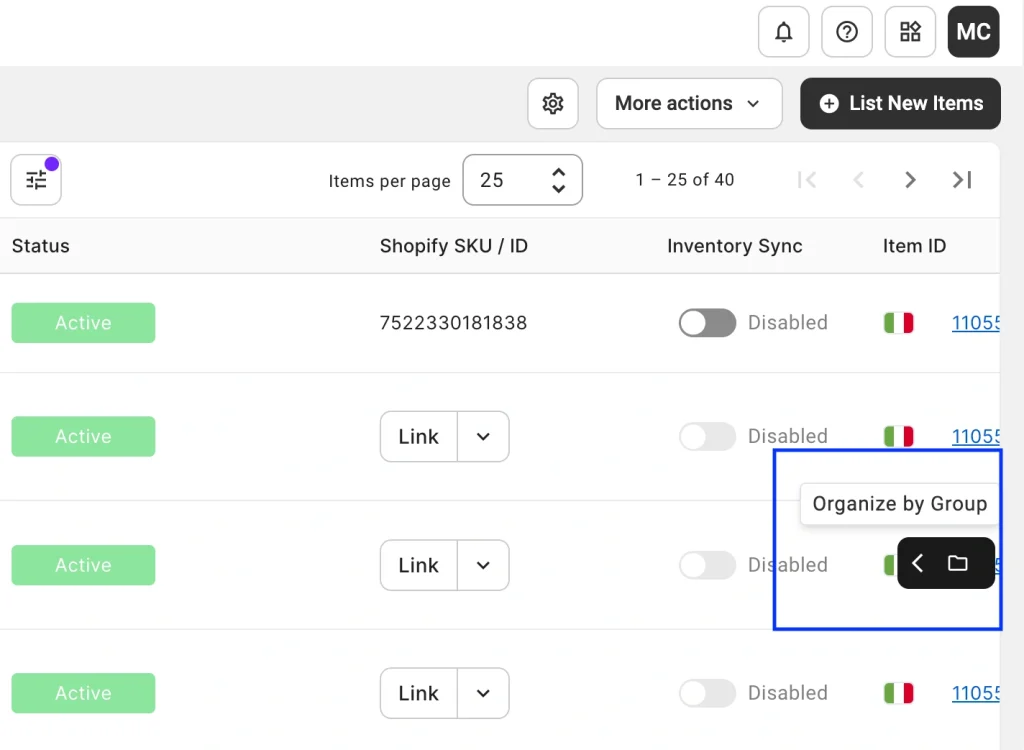
Use the Organize by Group option to refine your search by marketplace, category, or product type.

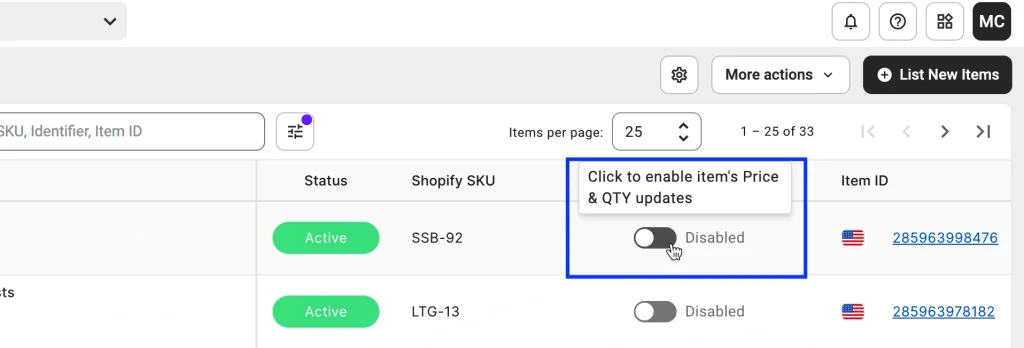
2. Test Sync on Individual Items: Find the desired product for individual testing and toggle the Inventory Sync option in the relevant column.

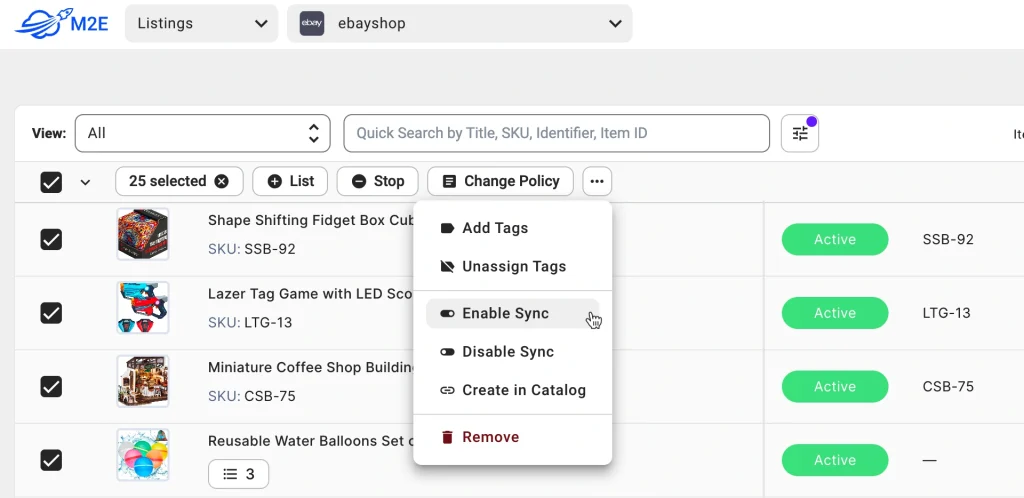
3. Enable Sync for Multiple Products: Select the items to sync, click the three dots, and choose Enable Sync. To adjust product settings in bulk, use the Change Policy action to apply the same settings across selected products.
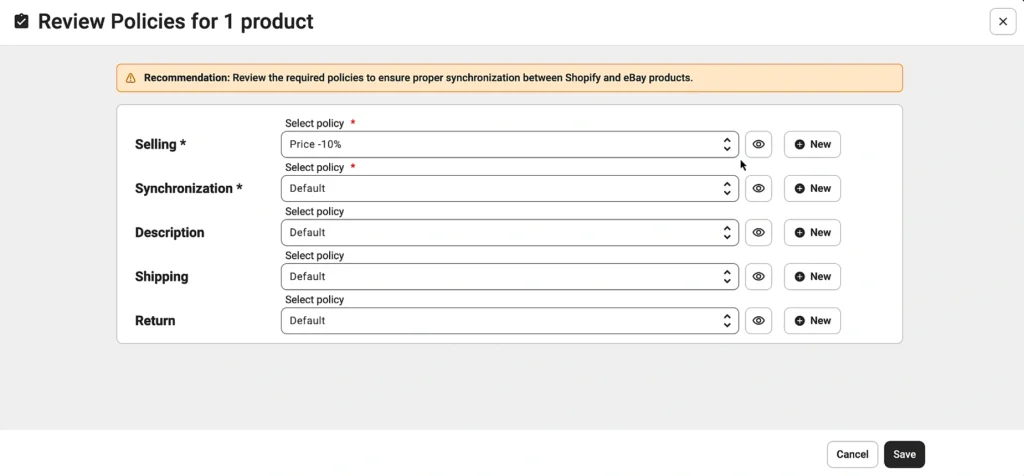
4. Adjust Product Settings: Review Policies, which are the rules for syncing pricing, quantities, titles, descriptions, images, and other details between your store and marketplaces. This is a crucial step to ensure your listings are accurate and up-to-date.

Set Platform-Specific Quantity Rules

Using Selling Policy in M2E Multichannel Connect, you can tailor pricing and inventory levels for each marketplace so they differ from your store’s stock. For example, if your store has 25 units of an item, you can set the quantity to display as 5 items on eBay and 20 items on Amazon.
These settings will help you optimize stock levels based on the demands of each channel. You can show limited stock on some marketplaces to create urgency or allocate specific stock to high-performing marketplaces.

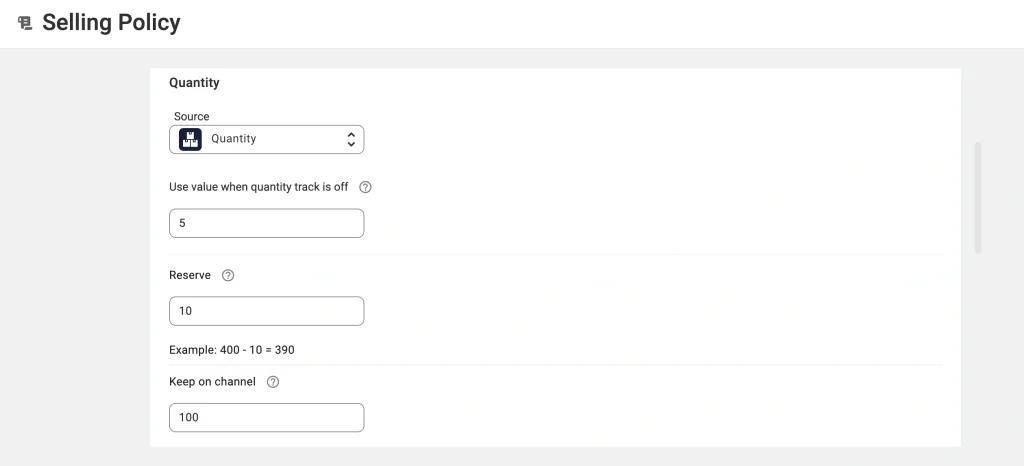
Let’s look at the available Quantity settings in more detail:
- Use value when quantity tracking is off: Define a default quantity to apply to products with unlimited or unspecified stock in your store.
Tip: Marketplaces don’t allow items to be listed without a definite stock level. By specifying a default quantity, you ensure that items with unspecified inventory in your store can still be sold on channels.
- Reserve: Hold back a specific quantity from your total stock.
Tip: If an item is very popular, we recommend reserving part of its stock rather than listing the entire quantity on each marketplace. Reserving stock helps avoid situations where the same item is sold on different marketplaces at the same time, reducing the risk of overselling and ensuring better inventory control.
- Keep on channel: Display only a designated quantity on a marketplace.
Tip: Use this option to boost sales. When buyers see that an item is low in stock, they are encouraged to purchase it quickly. Sellers may intentionally set a lower Keep on channel value to create a sense of urgency, indicating limited availability and driving interest in the product.
Once adjustments are complete, click Save to activate synchronization and update the product details on Amazon, eBay, Walmart, TikTok Shop, or Kaufland.
For more info, read our documentation about enabling sync for channel items. Also, remember to check our video guide on how to manage inventory across multiple platforms with M2E Multichannel Connect.
Step 3. Enable Quantity Reservation.
When a pending marketplace order comes in, M2E Cloud can reserve the product quantity until the order is confirmed or canceled, ensuring you have enough stock to fulfill the order and helping to prevent overselling. To enable this, simply switch on “Reserve quantity on Store for pending Channel orders” in your order settings.

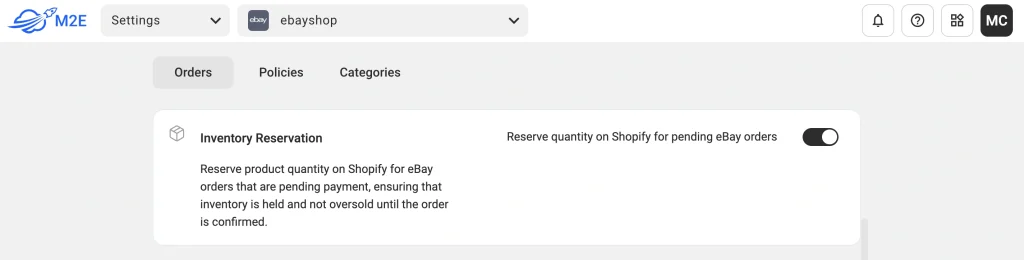
The quantity reservation option is currently available for Shopify, with support for other platforms coming soon.
For more details on how quantity reservation works in M2E Cloud, read this article.
FAQs: Manage Inventory and Avoid Overselling During the Holidays
Q1: What is Multichannel Inventory Management?
Multichannel Inventory Management is a system that helps businesses track and manage stock across multiple sales platforms (like Amazon, eBay, Shopify, etc.) in real-time. It ensures accurate stock levels, prevents overselling, and simplifies order fulfillment from one central place.
Let’s say you sell phone accessories on Amazon, eBay, and Shopify. With Multichannel Inventory Management, if you sell a phone case on Amazon, the system automatically updates your stock on eBay and Shopify, so you don’t oversell. It keeps everything in sync across all platforms without manual adjustments.
So, the info from your inventory database or a centralized platform that holds product details, stock levels, and order data (Shopify, BigCommerce, etc.) feeds real-time information to all connected sales channels (Amazon, eBay, etc.), ensuring each platform reflects accurate stock levels based on the source data.
Thanks to an integration tool like M2E Cloud, all of this happens with the ability to customize information for each channel individually.
With M2E Cloud, you gain real-time insights, keeping stock well-organized and seamlessly distributed across all your online platforms. This tool doesn’t just watch inventory; it helps you adjust quantities to meet customer demand, preventing costly under- or overstock scenarios.
This enables efficient multichannel inventory management from one place — your store — and prevents overselling.
Q2: What are Proper Inventory Management Benefits?
In e-commerce, inventory management is essential for delivering top-notch customer service, staying in the good graces of marketplaces, and maximizing profits. Here’s why inventory control is important:
- Prevent Overselling: Sync inventory across all channels to avoid cancellations and penalties.
- Improve Cash Flow: Track stock accurately, restock efficiently, and invest in top-sellers.
- Boost Customer Satisfaction: Avoid stockouts to fulfill orders reliably and build trust.
- Streamline Operations: Automate updates, reducing manual tasks and errors.
- Make Smarter Decisions: Use insights to refine purchasing and focus on top channels.
Q3: How Many Customers Spend on Black Friday in 2023?
Black Friday 2023 shattered records and showcased the evolving ways people shop—here’s a quick look at the numbers that defined the day:
- $9.8 Billion in Black Friday Sales: 2023 marked a massive year for Black Friday, with shoppers spending nearly $10 billion.
- Online vs. In-Store Shopping:
- 43% of Shoppers Went Online: 90.6 million people preferred the ease of online shopping.
- 76.2 Million Shopped In-Store: Brick-and-mortar shopping is still intense, with millions choosing the in-person experience.
- Mobile Dominates:
- 51.1% of Purchases on Mobile: Shoppers increasingly leaned on their phones for deals.
- 48.9% on Desktops: Desktops still held their ground, but mobile took the lead as the top shopping choice.
Finally, almost 15% of shoppers kick off Black Friday on Thanksgiving night, while 21% jump in between midnight and dawn—proving the shopping frenzy starts early!
Conclusion
M2E Cloud is your holiday hero for inventory management, keeping oversells at bay as Black Friday approaches. With real-time stock syncing, automated reordering, and centralized tracking, M2E Cloud ensures you’re ready for the demand spike. Stay stocked, prevent costly mistakes, and deliver a smooth shopping experience on every platform. Check out our blog for more e-commerce insights. This season, let M2E Cloud help you turn inventory management into a holiday success story!

