


Overselling is a nightmare for businesses, often leading to unhappy customers and potential marketplace penalties. With Amazon orders sometimes lingering in a “Pending” state, the risk intensifies, especially when you sell across multiple platforms like Shopify, eBay, Walmart, or TikTok Shop.
In this article, we’ll delve into how M2E’s quantity reservation system for Shopify helps secure inventory across multiple channels until the marketplace order status is finalized, so you can prevent overselling and maintain customer satisfaction.

Why are My Amazon Orders Pending?
On Amazon, an order can remain in a “Pending” status from a few minutes up to 21 days. This delay can be caused by:
- Payment processing issues. Problems with the buyer’s payment method can prevent immediate order confirmation.
- Delayed item availability. Items that aren’t immediately available can cause the order to pend until they are in stock.
- High demand periods. During holidays or sales events, high order volumes can slow down processing times.
- Buyer information verification. Additional checks on buyer details can delay order confirmation.
While an order is pending, sellers cannot confirm shipment. This uncertainty can impact inventory planning and customer communication. Moreover, during this time, the inventory is technically still available for sale on other platforms unless reserved.
As you can see, without a proper reservation system, you risk overselling, where the same item is sold more times than available in stock.
How M2E Cloud Helps Prevent Overselling Through Quantity Reservation
While some of your orders are stuck in “Pending”, you need to maintain enough stock to fulfill the rest of the orders on all Channels where your business operates. M2E Multichannel Connect helps you with this through the multi-platform quantity reservation system for Shopify, so your products are set aside for pending orders until confirmation is received.
The app offers actual inventory reservation rather than a draft order approach. Here’s a more detailed breakdown of how the system works:
- Reservation created. Once a pending marketplace order appears, the app reserves the ordered quantity of items. However, the order itself isn’t yet created in Shopify. For all other new orders of the same item, you will see a reservation note.
Example: Available Quantity decreases from 28 to 27 after a reservation. Committed Quantity stays at 0, while the On-Hand Stock is 28.
Why? The reservation appears in the Available Quantity, now shown as 27. The Committed Quantity only reflects orders that have been fully created in Shopify. Since this pending order hasn’t yet been processed in Shopify, only the Available Quantity is reduced, while the Committed Quantity remains at 0.
On-Hand Stock remains the same (28), as the reserved item is still technically in inventory.
- Order confirmed. If the order is confirmed, the Committed Quantity increases:
Example: Committed Quantity increases to 1 (reflecting that an order is pending fulfillment), while Available Quantity stays at 27. The On-Hand Stock remains at 28, with 1 unit allocated to fulfill the order.
- Reservation deleted. If the order is canceled or payment fails, the Available Quantity is restored. Order isn’t created in Shopify.
Example: Available Quantity returns to 28, and Committed Quantity goes back to 0. The On-Hand Stock remains unchanged at 28.
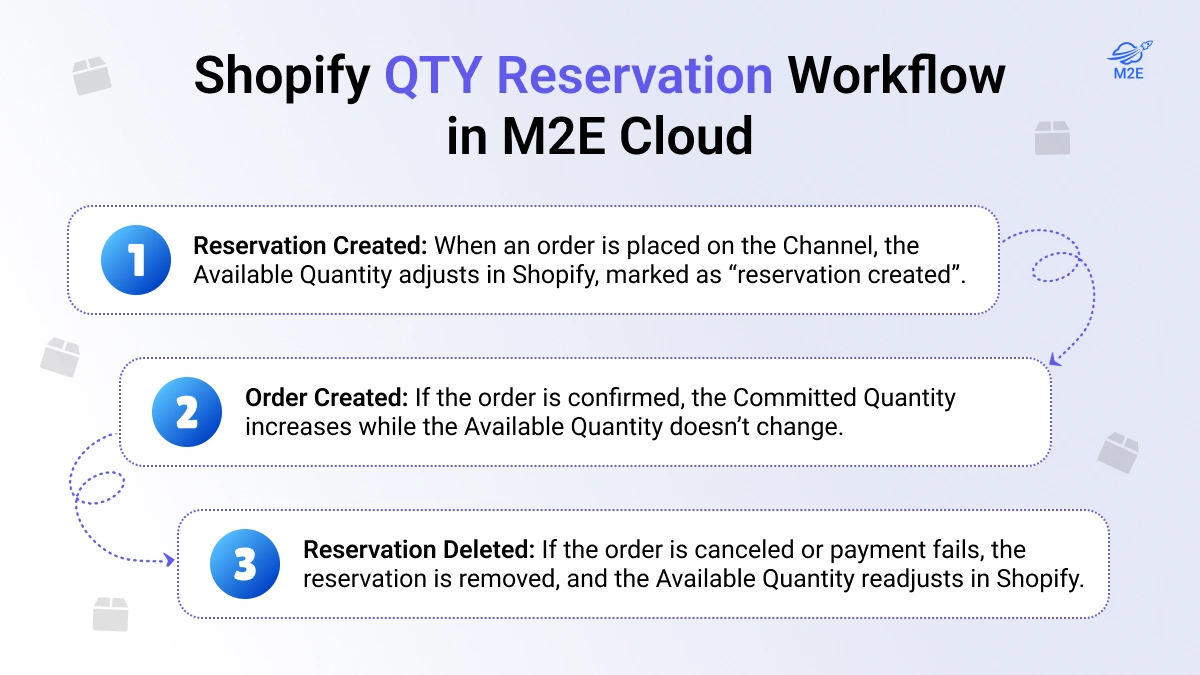
M2E Multichannel Connect automatically adjusts available quantities and reflects reservations without any manual action on your side. Inventory levels are synced in real-time between Shopify and the marketplace, accounting for pending orders. This is precisely what you need in high-demand sales periods when accurate quantities should be the least of your worries.
Reserving Quantity Across Multiple Platforms with M2E Cloud
In addition to Amazon, M2E Multichannel Connect supports Shopify inventory reservation across other marketplaces, following the same streamlined process:
- eBay: Ensures stock availability by reserving Shopify quantities for pending orders.
- TikTok Shop: Automates inventory adjustments between TikTok Shop and Shopify with flexible quantity reservation.
- Walmart: Holds reservations as long as needed and prevents accidental sales of reserved stock.
- Kaufland: Reserves Shopify quantities for pending Kaufland orders and synchronizes inventory levels to ensure accurate stock management.
The automated quantity reservation system in M2E Cloud not only aligns inventory across platforms and prevents stock mismatches but also reduces manual workload and errors, making it ideal for businesses handling multi-channel sales.

How to Set up QTY Reservation in M2E Cloud
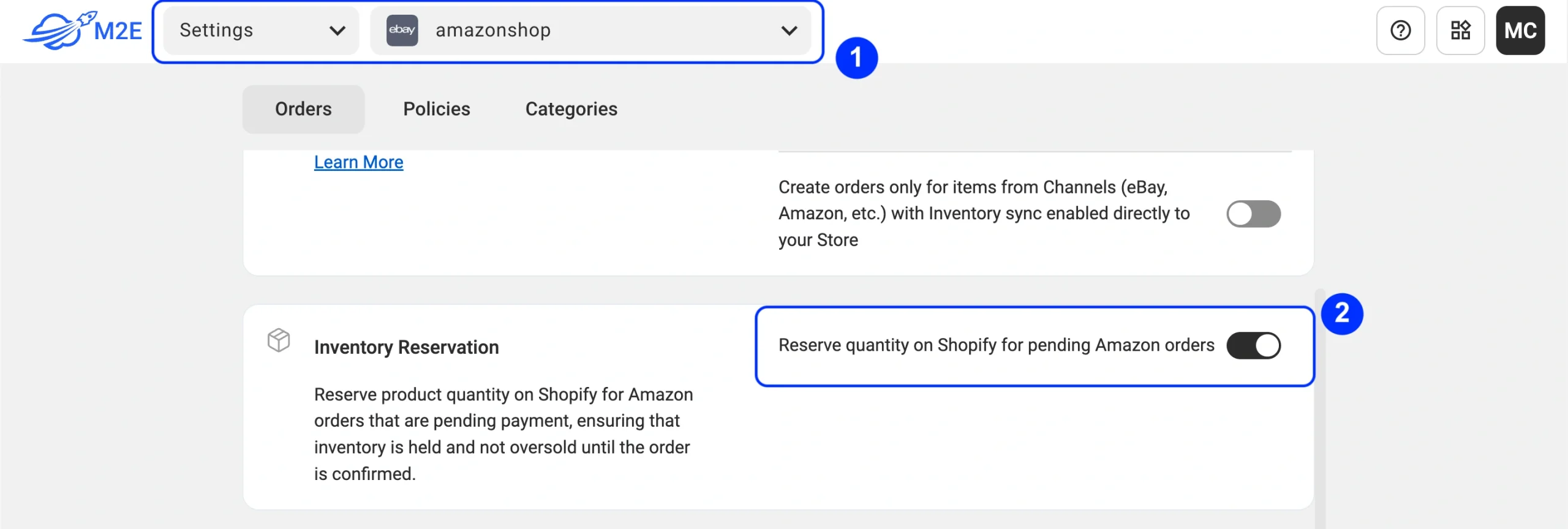
Setting up quantity reservation in M2E Cloud is quick and easy – no complicated setups or technical know-how required! After connecting your Shopify store and marketplaces to the app, all you need to do is enable the quantity reservation option in the order settings.
Select your Channel account, then go to Settings > Orders tab. In the Inventory Reservation section, switch on “Reserve quantity on Shopify for pending Channel orders” and save your changes.
That’s it! If you manage multiple Channel accounts, don’t forget to enable this option for each one of them in the order settings.
Conclusion
Effective inventory management during pending orders is essential, especially for sellers using Shopify alongside Amazon. With the quantity reservation system by M2E, sellers can hold stock securely during the pending order period—whether it lasts minutes or days. By ensuring you have enough inventory for timely fulfillment, you can expect more positive reviews from your buyers and repeat business.

