


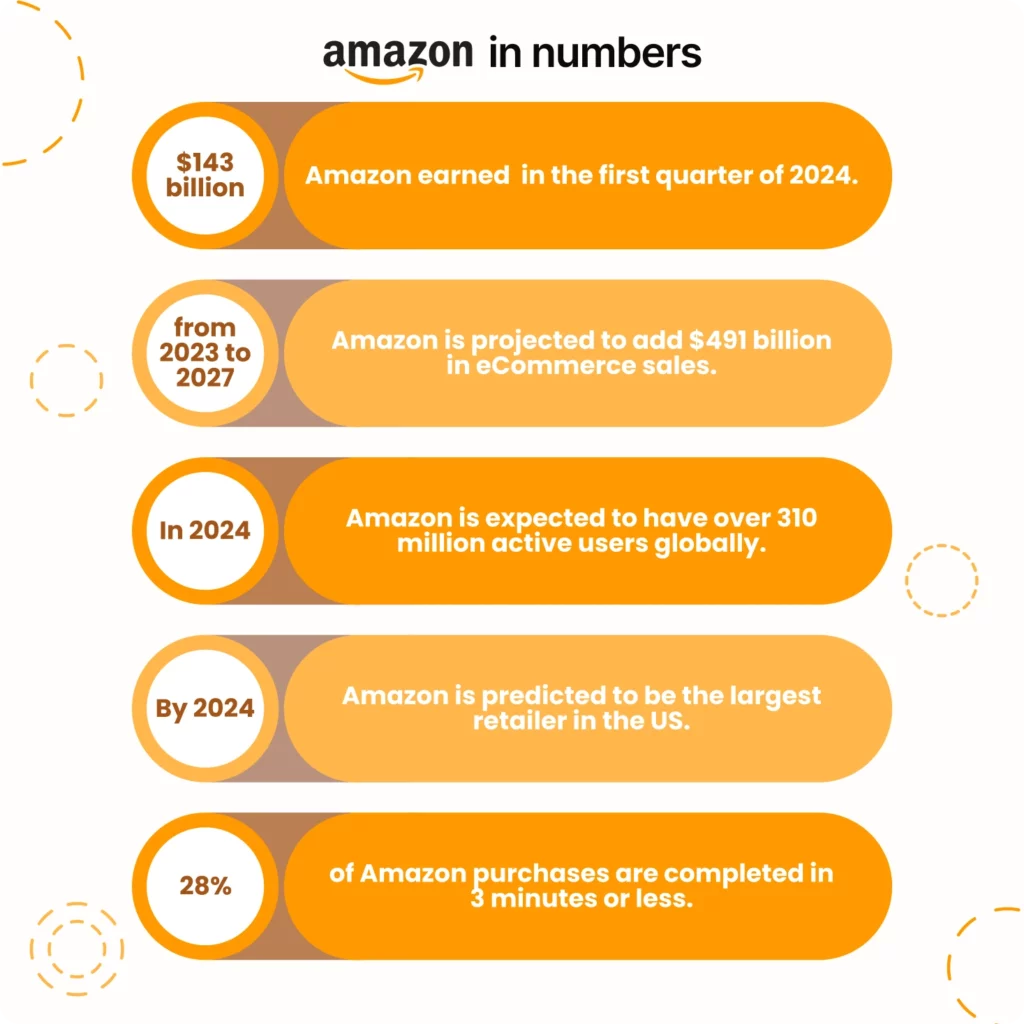
If you own a Shopify store and want to expand your reach by selling on additional platforms, Amazon is a top choice. As one of the leading global marketplaces, Amazon boasts an impressive user base, with projections indicating over 310 million active users worldwide in 2024.
As an e-commerce seller, you must know that Shopify Amazon integration has never been as easy as today. With just a few simple clicks, you can optimize your listings within the proper integration tools, enhancing sales and brand awareness. What’s more, what tools do you use for these purposes? Find the seven best Shopify Amazon integration apps in this blog and check their features.
7 Top Shopify Amazon Integrations
There are many Shopify Amazon integration software, so it might be hard to choose from. We prepared a list of the seven best Shopify Amazon integration tools to simplify this task. This list will help you find the most suitable app for your business needs.

#1: M2E Multichannel Connect
Using M2E Multichannel Connect, you can seamlessly integrate Amazon and Shopify. What else can this tool do? The app leverages Shopify as its primary data source to update products and orders automatically. This means that any product changes you make on Shopify are instantly reflected on Amazon through the app. It also allows you to import and manage Amazon FBA items and orders, and that’s not all. M2E Multichannel Connect has many features; let’s check them below.


Key Features and Benefits
- Unified management. You can effortlessly manage Shopify and your various sales channels from one unified dashboard, streamlining all the operations.
- Comprehensive stock supervision. This allows you to oversee stock levels across different channels easily. Also, it’s possible to seamlessly import your Shopify inventory into the app.
- Flexible settings. It lets you set tailored pricing and inventory levels for each sales channel. Effortlessly create new listings on Amazon to broaden your product range and link your Shopify inventory.
- Real-time updates. You can receive real-time status updates on orders and automatically update price and quantity changes on Shopify and Amazon.
- Efficient order processing. The app accelerates order processing by allowing you to filter orders by date and other parameters. With M2E Multichannel Connect, you can manage and fulfill your Amazon orders directly from your storefront. You can instantly sync ordered products across all locations to avoid overselling.
- Global expansion. With M2E Multichannel Connect, you can expand your reach to international markets, attracting new customers and boosting sales.
- Sales reporting and analytics. The tool generates comprehensive sales reports from individual channels to track and evaluate performance. You may find more analytical tools here. One of these software options is M2E Analytics, which is free for Multichannel Connect users.
- Amazon Repricer tool. Sellers featured in the Buy Box see an 83% increase in sales. The M2E Amazon Repricer considers various elements of the Amazon algorithm, enhancing your chances of securing the Buy Box. This service is highly responsive, adapting swiftly to even minor price changes. It allows you to continuously monitor competitor prices and adjust accordingly to maintain high profitability. The great plus is that M2E Multichannel Connect users can use this service for free.
- Extra features. M2E Multichannel Connect allows you to connect with other leading e-commerce platforms, such as Walmart and eBay, as well as eBay Motors.
To sum up, with M2E Multichannel Connect, you can streamline your e-commerce operations, enhance your reach across multiple marketplaces, and manage everything efficiently from one centralized platform.
Cons
- Shipping service limitations. Currently, M2E Multichannel Connect does not support integrations with niche marketplaces for shipping services, such as DHL, or accounting platforms like Xero, PR, and X. Despite these limitations, the application is under continuous development. This active development indicates that it is likely only a matter of time before similar integrations are made available, enhancing the platform’s utility for a broader range of marketplaces.
- Limited marketplace integrations. Although the app supports significant marketplaces like Amazon, eBay, and Walmart, some users have expressed a desire for more integration options with other e-commerce platforms, such as Manomano, which are currently not supported.
#2: Zonify ‑ Amazon Dropshipping
Zonify ‑ Amazon Dropshipping is a Shopify app that facilitates dropshipping from Amazon. It allows Shopify store owners to import products from Amazon directly into their Shopify store. This makes managing inventory and product listings easier.
Key Features and Benefits
- Product import. With this app, users can browse Amazon, find products they want to sell, and import them into their Shopify store with just a few clicks.
- Price and stock updates. Zonify helps businesses keep product prices and stock levels up to date by syncing with Amazon, ensuring that the information displayed in the Shopify store is accurate.
- Customizable listings. Users can customize product titles, descriptions, images, and prices before importing them into their store, allowing for better control over products’ presentation.
- Order fulfillment. When an order is placed on the Shopify store, Zonify allows users to simplify placing the corresponding order on Amazon, streamlining the fulfillment process.
- Product reviews. The app allows users to import product reviews from Amazon, helping to build trust with potential customers by displaying reviews and ratings.
Cons
- High price and limited free trial. Some users find the app’s pricing higher, which can be a deterrent, especially for small businesses or those just starting out. The free trial period is short (only one day), which may not be enough time for users to explore and thoroughly evaluate the app’s features and effectiveness.
- Inventory and pricing sync issues. There have been complaints about the accuracy and timeliness of inventory and pricing synchronization. Ensuring that the store’s listings are always up-to-date with Amazon’s can be challenging, and discrepancies can lead to customer dissatisfaction.
#3: Amazon Importer Spreadr App
The Amazon Importer Spreadr App allows users to customize product details such as titles, descriptions, prices, and images before importing. The app also supports the integration of Amazon affiliate links to earn commissions on sales. Additionally, it automatically syncs prices and stock levels to keep the Shopify store updated.
Key Features and Benefits
- One-click import. Users can import products from Amazon to their Shopify store with just one click.
- Product customization. It allows businesses to edit product titles, descriptions, prices, and images before importing to ensure they match the store’s branding and marketing strategy.
- Affiliate links. Users can import products with their Amazon affiliate links, earning commissions on sales referred through their Shopify store.
- Revenue tracking. The app allows users to track affiliate revenue generated through imported products easily.
- Price and stock sync. It automatically syncs product prices and stock levels with Amazon to keep the Shopify store up-to-date and avoid selling out-of-stock items.
- Efficient product addition. That means consumers can import multiple products simultaneously to save time and quickly expand the store’s catalog.
Cons
- No free plan for all users. The app does not offer a free plan for all merchants. Only affiliate and Shopify staff stores can access the free plan, while others must pay a monthly fee ranging from $5 to $75.
- Affiliate rules guidance: The app does not provide sufficient guidance on avoiding violations of Amazon’s affiliate rules, which can result in merchants not receiving their commissions.
- Issues with stock and orders. In some instances, users receive orders for products that have gone out of stock on Amazon. This forces the store owners to issue refunds, leading to potential customer dissatisfaction and additional fees.
#4: Sellbrite
Sellbrite is a cloud-based platform for e-commerce businesses to streamline multichannel listing and inventory management. It allows users to create and manage product listings across multiple sales channels from a single dashboard, making it easy to synchronize inventory levels and prevent overselling.
Key Features and Benefits
- Centralized listing management. It allows users to create and manage product listings from a single dashboard, making listing products across multiple sales channels easier.
- Bulk listing tools. The app provides the ability for an efficient listing of multiple products simultaneously, saving time and reducing manual work.
- Real-time inventory sync. Users can synchronize inventory levels across all sales channels to prevent overselling and stockouts.
- Centralized order processing. Users can view and manage orders from all sales channels in one place, simplifying the order fulfillment process.
- API access. It lets consumers have API access to custom integrations and advanced functionalities.
- Shipping labels. Users can generate shipping labels directly from the Sellbrite interface.
Cons
- Inventory update delays. One of the main issues is the delay in updating inventory. Inventory levels can take about 15 minutes to update after an order is placed, which might cause complications for businesses with low inventory and fast turnaround times.
- Integration challenges with Amazon. Some users have reported that Amazon’s integration is not as smooth as other platforms. This can result in additional manual work to ensure accurate and up-to-date listings.
- Short trial period. The free trial period is only 14 days, which some users find insufficient to fully evaluate the app’s capabilities and determine if it meets their needs.
#5: Amazon by CedCommerce
Amazon by CedCommerce is an advanced integration tool that empowers Shopify store owners to manage and expand their product listings on Amazon efficiently. It enables seamless synchronization of inventory and pricing between Shopify and Amazon, ensuring accurate and up-to-date product information.
Key Features and Benefits
- Customizable listings. Users can customize product titles, descriptions, images, and other attributes before publishing on Amazon.
- Automated updates. It allows consumers to automatically update stock levels and prices on Amazon as changes occur in the Shopify store.
- Order sync. Users can automatically sync orders from Amazon to Shopify for easy processing and fulfillment.
- Shipping labels. The app helps to generate shipping labels directly from the Shopify interface for Amazon orders.
- FBA support. The service allows users to manage fulfillment by Amazon (FBA) inventory and orders directly from Shopify.
- Sales and inventory reports. It provides access to detailed reports on sales performance across Amazon and Shopify.
Cons
- Learning curve. The app can be challenging due to Amazon’s rules and API complexity. Users often need significant support to understand and navigate the integration process effectively.
- Poor customer service. Several users have reported issues with customer service, citing poor communication and unresponsiveness. Some customers felt that their issues still needed to be resolved despite numerous attempts to get help, leading to frustration and dissatisfaction.
- Billing problems. Some users have reported being charged for the app even after they have deleted it from their Shopify store. This issue highlights potential problems with the billing system and the need for careful monitoring of app subscriptions.
- Unfulfilled promises. Users have mentioned that the app needed to fulfill the features promised in its marketing plan. They experienced delays and unfulfilled commitments, such as missed audits and lack of actionable support, leading to dissatisfaction with the service.
#6: Amazon Associate Connector
The Amazon Associate Connector is a Shopify app tailored to integrate Amazon products seamlessly into Shopify stores, enabling merchants to earn affiliate commissions. It simplifies importing Amazon products, complete with high-quality images, and ensures consistent inventory and pricing updates.
Key Features and Benefits
- Seamless product import. Users can easily import Amazon products, including high-resolution images, into their Shopify store to expand product offerings.
- Inventory and pricing synchronization. The app helps businesses automatically sync inventory and pricing from Amazon to Shopify, ensuring that store listings are always accurate and up-to-date.
- Amazon variants management. Users can import Amazon product variants as separate Shopify products or in formats similar to Amazon listings.
- Customer reviews integration. The app lets users import Amazon product reviews directly to Shopify product pages, enhancing credibility and customer trust.
- Affiliate revenue boost. By integrating Amazon’s vast product range, consumers can increase their store’s product diversity and potential affiliate earnings.
Cons
- Performance Issues: Several users have reported that the app can be very slow when importing products from Amazon. It can take excessively long to import a single product, which can be frustrating and time-consuming.
- Product import limitations. Despite claims of unlimited product imports, some users have experienced issues where they hit a product import limit, even after paying for higher-tier plans. This inconsistency has led to dissatisfaction among users.
- Customer support issues. While some users have praised the support team, others have found the support needs to be more consistent. Problems include delayed responses and insufficient assistance in resolving technical issues.
#7: JoeLister
JoeLister is a user-friendly tool that simplifies selling on Amazon for Shopify merchants. It automates the listing process, allowing you to quickly publish Shopify products on Amazon without creating new listings from scratch.
Key Features and Benefits
- Simple listing process. JoeLister allows users to quickly list their Shopify products on Amazon, helping them expand their reach without having to create new listings from scratch.
- Inventory sync. The tool helps to synchronize inventory across all connected platforms. When an item sells on one platform, JoeLister updates the inventory on all other connected platforms, preventing overselling and stock discrepancies.
- Automated fulfillment. JoeLister provides the ability to automate the fulfillment process for Amazon orders. It integrates with Amazon FBA to manage shipping and logistics, ensuring timely customer delivery.
- Price management. Users can set different pricing rules for Amazon to account for marketplace fees, shipping costs, and other factors, helping to optimize profitability.
- Sales dashboard. JoeLister has a comprehensive sales dashboard that offers insights into sales performance across different platforms. This helps track performance, analyze data, and make informed business decisions.
Cons
- Pricing issues. Some users have expressed dissatisfaction with JoeLister’s pricing model. Although the app offers a free trial, it is only partially free, and costs can add up quickly depending on usage and plan choices. This has been a point of frustration for users expecting a more cost-effective solution.
FAQs About Shopify Amazon Integration
Q1: How Much Does It Cost to Use Shopify?
Shopify provides multiple pricing plans to accommodate various business requirements. The basic one for solo entrepreneurs costs $32 monthly, and for small teams, it costs $92 per month. You can try any plan, except “Plus,” for $1 for your first month and decide if it fits you and covers all your needs.
Q2: How Can I Link My Shopify Store to Amazon?
To connect your Shopify store to Amazon, you must install a compatible integration app like M2E Multichannel Connect. This app provides step-by-step instructions on how to link your Amazon Seller Central account with your Shopify store. So, you do not need special knowledge or skills to do that.
Q3: Is It Possible to Sell My Current Shopify Inventory on Amazon?
Yes, you can do it because integration apps sync your Shopify products with Amazon, allowing you to manage listings and inventory from one central location. You can choose any app that best fits your needs.
Q4: What Advantages Does Integrating Shopify with Amazon Offer?
Integrating Shopify with Amazon offers several benefits, including:
- Increased sales reach by accessing Amazon’s vast customer base.
- Centralized inventory and order management.
- Automated synchronization of product details, inventory levels, and prices.
- Streamlined order processing and fulfillment.
Q5: Can I Manage Amazon Orders from My Shopify Dashboard?
Yes, you can. Integration apps import Amazon orders into Shopify. Thus, you can process and fulfill them alongside your Shopify orders.
Q6: Is It Possible to Use Amazon FBA with Shopify?
Yes, you can. Integration apps usually support FBA, allowing you to manage FBA inventory and orders directly from Shopify. This ensures that products fulfilled by Amazon are accurately reflected in your Shopify store.
Summary
If you still have some doubts about product selling on Amazon after reading this article, you can find more answers here. Meanwhile, integrating Shopify with Amazon can significantly enhance your e-commerce business by expanding your reach and streamlining operations. When is the best time to start? Today! Boost your brand awareness and sales with Shopify Amazon integration tools. Remember to find more helpful info and insights in our blog.

