For PrestaShop sellers, TikTok Shop is already becoming a more serious sales channel across Europe. It is active in the United Kingdom, Ireland, Spain, Germany, France, and Italy, which makes it a practical option for merchants looking to expand beyond traditional marketplaces.
The challenge, however, is not simply getting started on TikTok Shop. It is connecting TikTok Shop to your existing PrestaShop catalog, stock, pricing, and order workflow without creating more manual work behind the scenes.
This guide explains how to connect PrestaShop to TikTok Shop using the M2E app, what needs to be prepared before setup, how the connection process works, and how the integration helps centralize product listings, inventory updates, and order management inside one workflow. It also shows what usually goes wrong without integration and what sellers should pay attention to before launch.
TikTok Shop: Key Numbers in Europe
What makes TikTok Shop different is that discovery and purchase happen in the same environment. Products are sold through shoppable videos, LIVE shopping, and the in-app Shop tab, so the channel works less like a traditional search-based marketplace and more like a content-led commerce system. For merchants, that changes the sales journey: instead of waiting for shoppers to search with intent, TikTok Shop helps turn attention into purchases while people are still engaged. The commercial traction is already visible in several European markets.
- In Germany, more than 15% of tracked online shoppers had bought from TikTok Shop within its first year, and the number of sellers on the platform passed 25,000.
- In France, sales volume grew by more than 7x between April and September 2025, while the number of active local sellers rose from 5,966 to more than 16,450 in six months.
- In Spain, TikTok Shop passed 12,000 local stores in its first year and now drives more than 15,000 LIVE Shopping sessions per month.
The categories gaining attention across Europe include beauty, fashion, electronics, home and living, and consumer goods, which makes TikTok Shop especially relevant for sellers in fast-moving product verticals.
Getting demand is no longer the main issue. The real challenge starts when TikTok Shop begins generating orders, and you need to manage products, stock, and orders across both TikTok Shop and PrestaShop.
What Usually Goes Wrong Without Integration
Managing TikTok Shop manually can sound simple at first. You list products on TikTok Shop, keep selling through PrestaShop, and update both sides as things change.
That usually works only up to a point. Once the catalog grows, stock moves faster, or order volume increases, the process becomes harder to control.
Without a proper connection between your store and marketplace, sellers usually run into the same problems:
- product data ends up managed in more than one place
- stock levels stop matching across channels
- prices drift and become harder to control
- orders have to be checked and processed in separate systems
- the risk of overselling increases
None of these issues is critical on its own. The problem is the combined effect: more manual work, more room for mistakes, and less control over day-to-day operations.
What the M2E App Actually Helps You Manage
This is where the M2E Multichannel Connect becomes useful. It helps bring TikTok Shop listing management, inventory updates, and order flow back into the same broader PrestaShop workflow.
Product Listings
Products can be published from PrestaShop to TikTok Shop, and existing TikTok listings can be matched to your catalog automatically. The listing flow also includes category selection and attribute setup, with category suggestions based on your Store/Catalog data, so it is easier to place products into the right TikTok Shop categories before publishing.
If you already sell through other marketplaces connected in M2E, there is also an option to copy active listings from eBay, Amazon, and Walmart to TikTok Shop. In those flows, M2E prepares the product data, suggests TikTok Shop categories, and prompts you to complete the required attributes before sending listings for validation and review.
Inventory Updates
Inventory stays synchronized in real time. When price, stock, or product details change in PrestaShop, that information updates on TikTok Shop as well. This is one of the main ways to reduce overselling risk.
Order Flow
Orders placed on TikTok Shop are imported into PrestaShop automatically. After shipment, tracking details and order statuses sync back to TikTok Shop, which helps keep fulfillment inside the same operational flow.
Channel-Specific Control
TikTok Shop can run with its own prices and stock levels. Sync settings can also be controlled more selectively, including titles, descriptions, images, categories, prices, and stock levels. Sellers can sync the full catalog or selected products only, depending on how they want to launch and manage the channel.
GPSR Compliance for EU Sales
For EU sellers, GPSR compliance is part of listing setup. With M2E Multichannel Connect, you can add Manufacturer and Responsible Person details, map them to the right brand, and reuse that mapping for future listings. That means the required GPSR data does not have to be entered manually every time. M2E can also apply existing catalog data to required listing attributes, which helps reduce repetitive work when creating new TikTok Shop listings.
What Sellers Should Know Before Starting
Before you begin, make sure two things are in place.
1. You need a TikTok Shop seller account
Your TikTok Shop account should already be registered and ready for your market. If you are not registered yet, M2E has market-specific TikTok Shop registration guides for Ireland, Spain, Italy, France, and Germany that you can use as a starting point.
2. You need a structured product catalog
Your PrestaShop catalog should be ready for listing, with complete titles, descriptions, images, and product attributes. TikTok Shop is stricter than many channels when it comes to listing data, so weak or incomplete catalog inputs can slow down the launch. If some required data is missing, you can add marketplace-specific values through M2E Catalog custom attributes. These attributes are stored separately from your store data and do not affect your storefront, which is useful when you need TikTok-specific fields without changing the PrestaShop catalog itself.

How to Connect PrestaShop to TikTok Shop with M2E
The setup follows a simple, structured flow.
Step 1. Download and install the app
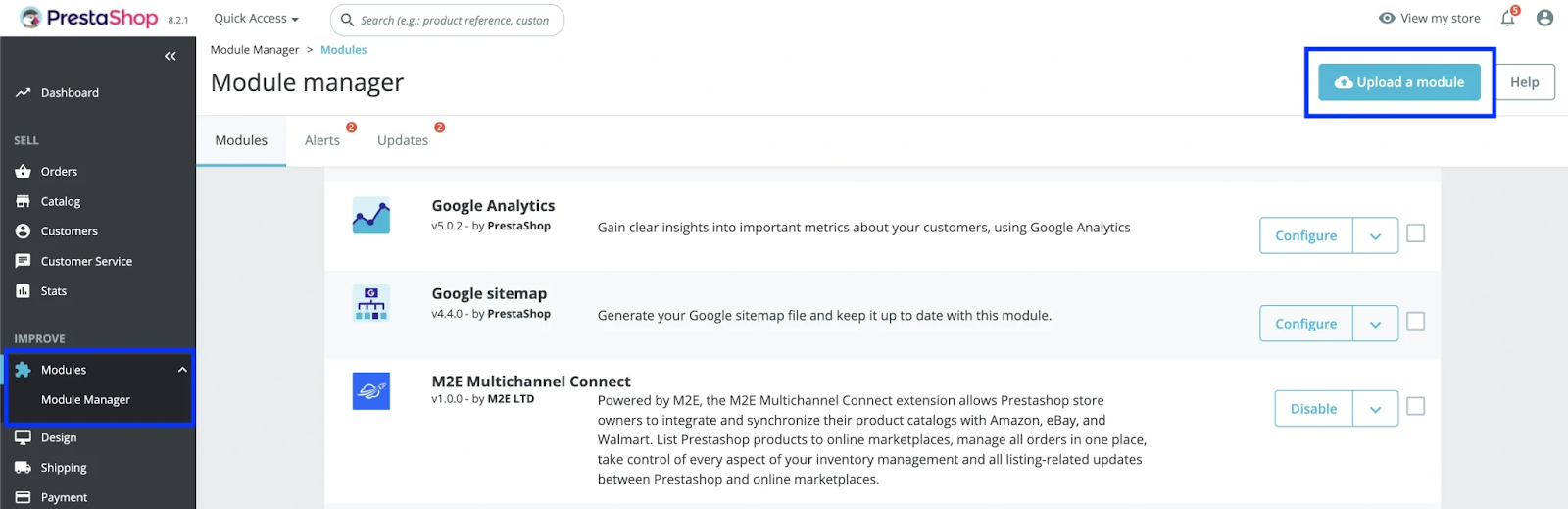
Download the latest M2E Multichannel Connect module, upload the ZIP file in Modules > Module Manager, click Install Now, and activate the plugin. After activation, M2E Multichannel Connect appears in the left-hand menu of your PrestaShop admin.
Step 2. Connect your TikTok Shop seller account
Inside the module, click Connect Marketplace Account, choose TikTok Shop. Select the region where your seller account is registered, and continue to the TikTok Shop Seller Center to authorize the connection. Once authorization is complete, your TikTok Shop account is linked to PrestaShop.
Step 3. Complete the setup wizard
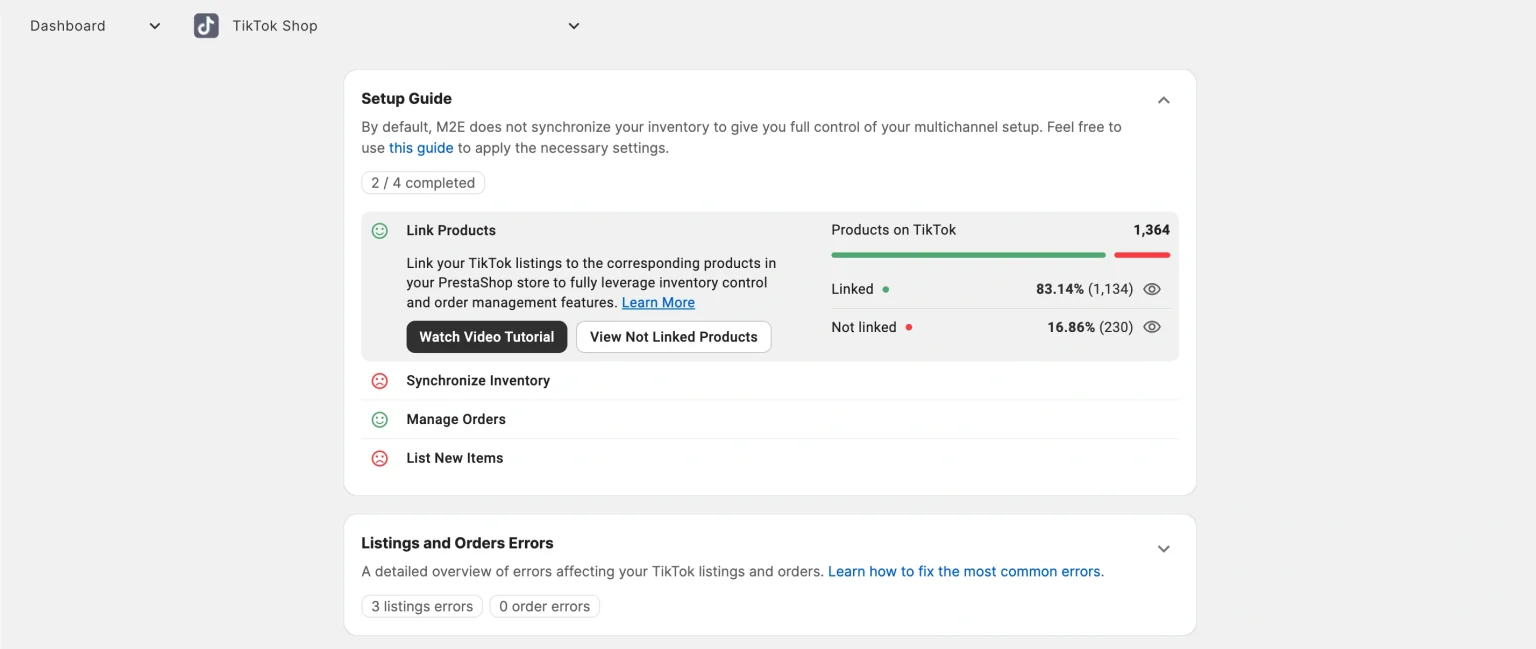
After the account is connected, the setup guide launches automatically. This is where you finish the core configuration:
- link existing TikTok Shop listings to your PrestaShop catalog
- enable inventory sync
- activate order import
- start listing products that are not yet live on TikTok Shop
Step 4. Create and publish TikTok Shop listings
Once your TikTok Shop account is connected, you can start creating listings from your PrestaShop catalog.
The listing flow includes:
- selecting the TikTok Shop account
- defining product settings
- choosing products to list
- assigning the TikTok Shop category
- filling in required attributes
- publishing listings or saving them as drafts
For more detailed setup instructions, you can find the full step-by-step guide here.
Final Thoughts
TikTok Shop is already becoming a real sales channel for PrestaShop merchants across Europe. The opportunity is clear, but the channel only works well when it fits into your existing catalog, stock, and order workflow.
That is where M2E becomes valuable. It helps keep listings, inventory, and orders connected inside one operational flow, so TikTok Shop does not turn into another manual process to manage separately.
If you are planning to start selling on TikTok Shop, the next step is simple: connect it to PrestaShop with a setup that is built to support both launch and long-term growth. For the full process, use the M2E step-by-step guide to get started.