Today’s ecommerce businesses can’t afford to rely on just one sales channel. The more marketplaces you sell on, the more potential you have to find new customers, increase sales, and reduce the risks of depending on a single marketplace. After all, what happens if your main marketplace suddenly restricts your account or your sales drop?
Of course, selling on multiple marketplaces brings new challenges. Many listings, different marketplace rules and requirements, complicated inventory, and a bunch of orders to manage.
But different channels don’t have to mean doubling your workload. Find out how M2E Cloud can help you reach your goals with minimal extra effort.
Why Now Is a Good Time for eBay Sellers to Expand on TikTok Shop
Let’s face it – TikTok is growing rapidly. The marketplace is expanding across Europe, with Poland, the Netherlands, Belgium, and Austria joining its list of markets in 2026.
The platform’s sales are growing just as fast. Momentum Works projected TikTok Shop’s global GMV at $50.3 billion in the first half of 2026, up 92% from the same period last year.
This gives established eBay sellers a chance to reach new customers without starting their product offering from scratch. You can just bring your existing catalog to a marketplace with a growing customer base.
And there’s another advantage: your eBay catalog already contains much of the product information you need. Instead of building every listing from scratch, you can use that data as a starting point for TikTok Shop.
That’s where M2E Multichannel Connect comes into play.

Copy Your eBay Listings to TikTok Shop with M2E Cloud
So, how does it work in practice? Let’s go through the steps and see how to get started with M2E.
One action to start expanding your catalog
If you have a large number of products on eBay, you don’t need to list them all again on TikTok Shop. Reuse your existing catalog instead.
Select your eBay listings in M2E and use the Copy to TikTok action to copy their information to TikTok Shop.
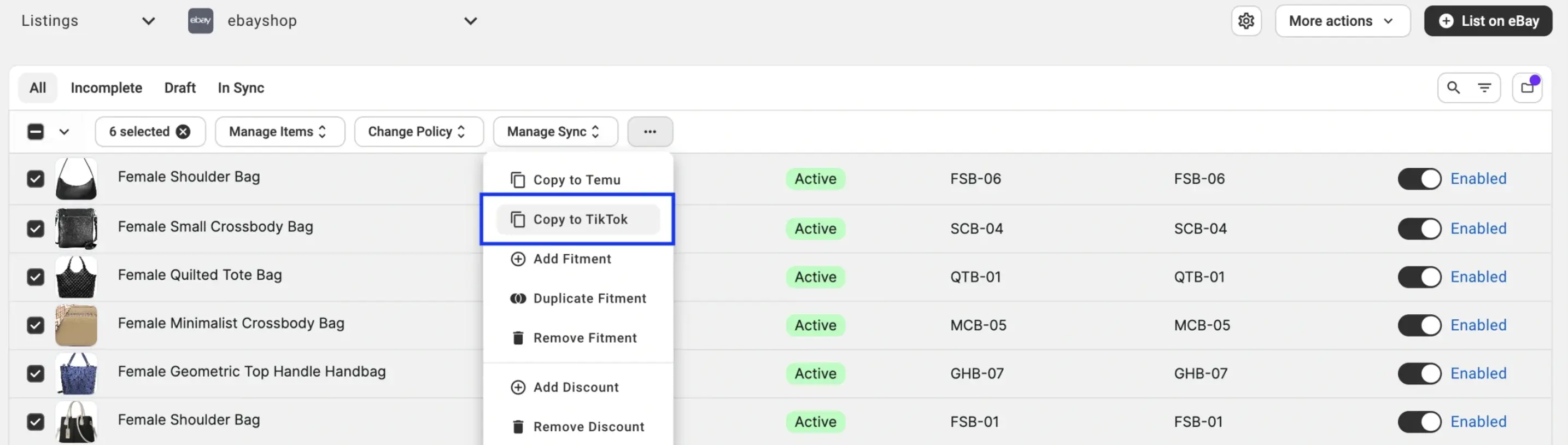
If you have many products to list, this option can save you hours of work. Select several eBay listings, copy them at once, and reduce manual data entry.
🙌 The best part? Your eBay listings remain active. And no matter how you customize the info for TikTok Shop, it all stays the same on eBay. You can keep your existing store running while adding another sales channel.
What does M2E prepare for you?
Copying your eBay listings is just one part of the process. Because TikTok Shop has specific requirements, you may need to adjust your pricing, product information, and product categories.
M2E Multichannel Connect guides you in creating the items you want to sell and lets you change the settings.
Here’s what is available for you to use and adapt:
- Titles and descriptions – M2E uses the already existing data from your connected store/catalog. So, there’s no need to input the same info over and over for every TikTok Shop listing.
- Pricing – By default, M2E stores your eBay price. If you want to implement different prices for the TikTok Shop, select another price source or modify prices in Selling Policies.
- Inventory – Utilize the stock levels from your ecommerce store and create quantity rules for TikTok Shop. For example, you can set a cap on the number of units available for sale on the marketplace.
- Synchronization – Determine which product data should be automatically updated by M2E. You can also create rules for pricing, quantity, and other details that fall under Synchronization Policies.
- Categories and attributes – Obtain TikTok Shop category recommendations based on your catalog’s current data. Review the suggested categories, categorize product attributes, and send back any details that need more information.
🙌 The best part? Using the same settings for all products isn’t a must. M2E lets you use different policies for different product groups so that you can manage your TikTok Shop listings based on your business needs.
💡 You can find more information about the entire process in our complete guide on how to copy eBay listings into TikTok Shop.
Customize your TikTok Shop listings
While you already have a great catalog containing titles, descriptions, sizes, and more, TikTok Shop could require extra data or different types of items.
You don’t need to rebuild your catalog to handle this.
With M2E Multichannel Connect, you can:
- Add missing details: Create custom attributes without changing your original store data. For large catalogs, use CSV files to update values in bulk.
- Match marketplace requirements: Map your product attributes to TikTok Shop fields and save the mappings for future listings.
- Change how products appear: Use Description Policies to create different titles and descriptions using your existing product data.
- Use flexible settings: Apply different policies to different product groups.
- Update more products at once: Use filters and bulk actions to manage listings faster.
🙌 The best part? Create as many Policies as you need. For example, you can use one Description Policy for clothing and another for accessories. Each group can have its own title format and product information.
Catch listing errors before they reach TikTok Shop
Before products go to TikTok Shop, M2E Validator Assistant reviews the listing data and helps identify any issues.
Here’s how it works:
- Review: M2E checks your product information against TikTok Shop’s requirements.
- Identify: Missing or incorrect details are highlighted.
- Fix: You get clear instructions on how to resolve each issue.
🙌 The best part? You don’t have to check every product manually or guess what’s wrong. M2E helps you fix issues before submission, saving you time and effort.
Once your listings pass validation, M2E sends them to TikTok Shop for approval.
Automate Your eBay and TikTok Shop Operations
Listing your products on TikTok Shop is just the beginning. Once you move into selling mode on both platforms, managing pricing, inventory, and orders will become paramount.
M2E Multichannel Connect goes beyond merely transferring your information. It offers flexible Selling and Synchronization Policies, letting you customize how your platforms work. You only need to set up the required rules, and M2E takes care of all subsequent updates.
Control inventory across both marketplaces
A product sold on both TikTok Shop and eBay doesn’t necessarily mean the available quantity should be the same in both places.
With M2E, you can:
- Limit the quantity available to sell – You can set limits on how many pieces are displayed on each marketplace, even if you have more in stock than displayed.
- Allocate stock – You can allocate some quantity of your inventory for other selling channels.
- Synchronize stock automatically – If your stock changes, it will be reflected across connected marketplaces.
- Prevent overselling – Your stock levels will always be updated properly when orders come in from different channels.
🎯 Simple example: Let us say that you have 1000 units. You can keep your listing on TikTok Shop limited to 200 units.
Manage orders without changing your workflow
Having multiple marketplaces means getting lots of orders. However, you don’t have to establish a different order process for each marketplace.
M2E allows you to manage your orders from eBay and TikTok Shop within your existing order processing system.
- Automated order import – Receive orders from your connected ecommerce store.
- Order settings options – Set how marketplace orders should be processed.
- Distributing orders – Process orders through your store’s existing workflow.
- Shipping updates synchronization – Send numbers and statuses of shipped packages.
🙌 The best part? You can handle orders from several marketplaces without switching accounts for every task.
Set your own pricing rules
When selling on eBay and TikTok Shop, you don’t need to maintain the same pricing.
The policies set forth by the M2E offer flexibility in creating and modifying prices across all marketplaces.
- Choose the source for pricing – Define the prices based on your store, catalog attributes, or any other valid resource.
- Facilitate automatic pricing – Increase or decrease prices by a certain percentage.
- Apply different rules for pricing policies – Use any specific pricing policy for a specific product category.
- Keep your prices up to date – Have M2E implement all the price changes as per your synchronization policies.
🎯 Simple example: You sell a pair of sneakers for $100 on eBay but want to charge 10% more on TikTok Shop to cover extra costs. With M2E, you can set a pricing rule that automatically increases the TikTok Shop price to $110. If you change the base price later, M2E adjusts the TikTok Shop price based on your rule.
Track sales with M2E Analytics
Would you like to find out about the performance of your products on eBay in comparison to TikTok Shop?
With M2E Analytics, you can evaluate your sales and order trends on different online platforms.
- Find out your sales revenue from every online sales channel.
- Monitor the order volume and trends.
- Compare the performance of your products on different platforms.
🎯 Simple example: You sell the same sneakers on eBay and TikTok Shop. And your sales may perform differently on each marketplace. With M2E Analytics, you can compare sales across marketplaces. See where customers place more orders and where your business earns more.

Expand to more marketplaces
Why limit yourself to just eBay and TikTok Shop? With M2E, you can tap into more than 600 marketplaces worldwide without altering your existing ecommerce infrastructure.
Select your source of products:
- Online stores: Shopify, BigCommerce, WooCommerce, Ecwid, Shopware, and PrestaShop.
- Enterprise platforms: Salesforce Commerce Cloud.
- POS systems: Lightspeed POS and Square POS.
- Magento (Adobe Commerce) via M2E Pro.
- Other options, such as ERP, PIM, or custom catalogs via the M2E Cloud API.
Select your sales channels:
- Amazon, eBay, and Walmart.
- TikTok Shop, Temu, and SHEIN.
- Kaufland, OTTO Market, and OnBuy.
- 450+ Mirakl marketplaces, including Decathlon and Carrefour.
🙌 The best part? You don’t need a complete expansion plan to get started. Connect the marketplaces you want to sell on now. And expand to new marketplaces without rebuilding your setup once you’re ready.
Expand to TikTok Shop Without Starting from Scratch
With M2E Multichannel Connect, you do more than copy your listings. You will get unique tools to control how you list, price, and update your items on both platforms. You will be able to:
- Use your eBay listing: Upload eligible items to TikTok Shop without having to key in the product information again.
- Personalize your listings: Update product details, link characteristics, and set different pricing and stock terms.
- Simplify the routine: Manage stock and pricing updates, process orders, and set the information that transfers between platforms.
Don’t waste your time on mundane manual updates – spend more of it on your business growth.
Want to go for it? Use M2E Multichannel Connect and start selling on TikTok Shop using the pre-existing eBay listings.