
Pricing on eBay is one of those things that looks simple until you actually have to do it. Set your price too high, and listings sit untouched. Go too low, and every sale eats into your profit. And somewhere in between is a number that brings orders, covers your costs, and leaves enough margin to keep the business healthy.
The challenge is that “somewhere in between” shifts constantly. Competitors adjust their prices, demand changes with seasons, and eBay’s algorithm rewards certain pricing behaviors over others. You may be left wondering how to price things on eBay, especially when you have hundreds of listings.
This guide breaks down the most effective eBay pricing strategies, explains when each one makes sense, and shows how to put them into practice.
Key Pricing Strategies That Work on eBay
Before we dive in, keep in mind that there’s no universal strategy that works for every product or category. Once you understand which strategies fit your situation, you’ve taken the first step toward getting pricing right.
Competitive Pricing
Best for: Products with many competing sellers and categories where buyers actively compare before purchasing.
Competitive pricing means setting your price based on what the market is actually paying, not what sellers are asking. The difference matters. Listing prices show what sellers hope to get. Sold prices show what buyers are willing to spend.
eBay gives you two tools to research the prices of products similar to yours:
1) “Sold items” filter in search results. It shows the last 90 days of completed transactions by default, which is enough to reflect current demand.
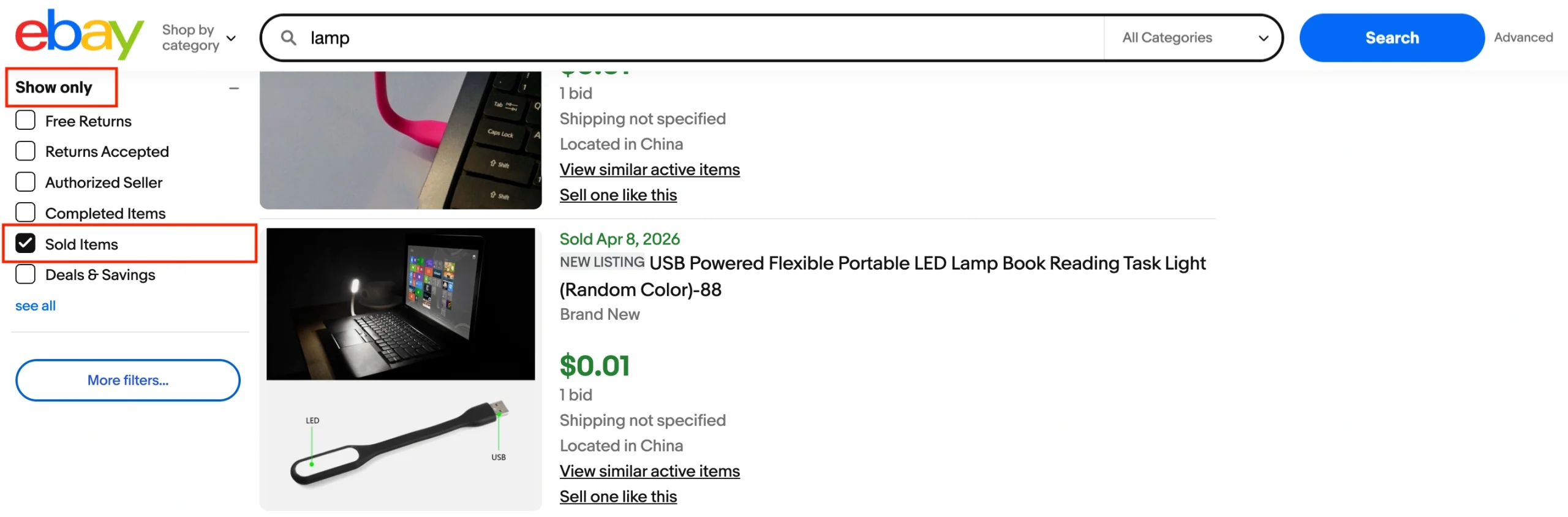
Don’t just glance at prices, though. Filter items by condition and shipping method. A used item and a new one aren’t comparable, and neither are a $50 listing with free shipping and a $45 one with $8 on top. Your baseline price should come from items that match yours as closely as possible.
2) Product Research in Seller Hub. eBay’s Product Research tool is free for all sellers and gives you up to 3 years of sales data, including sold prices, accepted Best Offer prices, average shipping costs, and sell-through rates. If you want eBay price recommendations grounded in real data, this is where you should start.
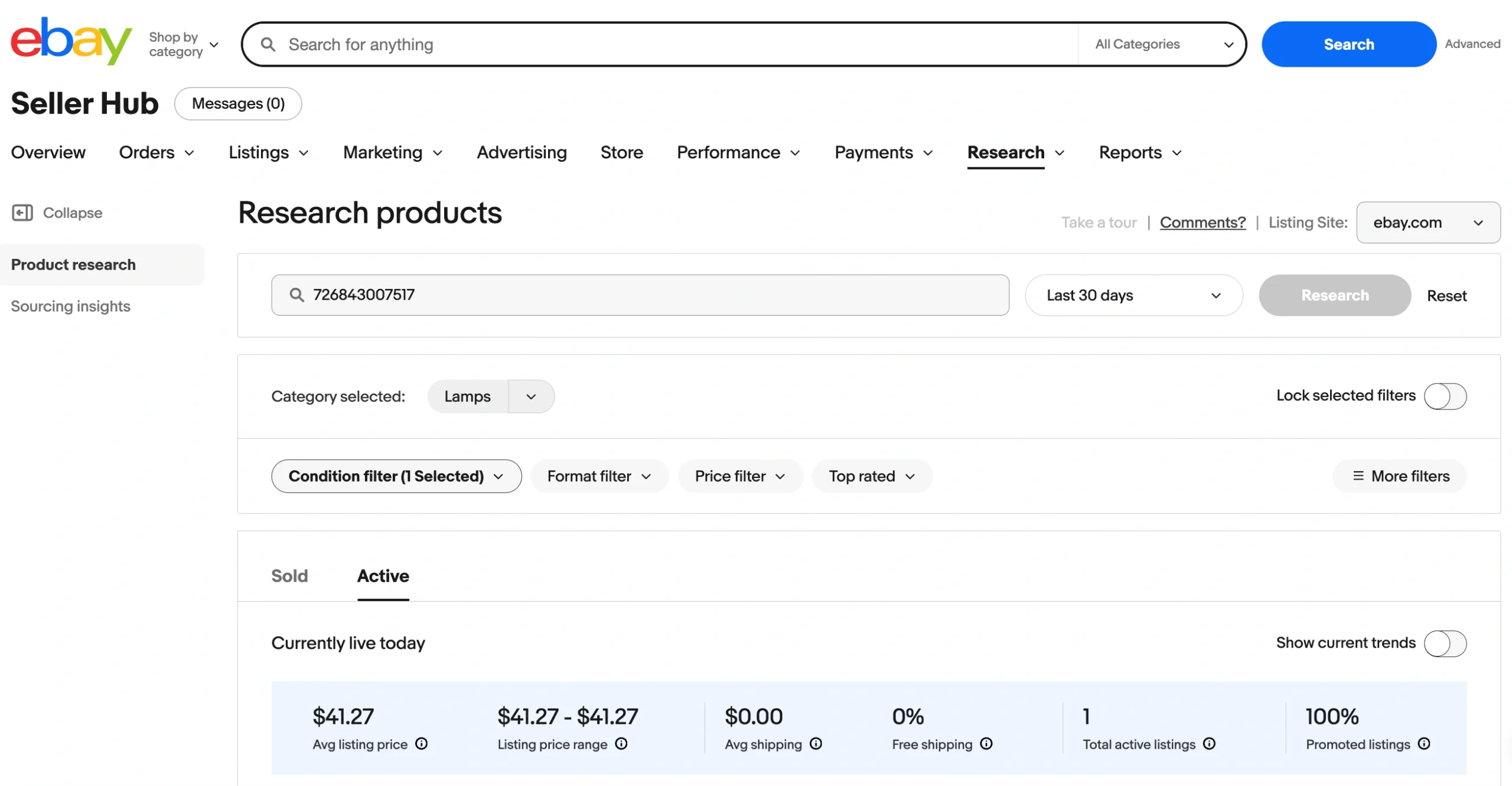
Pay extra attention to the sell-through rate in eBay Product Research. For example, if 200 items are listed but only 15 are sold in the last 90 days, the market is saturated. Matching the going rate won’t help if items at that price aren’t moving.
Once you have a baseline price, there are three paths:
- Match the market price. This is the safest option when your listing is comparable to what’s already selling – similar condition, similar photos, similar seller rating. It’s the low-risk option that keeps your listings competitive.
- Price below the market. This is a good move when you need early sales and visibility. It works for new accounts with little feedback, listings without reviews, or products you want to move quickly.
- Price above the market. This works when you can justify the premium – new condition, professional photos, detailed description, or a strong seller reputation. Buyers will pay more when the listing gives them confidence.
Dynamic Pricing
Best for: Seasonal products, trending items, and listings that have been sitting without sales.
Competitive pricing helps you set the right price at the moment of listing. Dynamic pricing is about adjusting it after that, as the market doesn’t stay still, and neither should your prices.
On eBay, dynamic pricing is mostly manual. Here is when it makes sense to adjust prices:
- Seasonal demand. Raise prices when demand peaks, for example, winter gear in October, outdoor furniture in spring. Lower them when the season fades and buyers disappear.
- Demand spikes. Sometimes demand can shift without warning. For example, a product gets discontinued, an influencer mentions it, or a trend takes off. If you’re listing that item and see the extra attention, your price can go up.
- Aging inventory. If a listing hasn’t had views or sales in two to three weeks, the price is likely part of the problem. A small, steady reduction, like 5-10% at a time, is usually more effective than one big cut. It lets you find where buyers start responding without giving away margin.
- Competitor shifts. Other sellers run out of stock or raise their prices. That’s an opportunity to adjust yours – up or down depending on the situation.
Knowing when to adjust prices is one thing, but spotting the right moment is another. You can monitor your eBay Seller Hub for views, watchers, and conversion rates of each listing. If a listing is getting views but no sales, the price might be too high. If watchers are piling up, buyers are interested but waiting, most likely for a price drop.
Instead of reacting to each listing individually, build a habit. Review your underperforming and top-performing eBay listings once a week. That should be enough to catch most signals early.
Psychological Pricing
Best for: Fixed-price listings in most categories, especially when competing with similar products at similar price points.
Sometimes a small change in how you format your price makes more difference than the price itself. Here are a few ways to use that to your advantage:
- Use .99 or .95 endings. It’s one of the oldest tricks in retail, and it still works. $19.99 feels meaningfully cheaper than $20.00 to most buyers.
- Try precise pricing. A price like $47.38 feels more intentional than $47.00 or $49.99. It signals a calculated price, which can build trust, especially for used or refurbished items.
- Reference the original price. If your item retails for $80 and you’re listing it at $54.99, make that gap visible. Mention the retail price in your description, or use eBay’s seller promotions tools to display a crossed-out “was” price next to your current price.
Auction Pricing
Best for: Rare, collectible, or one-of-a-kind items and situations where you’re not sure what the market will pay.
eBay gives sellers two ways to list items: fixed-price, where you set the price and buyers pay it directly, and auction, where buyers bid and the highest offer wins. Most of the eBay pricing strategies in this article apply to fixed-price listings. But auctions follow a different pricing logic.
The key decisions with eBay auction pricing come down to where you start and how you protect your bottom line:
- Start low to drive interest. A low starting price attracts bidders and watchers. The more activity a listing gets, the more visible it becomes. In many cases, competitive bidding pushes the final price above what a fixed listing would have earned.
- Use a reserve price if needed. If you aren’t comfortable letting the market decide entirely, set a reserve – the minimum price you’re willing to accept. Bidding still starts low, but the item won’t sell unless the reserve is met.
- Add a Buy It Now option. This lets buyers skip the auction and purchase the item immediately at a set price. eBay recommends setting it at least 40% above your starting bid. Once someone places a bid, the Buy It Now option disappears.
Not ready for a full auction but open to negotiation? You can use the eBay Best Offer option for fixed-price listings. Allow buyers to propose a price, then review each offer and decide whether to accept, decline, or counter it. If you want to save time, set minimum and maximum thresholds and let eBay handle offers automatically.
Bundle Pricing
Best for: Slow-moving inventory and complementary products that can be sold together.
Instead of listing items individually and hoping each one sells, try bundling related products into a single listing at a combined price. For example, a phone case, screen protector, and charging cable can be sold as one kit.
A product bundle may be effective for a few reasons:
- Move stale inventory. Items that aren’t selling on their own can find new life as part of a bundle, especially if paired with a stronger product.
- Increase average order value. Buyers spend more per transaction, and you save on shipping and packaging compared to selling each item separately.
- Reduce direct price comparison. When your listing is a unique bundle, buyers can’t easily compare it against a single-item listing from a competitor. That gives you more control over pricing.
If you have inventory that isn’t selling, bundling is one of the eBay pricing strategies worth testing before you resort to markdowns.
How M2E Helps You Manage eBay Pricing
eBay pricing strategies will work only if you are consistent with them. But if you’re selling both through your own store and on eBay, keeping prices aligned or intentionally different on both channels takes effort.
M2E Multichannel Connect is built to solve this. It connects your e-commerce platform to eBay, and lets you manage listings, including pricing, from a single interface.
With M2E, you can control how your prices appear on eBay directly within your store. You don’t need to switch between eBay and the store since M2E supports the majority of eBay’s pricing tools. You can create multiple pricing rules to fit different product groups or strategies and apply them to both new and existing listings.
These are the eBay pricing features that M2E offers:
- Price source. Use your store’s base product price or sell on eBay at a different price than your store.
- Price modifications. Add a fixed amount to cover eBay fees or apply a percentage decrease to stay competitive, without touching your store prices.
- Price rounding. Set up rounding rules to clean up the prices and apply the psychological pricing tactics we’ve covered earlier.
- Strikethrough pricing. Show buyers how much they’re saving with a crossed-out original price next to your selling price.
- Variant pricing. If your products come in different sizes, colors, or styles, you can price them all the same or set individual prices per variant.
- Multipacks. Sell identical items in packs at a better per-unit price, without adjusting your store inventory.
- Best Offer. Turn on buyer negotiations and define your price boundaries right from M2E. There is no need to switch to eBay to manage them.
- Auctions. If you prefer the auction format for some of your products, you can configure auction pricing separately from your fixed-price listings.
Pricing sets the foundation, but eBay promotions can give your listings an extra push. M2E also lets you manage eBay promotional activities, so you can run sales and apply discounts without leaving your e-commerce platform.

Summary
Pricing on eBay isn’t something you figure out once and forget about. Markets shift, competition changes, and what worked last quarter might not work now. The strategies in this guide are meant to help you make better pricing decisions and keep making them as your business grows.
Research what the market is paying and adjust prices when conditions change. And don’t forget to use the tools available to you, both on eBay and through solutions like M2E, to keep your pricing consistent and competitive.