



Going viral on TikTok Shop is exciting—until you’re drowning in orders and struggling to keep up with fulfillment. Shipping delays, stock issues, and manual processing can quickly turn success into stress.
That’s where Amazon Multi-Channel Fulfillment (MCF) comes in. With MCF, you can store inventory in Amazon’s warehouses and let them handle packing, shipping, and delivery—even for TikTok Shop orders. There is no need to juggle multiple fulfillment processes or risk late shipments.
Are you ready to streamline your TikTok Shop logistics? Let’s explore how Amazon MCF for TikTok Shop can simplify your fulfillment and keep customers happy.
What is Amazon Multi-Channel Fulfillment (MCF)?
Amazon Multi-Channel Fulfillment (MCF) is a logistics service that allows businesses to use Amazon’s warehouses, packing, and shipping network to fulfill orders from other sales channels, like TikTok Shop.
For example, suppose you sell a product on TikTok Shop. In that case, MCF can automatically pick, pack, and ship the order from your Amazon inventory—delivering it to the customer quickly, often within two business days. This eliminates the need for separate storage or manual shipping, making fulfillment faster, scalable, and hassle-free.
Why Use Amazon MCF for TikTok Shop Orders?
Imagine you launch a product on TikTok Shop, and it suddenly goes viral. Orders skyrocket overnight, but keeping up with fulfillment becomes a nightmare. You either scramble to pack and ship everything manually or risk delays, unhappy customers, and order cancellations.
That’s where Amazon MCF comes in. It leverages Amazon’s vast logistics network to handle storage, picking, packing, and shipping for you—ensuring fast, reliable deliveries while freeing up your time to focus on growing your business.
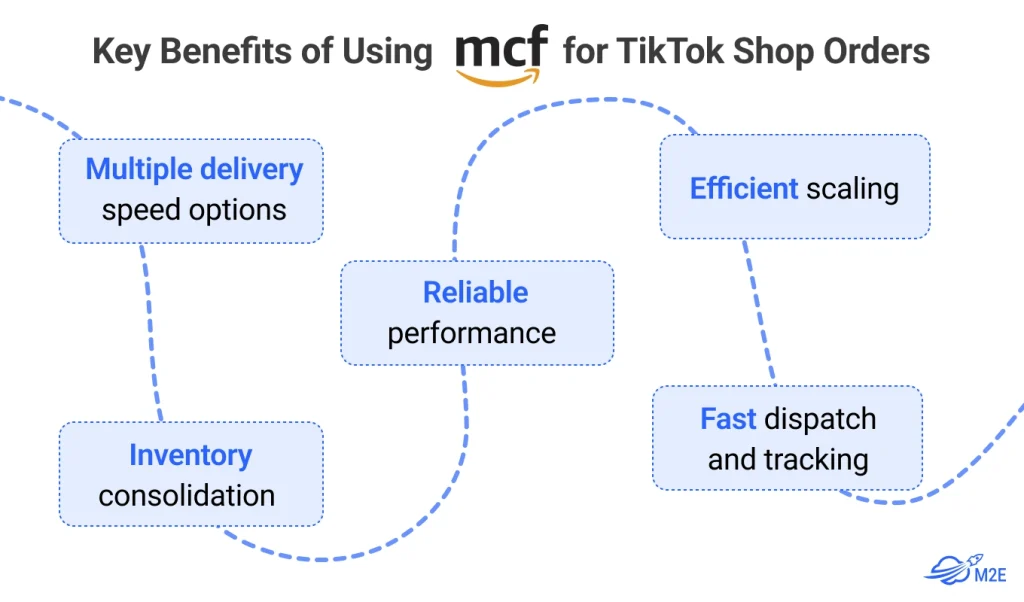
Key Benefits of Using MCF for TikTok Shop Orders
- Multiple delivery speed options—You can choose from various delivery speeds, with the fastest option delivering within two business days.
- Reliable performance – With a >97% on-time delivery rate and a 99.98% undamaged delivery rate, MCF ensures a seamless customer experience.
- Efficient scaling – Amazon’s fulfillment network is built to handle high order volumes, making it ideal for sudden spikes in demand.
- Fast dispatch and tracking – 98% of standard-speed orders are dispatched within three business days, with real-time monitoring provided for all shipments.
- Inventory consolidation – By maintaining a single inventory pool, you can optimize stock allocation across multiple sales channels, improving turnover and reducing stockouts.
Use Amazon MCF for TikTok Shop to Automate Order Fulfillment
To streamline order fulfillment, you can integrate TikTok Shop with MCF using third-party solutions such as M2E Cloud (for Shopify, WooCommerce, and Ecwid sellers) or the M2E Amazon MCF Magento 2 extension for Magento (Adobe Commerce). These integrations allow you to:
- Automatically sync TikTok Shop orders with your Amazon inventory.
- Ensure accurate stock tracking and prevent overselling.
- Provide real-time order status updates to customers.
- Speed up order processing by automating fulfillment.
How to Use M2E Cloud to Benefit from Amazon MCF for TikTok Shop
M2E Cloud allows you to sync your TikTok Shop with Amazon MCF (Multi-Channel Fulfillment) to automate order fulfillment, reduce logistics costs, and ensure fast, reliable shipping.
Step 1: Understanding the Role of Each App
- Amazon MCF App works with Data Source platforms (e.g., Shopify, WooCommerce, Ecwid) and Amazon. Its primary function is to enable the fulfillment of Amazon FBA products through a seller’s website connected to the Data Source.
- M2E Multichannel Connect is required to integrate TikTok Shop. The need for a second app is justified by the fact that not all seller inventory is stored in Amazon FBA. Multichannel Connect allows for automated inventory and order management for products fulfilled by the seller directly, rather than Amazon.
Step 2: Install Amazon MCF App
- This connects your Amazon and Data Source accounts.
- The Data Source account is linked during registration.
- The Amazon account is connected via the dashboard.
- Important: M2E will sync only Amazon FBA products, as only these can be fulfilled via Amazon MCF.
Step 3: Install M2E Multichannel Connect
- This app connects TikTok Shop to your Data Source account.
Once both apps are set up and the product catalogs are imported, an automatic linkage occurs. This ensures that the same product, sold across different platforms, is properly synchronized for seamless order management and fulfillment.
Step 4: Set Up Order Preferences
Enable Order Management in M2E Multichannel Connect:
- In the Multichannel Connect app, go to the Settings for your TikTok account.
- Enable the Order Management feature.
- This ensures that all TikTok orders are automatically created in the Data Source.
Set Up Amazon MCF for Order Creation:
- Open the Amazon MCF app.
- In the settings, make sure the option to create MCF orders based on the Data Source orders is enabled.
- This allows the system to check whether the ordered products are stored in Amazon FBA.
Automated Order Processing:
- When a TikTok order appears in the Data Source, the Amazon MCF app automatically verifies if the ordered products are available in Amazon FBA.
- If they are, the app creates a matching order in Amazon, and Amazon fulfills it.
Fulfillment Information Sync:
- First, Amazon updates the fulfillment details in its system.
- Then, the information is automatically sent to the Data Source order (this is handled by M2E Multichannel Connect).
- Finally, the fulfillment update is synced from the Data Source to the TikTok order.
Step 5: Map Shipping Methods
- Click Shipping Settings and match TikTok Shop shipping options with Amazon MCF delivery methods.
- This ensures correct shipping speeds and tracking updates.
General Guide: How Amazon MCF Helps Fulfill TikTok Shop Orders
If you are an Amazon FBA product seller, you can use your existing inventory with Amazon to fulfill orders on social commerce channels with MCF. There is no additional sign-up or inventory transfer required. There is a clear 6-step guide.

Step 1: Store Your Inventory in Amazon Fulfillment Centers
Before using MCF, you must send your products to Amazon’s fulfillment centers like you would for FBA.
- Create a shipment in your Amazon Seller Central account.
- Label and package your products according to Amazon’s guidelines.
- Ship the inventory to Amazon’s warehouse, which will be stored until orders arrive.
Step 2: Connect TikTok Shop to Amazon MCF
Let’s start with the fact that TikTok needs to list the products the seller has in Amazon FBA warehouses for sale. For this, you must integrate your TikTok Shop with MCF to automate order fulfillment using a third-party app.
- Choose an integration tool. For example, with M2E Cloud, you can optimize your online business by connecting your store (Shopify, WooCommerce, Ecwid) with Amazon MCF. Still, if you are selling with Magento (Adobe Commerce), you can try the M2E Amazon MCF Magento 2 extension.
- Sync your TikTok Shop account with your Amazon MCF inventory.
- Set up automatic order routing to send TikTok orders to Amazon for fulfillment.
Step 3: Customer Places an Order on TikTok Shop
Once a customer purchases your product on TikTok Shop, M2E Cloud integration automatically transmits the order to Amazon MCF.
- The integration pulls order details, including product, quantity, and shipping address.
Step 4: Amazon MCF Picks, Packs, and Ships the Order
Once the order is received, Amazon’s warehouse team picks, packs, and ships the product using its optimized logistics network.
- Amazon selects the most efficient fulfillment center based on the customer’s location.
- The order is packed securely using Amazon’s shipping standards.
It is shipped using the chosen delivery speed, such as:
- Standard (3–5 business days);
- Expedited (2 business days);
- Priority (next-day delivery);
Step 5: Customer Receives the Order with Tracking Information
- Once shipped, real-time tracking is provided so customers can monitor their delivery status.
- The tracking number is synced back to TikTok Shop (via your integration), ensuring transparency.
- The order is delivered within the selected shipping time, maintaining customer satisfaction.
Step 6: Manage Returns & Customer Support (Optional)
If a customer wants to return a product, you have two options:
- Use Amazon’s MCF return services – Customers can return items to an Amazon fulfillment center.
- Handle returns independently – Customers return items to your business instead of Amazon.
3 Tips to Maximize Efficiency with Amazon MCF for TikTok Shop
1: Optimize Your Inventory Allocation
Since consumer demand can vary across platforms, maintaining a centralized inventory strategy helps avoid stockouts or overstocking. Use data analytics to predict demand and adjust stock levels accordingly.
2: Leverage Real-Time Tracking
Providing real-time tracking information enhances customer satisfaction and reduces inquiries regarding order status. MCF ensures that every order is traceable from dispatch to delivery.
3: Plan for Seasonal Demand Spikes
Social commerce trends can lead to unexpected spikes in demand, especially during promotional events or viral campaigns. You can handle these surges by leveraging MCF’s scalability without disrupting your fulfillment operations.
Bonus Info: Amazon MCF vs. TikTok Shop Fulfillment
When selling on TikTok Shop, choosing the right fulfillment method is crucial for maintaining fast delivery times, meeting platform requirements, and optimizing costs. Sellers can either use TikTok Shop’s native fulfillment options or leverage Amazon Multi-Channel Fulfillment (MCF). Here’s a side-by-side comparison to help you decide which option suits your business best.
Fulfillment: Who Handles What?
- Amazon MCF: Sellers store inventory with Amazon, which picks, packs, and ships orders, including TikTok Shop sales.
- TikTok Shop: Sellers fulfill orders manually or use Fulfilled by TikTok (FBT), where TikTok handles storage and shipping.
Shipping: How Fast?
- Amazon MCF: Standard (3–5 days), Expedited (2 days), Priority (next-day).
- TikTok Shop: Delivery varies by seller’s location; FBT offers fast shipping but isn’t available to all.
Costs: Which is Cheaper?
- Amazon MCF: Per-order fees cover storage, picking, packing, and shipping; idle inventory incurs long-term storage fees.
- TikTok Shop: Manual fulfillment is cheaper but time-consuming; FBT fees depend on weight, size, and volume.
Inventory: Which is More Efficient?
- Amazon MCF: One inventory pool for multiple platforms prevents stock issues.
- TikTok Shop: Separate inventory may cause stock imbalances.
FAQs about Amazon MCF for TikTok Shop
1. Can I use Amazon MCF to fulfill TikTok Shop orders if I don’t sell on Amazon?
Yes. You don’t need to sell on Amazon to use MCF. You can store inventory in Amazon’s fulfillment centers and use MCF to fulfill orders from TikTok Shop or other platforms.
2. Does Amazon MCF provide tracking for TikTok Shop orders?
Yes. MCF provides real-time tracking, which you can share with customers to reduce order status inquiries and improve the shopping experience.
3. Are there any TikTok Shop compliance issues with using MCF?
Possibly. TikTok Shop has specific fulfillment and tracking requirements. To avoid order issues, check if Amazon’s tracking and shipping carriers meet TikTok’s policies before using MCF.
4. What are the costs associated with using Amazon MCF?
Amazon MCF costs include fulfillment fees, storage fees, and optional service fees:
- Fulfillment Fees (per unit) – Charged based on size, weight, and shipping speed (Standard, Expedited, or Priority).
- Storage Fees (monthly) – Charged per cubic foot for keeping inventory in Amazon’s warehouses.
- Optional Fees – May include return processing, long-term storage, or unplanned service fees.
5. How much does it cost to use Amazon MCF?
As of January 15, 2025, Amazon’s Multi-Channel Fulfillment (MCF) fees have increased by an average of 3.5%. Here’s a breakdown of the associated costs:
1. Fulfillment Fees (Per Unit):
These fees are determined by the product’s size, weight, and chosen shipping speed:
Standard Delivery (3–5 Business Days):
- Small Standard-Size (≤1 lb): $5.85;
- Large Standard-Size (1–2 lb): $6.95;
- Large Standard-Size (2–3 lb): $8.15;
- Oversize (3–20 lb): $10.25 + $0.25/lb above 3 lb;
Expedited Delivery (2 Business Days):
- Small Standard-Size (≤1 lb): $7.25;
- Large Standard-Size (1–2 lb): $8.35;
- Large Standard-Size (2–3 lb): $9.55;
- Oversize (3–20 lb): $11.65 + $0.30/lb above 3 lb;
Priority Delivery (1 Business Day):
- Small Standard-Size (≤1 lb): $9.00;
- Large Standard-Size (1–2 lb): $10.10;
- Large Standard-Size (2–3 lb): $11.30;
- Oversize (3–20 lb): $13.40 + $0.35/lb above 3 lb;
2. Storage Fees (Monthly):
Storage fees are based on the average daily volume (in cubic feet) your inventory occupies in Amazon’s fulfillment centers and vary by season:
January – September:
- Standard-Size Items: $0.78 per cubic foot;
- Oversize Items: $0.56 per cubic foot;
October – December:
- Standard-Size Items: $2.40 per cubic foot;
- Oversize Items: $1.40 per cubic foot;
Final Thoughts
Amazon MCF is a powerful solution for businesses looking to streamline their TikTok Shop fulfillment. By leveraging Amazon’s fulfillment network, you can enhance order reliability, manage inventory efficiently, and scale effortlessly as your social commerce sales grow.
Automating your TikTok Shop fulfillment with an MCF integration like M2E Cloud will improve efficiency, ensuring fast, seamless deliveries and an optimal shopping experience for your customers. Remember to check our blog for fresher e-commerce insights.
