What is TikTok Shop Fulfillment?
TikTok moved fast. It went from “content app” to a real ecommerce channel with in-app checkout, product discovery, and seller tooling that keeps purchases inside TikTok Shop. For sellers, that’s the upside: demand can spike fast, sometimes overnight.
But besides lightning-fast orders, sellers often have a question: how to properly deliver orders? How to maintain clear tracking and avoid a drop in productivity when volumes increase, or the shipping operator gets lost? This is where most TikTok Shop operators either stabilize or start spending money and improving the health of the account.
In this guide, we’ll focus on the most important practical aspect for sellers: TikTok Shop fulfillment. We’ll look at 3 fulfillment options that TikTok supports, plus one bonus (read until the end for insights).
We’ll explain how each process works in Seller Center, and outline what to expect in terms of costs, lead times, and operational responsibilities. You’ll also see how each option ties into the performance metrics that TikTok tracks (such as shipping, delivery, cancellations, and valid tracking) so you can choose a setup that fits your needs today and still scales as TikTok’s demand grows tomorrow.
TikTok Shop fulfillment is the set of logistics setups TikTok Shop sellers can use to process, ship, and deliver orders. Packaging can also influence fulfillment efficiency, especially for sellers handling rising order volumes or varied product sizes. Using standardized box sizes helps speed up packing, reduce dimensional weight surprises, and improve consistency during dispatch. Many e-commerce brands review options such as Arka when refining their shipping workflows and packaging operations. In practice, it comes down to three routes:
- 4PL (Shipped via Platform). You store and pack orders, while TikTok Shop manages delivery.
- Fulfilled by TikTok (FBT). TikTok manages storage, packing, shipping, and customer service. Currently, this option is available in the US, England, Germany, France, Ireland, Italy, and Spain.
- Shipped by Seller (SOF). You take full responsibility for storage, packing, shipping, and customer service. That level of control also extends to packaging decisions, which can affect shipping efficiency, branding, and the customer experience. Depending on the product category, sellers may choose options such as compostable stand up pouches with window, which can be practical thanks to their lightweight design, product visibility, and presentation appeal.
Read to the end of the article to learn about another alternative method for delivering TikTok Shop orders.
TikTok Shop Fulfillment Metrics to Keep in Mind
Regardless of which method you use to fulfill orders on TikTok, there are certain metrics you need to follow to ensure you increase your visibility, engage with your customers, and avoid merchant penalties.
| Metric | Description | Minimum Requirement |
| On-Time Delivery Rate (OTDR) | % of orders delivered on or before the promised date | ≥ 80% |
| Late Dispatch Rate (LDR) | % of orders shipped after the SLA cutoff | ≤ 4% |
| Seller Fault Cancellation Rate (SFCR) | % of seller-cancelled orders pre-shipment | ≤ 2.5% |
| Valid Tracking Rate (VTR) | % of orders with correct tracking info | ≥ 95% |
3 Ways to Ship TikTok Shop Orders
TikTok Shop gives sellers three main fulfillment paths. The difference is simple: who owns storage, packing, shipping, and fulfillment-related customer issues.
Shipped via Platform
In this model, you, as the seller, manage your own inventory and packaging, but TikTok facilitates the delivery through its network of partner carriers. Essentially, you prepare the parcel and TikTok arranges for pickup and delivery to the customer on your behalf. This is considered a “fourth-party logistics” approach because TikTok coordinates the logistics with third-party couriers, acting as an intermediary platform.
How Shipped via Platform Works
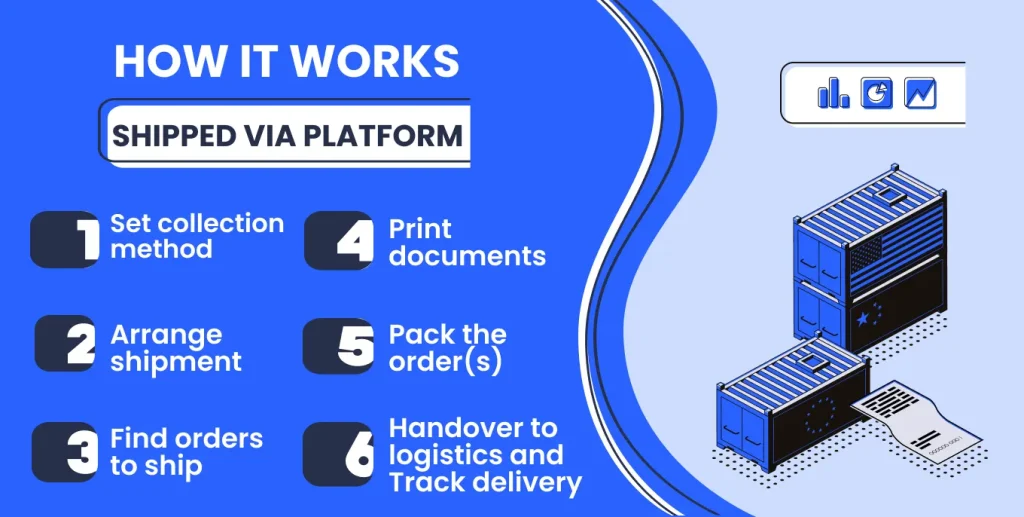
On the seller side: In Seller Center, you go to Orders > Manage Orders > To Ship, filter for Fulfillment Type: Shipped via Platform and Order Status: Awaiting Packing, then prepare the parcel.
TikTok’s side: You click Arrange Shipment, and TikTok assigns the logistics provider for the order. The platform generates the shipping documents, and you print the shipping label (plus packing list/picking list if needed). Tracking is tied to the order through this flow.
Handover: You hand the parcel over via drop-off (authorized drop-off hub/ parcelshop/post office) or pick-up, based on the collection method set in Fulfilment Settings. The logistics provider scans the parcel to confirm collection.
Tracking and delivery: After the scan, the order status updates to Shipped automatically. You can follow the shipment in Seller Center through In-Transit and Delivered, and view Proof of Delivery after completion.
Benefits of Using Shipped via Platform for TikTok Shop Fulfillment
- Shipped via Platform can connect with external tools, which helps keep tracking and order updates aligned with your existing stack.
- If something goes wrong with collection, drop-off, or delivery, TikTok Shop liaises with the logistics partner. You’re not left to chase the courier alone.
- Collection by TikTok can scan parcels on-site at pickup, which reduces handover lag that can trigger late handover penalties. TikTok also mentions pickup options that work for different seller sizes, including van collection for higher daily parcel volumes.
- TikTok notes that better delivery performance can support eligibility for incentives like traffic boosts and shipping subsidies. Some protections may also apply in delivery disputes (late delivery violations, lost/damaged claims, delivery-issue refunds), but outcomes depend on TikTok’s investigation.
Fulfilled by TikTok
Fulfilled by TikTok (FBT) is TikTok Shop’s in-house fulfillment option. Instead of shipping every order from your own warehouse, you send inventory to TikTok’s fulfillment network, and TikTok handles storage, packing, and shipping for eligible items. TikTok positions FBT as a “send inventory once, ship faster” model, with a Free 3-Day Delivery experience for customers on eligible listings.
TikTok may also work with third-party fulfillment partners to run parts of the program in specific markets (for example, ShipBob in the US). However, FBT isn’t automatically available to every seller or country. Access depends on TikTok’s rollout and eligibility, so some sellers may need to wait or use other fulfillment methods until it’s available to them. Currently, this option is available in the US, England, Germany, France, Ireland, Italy, and Spain.
How Fulfilled by TikTok Works
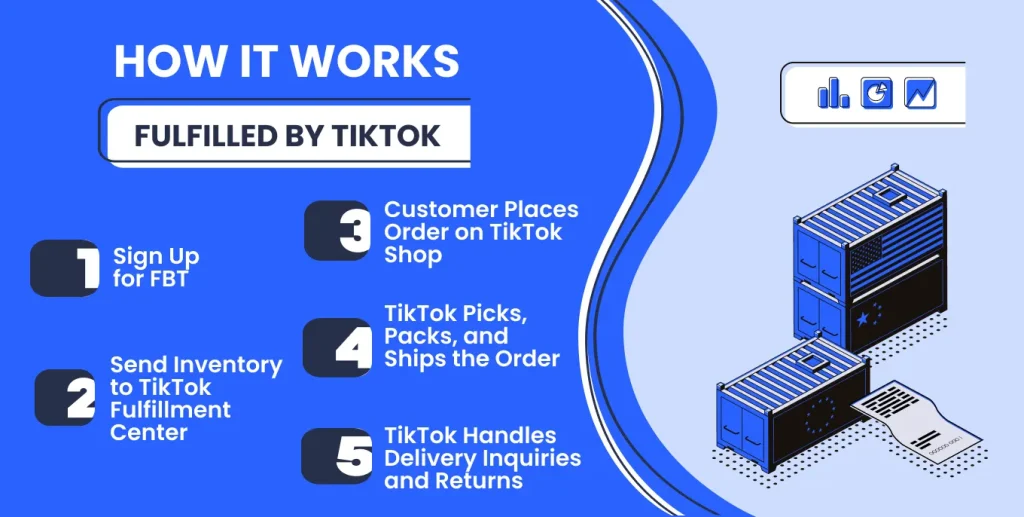
On the seller side: You enroll through TikTok Shop Seller Center and prepare your products for inbound (TikTok points sellers to an FBT portal flow where you set up SKUs and create inbound shipments).
TikTok’s side: You ship a quantity of your products to TikTok’s designated warehouse. TikTok Shop fulfillment centers (often operated by partners like ShipBob) receive and store your stock. When a TikTok Shop customer buys your product, the order is automatically routed to the TikTok Shop fulfillment center holding your inventory. At the warehouse, TikTok’s team (or partner 3PL staff) will pick the item, pack it, label it, and dispatch it to the buyer. A shipping partner then delivers the package to the customer’s doorstep. TikTok’s system updates the order as shipped and provides the tracking to the customer.
Handover: A carrier delivers the package to the customer. TikTok also manages returns.
Tracking and delivery: FBT includes customer service for shipping. TikTok’s support will handle questions like “Where is my order?” via instant message, sparing you from those logistics-related queries. If the buyer needs to return the item, the return is sent back to TikTok’s facility, and TikTok manages the return processing for you.
Benefits of Fulfilled by TikTok Shop
- FBT also gives your listings a clearer delivery promise. Eligible products can display the Free 3-Day Delivery tag, which sets expectations right on the listing and makes the offer feel more reliable.
- FBT is also positioned as a “protected” logistics flow. TikTok states that logistics-related issues for FBT orders, including late dispatches, cancellations, and negative reviews tied to logistics, are excluded from seller performance metrics. Shipping-related inquiries are handled by TikTok, so you’re not running courier support for those orders.
- When parcels go wrong, TikTok describes a claims path for FBT incidents, including a reimbursement process for lost or damaged parcels.
- Finally, TikTok documents an FBT-specific shopping mechanic: shoppers can combine items from multiple FBT shops to reach a $30 free shipping threshold, which can make it easier for customers to qualify for free shipping without buying everything from one store.
Shipped by Seller
Shipped by Seller (SOF) is TikTok Shop’s seller-fulfilled shipping option. Instead of using TikTok to coordinate delivery, you run the entire fulfillment flow yourself: you store inventory, pick and pack each order, choose your own shipping provider, and ship the parcel to the customer.
TikTok’s role is mainly operational tracking. You confirm fulfillment by uploading shipping information in Seller Center (either in bulk via spreadsheet or order-by-order), and once the order is delivered, you also update the delivery status.
How Shipped by Seller Works
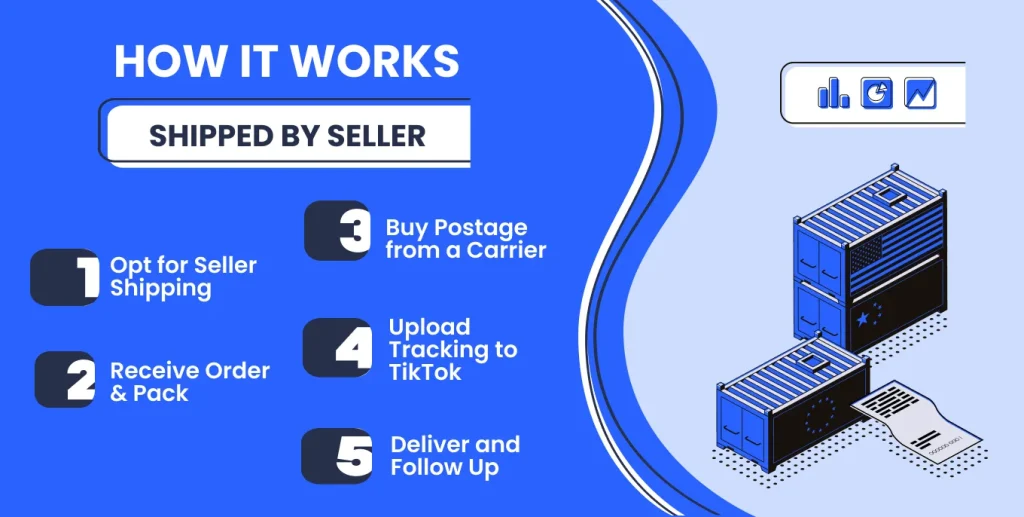
On seller’s side: When an order comes in, you prepare it just as you would any online order – pick the item from your inventory, pack it securely, and include any necessary paperwork (packing slip, etc.). All fulfillment work is done in-house or by your own team. You must purchase shipping for the package using your preferred carrier (e.g., USPS, UPS, FedEx, DHL, local courier, etc.). You can do this through your own business shipping account or at a post office/shipping center. The key is you are not using a label from TikTok; you’re paying the carrier directly or via a third-party shipping software.
TikTok’s side: TikTok does not arrange delivery here. The platform mainly acts as the place where you report shipping and delivery data back into Seller Center.
Handover: You hand the parcels to your shipping provider (pickup or drop-off depends on the provider you chose).
Tracking and delivery: You must upload shipping info to Seller Center, so TikTok knows the order is fulfilled. You can do it in bulk (template upload) or one-by-one (Add Tracking Info). After delivery, you must also update the delivery status (bulk template or one-by-one, with an option to attach photos). If there are delays or issues, you will be the one to communicate with the customer and resolve them. Any returns would also come back to you directly; you’d refund or replace items per your policy and update the order status on TikTok.
Benefits of Shipped by Seller for TikTok Shop Fulfillment
- You are not limited to TikTok-assigned carriers. If you already have better rates with a provider, or you need a niche service, you can build your own shipping stack around it.
- Because you pack orders yourself, you can maintain your preferred unboxing style and packing routine, as long as it stays within TikTok’s rules.
- You keep inventory in your own operation. You do not need to send stock into a separate fulfillment network. This can feel simpler if TikTok is just one of several channels you run.
How to Choose a TikTok Shop Fulfillment Method
Start with the one constraint TikTok controls: availability. If FBT is not available in your market or you’re not eligible yet, you’re choosing between Shipped via Platform and Shipped by Seller.
Choose Shipped via Platform if:
- You want to keep your own packing flow, but you want TikTok to handle delivery coordination.
- Want a more guided workflow in Seller Center where labels and tracking are generated through the platform.
- Prefer TikTok to liaise with the logistics partner when collection, drop-off, or delivery issues happen.
Choose Fulfilled by TikTok (FBT) if:
- You want TikTok to run fulfillment end-to-end after you receive inbound inventory.
- You want the FBT shopping mechanic where shoppers can bundle across multiple FBT shops.
- You’re comfortable sending inventory in advance and operating with inventory split across locations.
Choose Shipped by Seller (SOF) if:
- You can handle the operational overhead: export orders, upload tracking, and update delivery status.
- Need full control over carriers, service level, and how orders are packed.
- You already have a shipping stack and want to run TikTok like another independent sales channel.
Bonus Fulfillment Option: Amazon Multichannel Fulfillment (MCF)
If your inventory already sits in Amazon FBA, you do not have to build a separate TikTok-only fulfillment setup. You can use Amazon Multi-Channel Fulfillment (MCF) to ship TikTok Shop orders using the same Amazon warehouse stock you already rely on.
The core idea is simple: TikTok brings the orders, and Amazon handles the physical work. Instead of running your own packing line, you route eligible TikTok orders into Amazon MCF. Amazon then picks, packs, and ships to the customer, and you push tracking back to TikTok so the order stays compliant and visible in Seller Center.
It works like this: a TikTok order comes in, the order is routed into your store system, and a fulfillment request is created in Amazon MCF. Once Amazon dispatches, tracking and shipment status flow back the same route, so TikTok orders update correctly.
M2E Cloud supports an Amazon MCF workflow where TikTok Shop orders can be fulfilled through FBA via MCF, with status and tracking syncing back to TikTok through your connected store.
How it works with M2E
- A customer places an order on TikTok Shop.
- The order syncs to your connected store (Shopify, WooCommerce, Ecwid, etc.).
- The M2E Amazon MCF app checks whether the product is available in your FBA inventory.
- If it is, an MCF request is triggered automatically. Amazon picks, packs, and ships the item.
- Tracking info and fulfillment status sync back from Amazon → to your store → to TikTok Shop.
You can find more information in our guide.
Centralize TikTok Orders with M2E Cloud
No matter which shipping method you choose (Shipped via Platform, FBT, or Shipped by Seller), at some point you get not into logistics, but into the operating system: statuses, tracking, balances, “where is this order now”, and “did they sell it twice”.
M2E order management brings this to a single control center: you can automatically connect products from your store to marketplaces (including TikTok Shop), manage inventory and orders in one software, and update balances in real time to reduce the risk of overselling. The system also automatically synchronizes orders and shipment statuses so that you see fulfillment as a process, not a chaos of tabs and files.
From a routine perspective, it comes down to simple things:
- Synchronization between channels: real or near real-time sync for critical things like stock levels and order statuses (and less priority updates can be scheduled).
- Inventory management without manual pain: automated balance updates and logic that helps prevent overselling.
- Order management in a single interface: from purchase to delivery, with statuses and checkpoints, rather than “searching for truth” across systems.
Conclusion
TikTok Shop gives you three ways to fulfill orders, but they all come down to the same trade-off: how much logistics work you keep in-house versus how much you hand off to TikTok or your own shipping partners.
- Shipped via Platform works when you want to keep packing under your control, while TikTok coordinates delivery.
- Fulfilled by TikTok (FBT) is the convenience-first route: for eligible items, TikTok handles fulfillment operations end-to-end, so you do not manage day-to-day shipping tasks.
- Shipped by Seller gives full control over carriers and the packing process, but also puts full responsibility for delivery performance, tracking updates, and logistics issues on you.
There’s also a bonus route if your inventory already sits in Amazon FBA: Amazon Multi-Channel Fulfillment (MCF). In that setup, TikTok drives the order, but Amazon handles pick, pack, and shipping, which can help you avoid running a separate warehouse workflow for TikTok.
No matter which model you pick, the operational baseline stays the same: inventory must stay accurate, tracking must stay clean, and order statuses must stay in sync. M2E Cloud helps you keep that baseline stable by centralizing multichannel order management and supporting automated inventory and order status synchronization, so TikTok Shop fulfillment stays predictable even when order volume spikes.