M2E Multichannel Connect is a cloud application for brands that sell across multiple marketplaces. It brings listings, inventory, pricing, and orders into one place, allowing you to scale without needing additional tools.
Unlike M2E Pro, which is a Magento extension focused on eBay, Amazon, and Walmart, Multichannel Connect works independently of your store engine and supports platforms like Shopify, BigCommerce, Ecwid, and WooCommerce.
It runs on M2E Cloud, our platform built to support growth across stores and channels.

What is M2E Multichannel Connect?
M2E Multichannel Connect links your store to leading marketplaces such as Amazon, eBay, Walmart, and TikTok Shop, plus newer options including Temu, Shein, OTTO, OnBuy, and Kaufland. You manage listings, inventory, pricing, and orders from a single dashboard.
The app runs on M2E Cloud, a SaaS platform that integrates with Shopify, Shopify Plus, BigCommerce, BigCommerce Enterprise, WooCommerce, Ecwid, Salesforce B2C Commerce Cloud, Shopware, PrestaShop, Magento, Square POS, and Lightspeed POS.
If you switch between supported platforms, your marketplace operations migrate without downtime. Your sales continue without interruptions.
How is M2E Multichannel Connect different from M2E Pro?
M2E Multichannel Connect is shaped by years of Magento experience.
M2E Pro, our Magento-native extension, helps merchants upload and manage inventory on leading marketplaces such as eBay, Amazon, and Walmart. To go beyond Magento, we introduced M2E Connect, which opened integrations with marketplaces like TikTok Shop, Kaufland, OTTO, OnBuy, Shein, and Temu.
Today, M2E Multichannel Connect brings these capabilities together in one cloud-based solution with faster onboarding, easier daily workflows, and the flexibility to start with a test store or go live with your current catalog.
- Technology. M2E Multichannel Connect is a cloud-based solution with modern architecture. M2E Pro is a Magento extension you host on-premise.
- Updates and maintenance. M2E Multichannel Connect updates automatically. New features, marketplace integrations, and compliance fixes roll out without manual upgrades.
- Integrations. Our new app works with more marketplaces – TikTok Shop, Temu, Shein, OTTO, OnBuy, Kaufland, and many others. M2E Pro connects to eBay, Amazon, and Walmart.
- Scalability. M2E Multichannel Connect efficiently handles larger catalogs and cross-platform sales, ensuring your store remains operational.
M2E Cloud offers the trusted M2E experience with more marketplaces, less maintenance, and room to grow.
M2E Multichannel Connect vs. M2E Pro: Full Comparison
| Feature | M2E Pro | M2E Multichannel Connect |
| Type | Magento extension (on-premise) | Cloud-based SaaS |
| Platform support | Magento (Adobe Commerce) only | Shopify, BigCommerce, WooCommerce, Ecwid, PrestaShop, Shopware, Salesforce Commerce Cloud, Magento |
| Marketplace integrations | Amazon, eBay, Walmart | Amazon, eBay, Walmart, Kaufland Global, Temu, TikTok Shop, Shein, OnBuy, Kaufland Global Marketplace + more expanding |
| Management interface | Inside Magento Admin Panel | Unified cloud dashboard, separate from store backend |
| Setup & maintenance | Requires installation/updates on Magento server | No installation needed, runs in the cloud |
| Scalability | Limited by Magento server resources | Optimized for higher volumes and cross-platform operations |
| Best for | Sellers who run exclusively on Magento | Sellers using different e-commerce platforms or managing multiple stores/marketplaces |
| Support | Email + knowledge base (Magento-focused) | Support via email, knowledge base, and video calls (for paid plans) |
How to Transition From M2E Pro to M2E Multichannel Connect
Are you currently using M2E Pro to list Adobe Commerce (Magento) products to eBay, Amazon, and Walmart, but considering a switch to another e-commerce platform? If so, we have a relevant solution for you. You can transition to M2E Multichannel Connect, a cloud-based application that helps integrate your store’s inventory and sales with the most prominent marketplaces.
Switching from M2E Pro to M2E Multichannel Connect is a straightforward process. Make sure to follow the steps listed below before you start testing and using M2E Multichannel Connect.
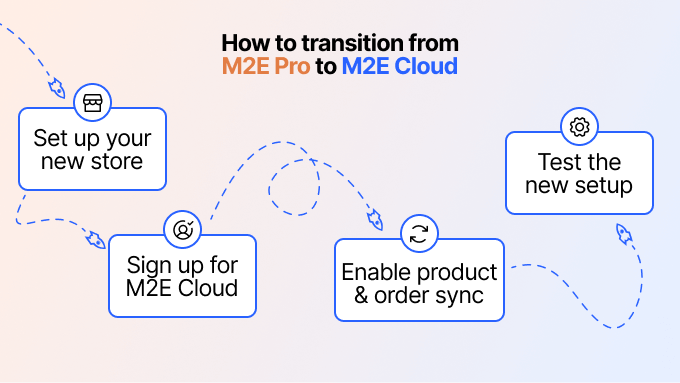
Step 1. Set up your new store
Create a store on the e-commerce platform of your choice. You can get started with a test store and test products, or set up a production store right away with your actual inventory. In the latter case, you will need to move your Magento catalog to the new store.
We understand that data migration is a crucial concern when transitioning to a new platform. To ensure a smooth and seamless transfer of your Magento data, we recommend using a dedicated migration tool. You can find it using search queries like “Magento to Shopify Migration” or other relevant ones based on the platform you are moving to. Such tools will handle the data migration, ensuring that your product information, customer details, and order history are securely and accurately transferred to your new store.
Still haven’t decided on an e-commerce platform to move to? Check out our detailed comparison of the top contenders and learn which platform aligns best with your business needs.
Step 2. Register for an M2E Multichannel Connect account
Sign up on the M2E Cloud registration page to create an account. Enter your details, confirm your email, and create a password.
Next, connect your store to Amazon, eBay, or Walmart accounts. You can link your test store or dedicated sandbox accounts for testing purposes, or use your actual channel accounts and production store to test your setup with real product and order data.
You can safely link your stores and channels to the application. Inventory and order synchronization will remain under your control.
Step 3. Enable order and inventory synchronization
Once your accounts are connected, M2E Multichannel Connect will prompt you to create policies for your channel items and to enable order and product sync. You decide which items to sync. The app does not update products or orders while sync is off.
To avoid double sync, enable only the products you need, especially if you still use M2E Pro or another solution.
You can sync linked products only. If you connected a production store, M2E Multichannel Connect links by SKU or product ID. You can also link test products manually.
Watch this video for step-by-step guidance on how to set up your M2E Multichannel account.
Step 4. Test the new setup thoroughly
Before making a complete transition, test the application to ensure everything functions correctly, including inventory and order synchronization between your store and channels. Once you are confident with the new setup and ready to switch to M2E Multichannel Connect entirely, make sure to turn off synchronization in M2E Pro or any other solution you previously used.
You do not need a separate subscription to use M2E Multichannel Connect. Cancel your M2E Pro subscription in M2E Accounts to prevent double recording of channel sales. Any remaining funds from your M2E Pro plan stay available for other M2E services.
If you encounter any issues during the transition process or have questions, our support team is here to assist you. On paid plans, you can book a video call with our support team for hands-on setup.