Imagine your supplier sends you an ACES XML file with fitment data for thousands of auto parts. You want to list those products on eBay Motors, but eBay uses its own vehicle database for Parts Compatibility.
How do you turn your existing fitment data into information eBay can use?
You need to map the vehicle applications from ACES to eBay Master Vehicle List (MVL). The process can also work in reverse if you already have Parts Compatibility data on eBay and need to prepare it for an ACES-based catalog.
In this guide, we’ll cover both workflows, explain the key differences between ACES and eBay MVL, and show how M2E Multichannel Connect helps you manage Parts Compatibility once your data is ready.
What Is ACES?
Aftermarket Catalog Exchange Standard, more commonly called ACES, is an online XML standard that allows you to share car fitment information. Manufacturers, suppliers, wholesalers, and retailers use it to manage the fitment data for their products.
For instance, a vendor can supply an ACES XML document with fitment data about thousands of items. Instead of collecting that information for each SKU, automotive sellers can use existing data.
ACES files may feature:
- Vehicle’s year, model, manufacturer;
- The engine and vehicle configuration;
- Various fitment conditions, such as installation requirements, etc.
ACES uses reference databases such as VCDB (Vehicle Configuration Database) for vehicle identification and to adopt fitment conditions, product categories, and brands.
Nonetheless, ACES doesn’t determine if a component can be used on a car. The vehicle maker or supplier provides compatibility data. ACES provides a uniform way to exchange that information.
ACES is widely used in the North American automotive aftermarket to share vehicle fitment data. It covers vehicles in the US, Canada, Mexico, and other parts of Latin America.
If you’re preparing ACES data for eBay, it’s high time to prove two things:
- File version: Find out which ACES version your supplier uses.
- Compatibility: Check that your mapping software is compatible with your ACES version.
The ACES 5.0 version was released in April 2026. So, other versions may still be active in supplier data.
What Is eBay MVL?
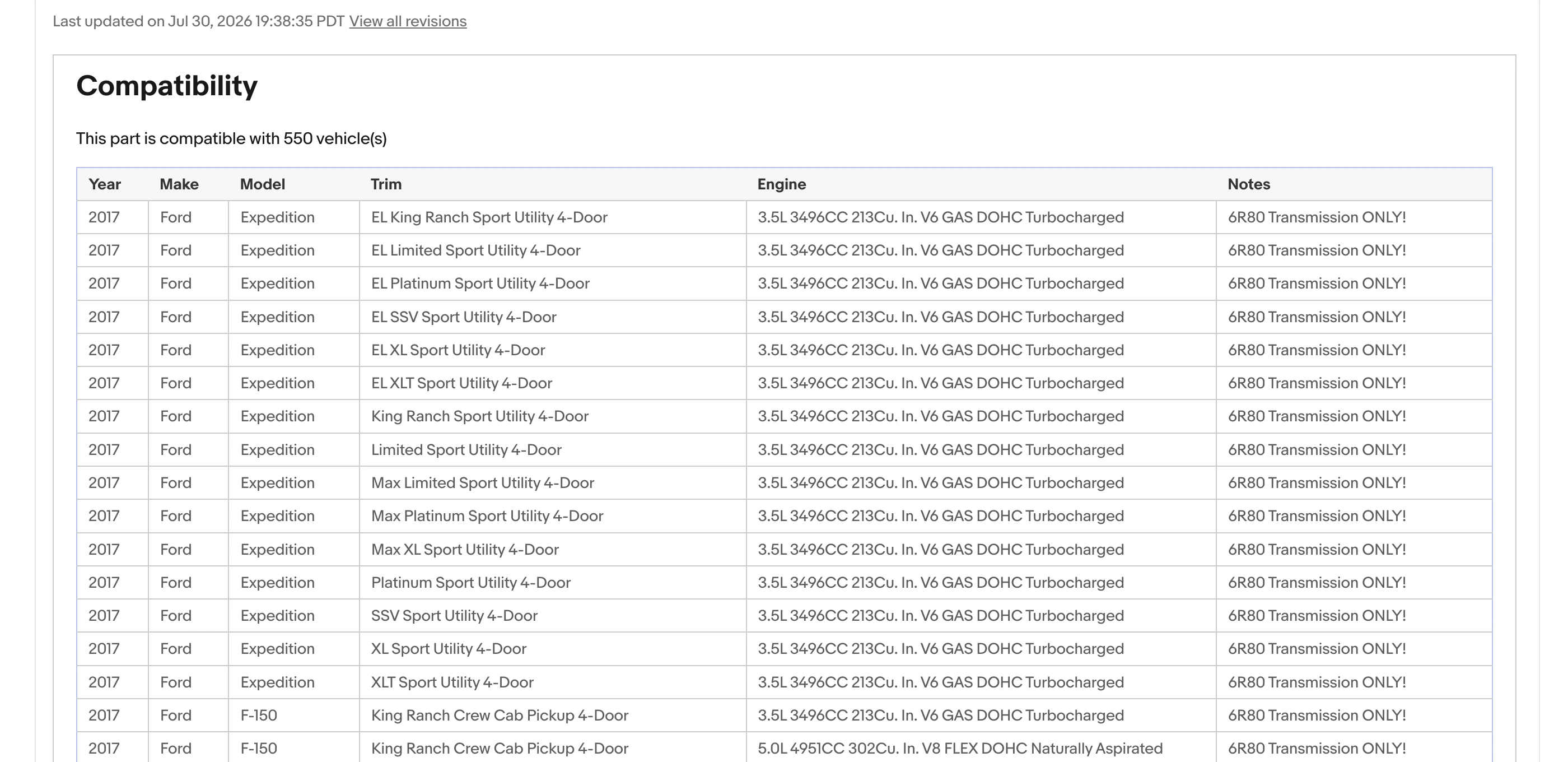
eBay’s Master Vehicle List, or simply MVL, is the vehicle database behind eBay Parts Compatibility. Sellers use these records to add Parts Compatibility information and show buyers which vehicles their products fit.
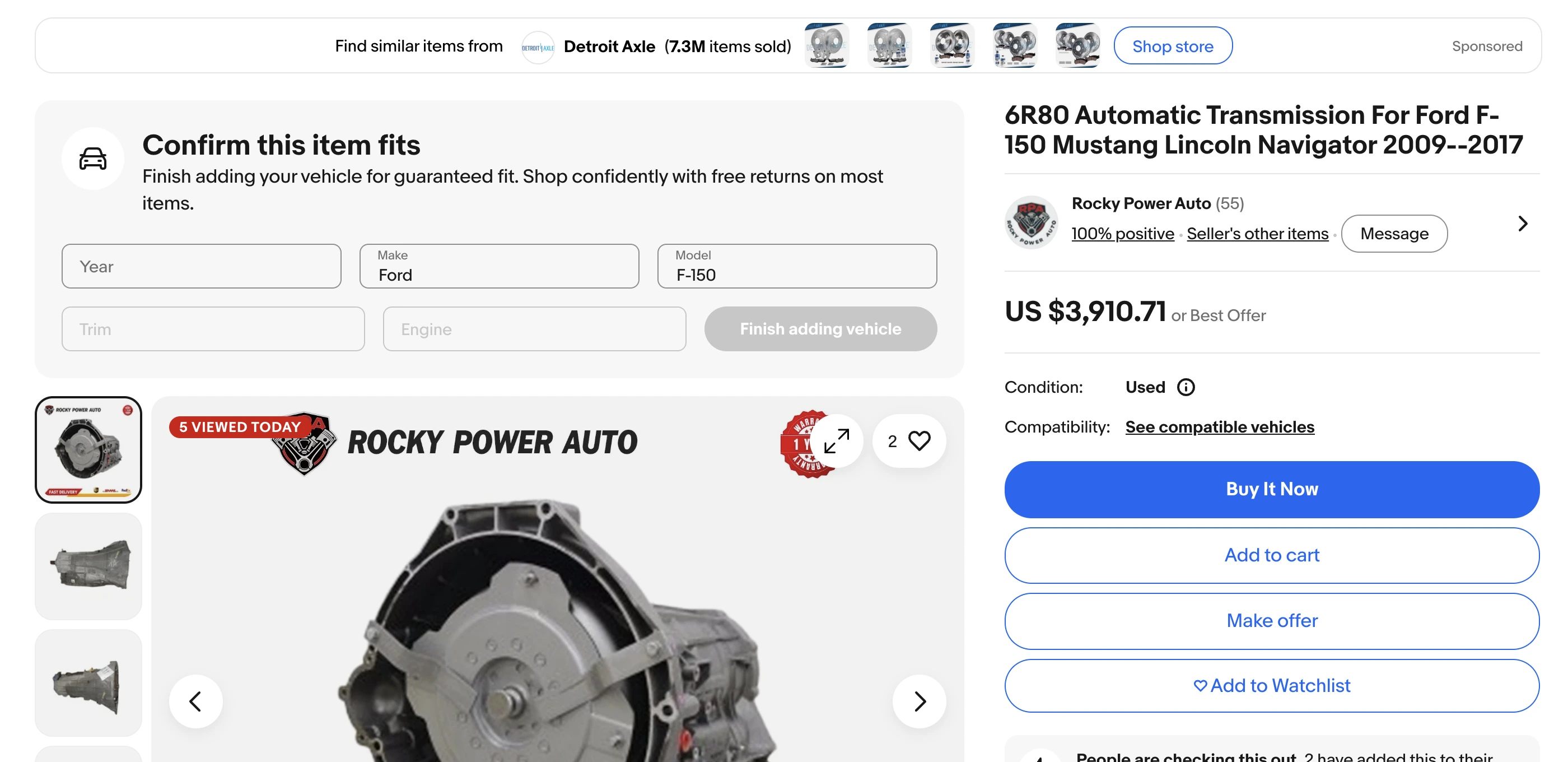
Let’s imagine you’re listing a part for a Ford F-150. Writing ‘Fits Ford F-150 models from 2018-2022’ in the description may not be enough. The part might fit only certain engine types or configurations within those model years.
With eBay Parts Compatibility, you can assign the specific vehicle applications that match your product. Buyers can then check whether the part is listed as compatible with their vehicle.
The main distinction is that eBay MVL provides vehicle records, not verified product fitment.
Before adding vehicle compatibility to your eBay listings, make sure to keep in mind the following:
- Check your fitment information. Make sure you know which vehicles each part fits based on reliable product data.
- Confirm marketplace support. You can use eBay Parts Compatibility in the US, UK, Australia, Germany, France, Italy, and Spain.
- Review rules per category. Supported vehicles, identifiers, and listing requirements vary by marketplace and category.
For sellers using ACES XML catalogs, this means matching their existing vehicle applications to the corresponding records eBay accepts.
Option 1 – ACES XML to eBay MVL
Managing a huge automotive catalog means creating fitment for eBay is more than matching vehicles.
You must link each item to the correct vehicle record, maintain fitment restrictions, and ensure eBay accepts the compatibility information.
ACES-to-MVL mapping aims to transform your existing vehicle applications into compatibility information suitable for eBay listings.
A standard workflow consists of the following stages:
- Data validation. Verify the ACES file and its version, reference data, product IDs, and vehicle application before mapping.
- Destination identification. Select the eBay marketplace and category, and check which compatibility requirements it supports.
- Actual application mapping. Link your source vehicle records to the eBay vehicle record, ensuring that engine configuration and installation restrictions are observed.
- Exceptions processing. Send applications with missing, contradictory, or unmatched information for further processing.
- Output preparation. Map applications to product SKU and adjust the information to make it suitable for the listing tool.
- Results verification. Determine which compatibility statuses eBay accepted and analyze the mismatched applications.
This last step matters when processing large catalogs. eBay can accept a listing update even if some compatibility entries are invalid. A successful submission alone doesn’t confirm that every application was published.
Mapping also requires considering fitment conditions. For instance, if a part fits only cars with a certain engine or equipment package, the compatibility data must include that limitation.
Option 2 – eBay MVL to ACES
What if you already have detailed Parts Compatibility information on eBay and want to use it in your automotive catalog?
You may be able to map your existing eBay vehicle applications back to ACES. However, direct compatibility isn’t guaranteed in every case because some fitment details may be missing or organized differently, so you should review the data before reusing it.
Common workflow stages include:
- Check data access. Confirm which compatibility information you can retrieve and whether you’re allowed to reuse it outside eBay.
- Retrieve existing fitment. Export the available product-to-vehicle applications from your eBay listings.
- Match vehicle records. Map the retrieved applications to the corresponding ACES vehicle configurations.
- Review missing details. Check whether engine specifications, installation positions, or other fitment conditions need to be added from reliable sources.
- Prepare and validate ACES data. Vehicle applications must follow the ACES structure to meet the standard’s requirements.
The information you can obtain depends on the eBay site where the product is sold and the method used to obtain it. Some data about the car may be subject to limitations, and therefore, you should find out whether you can use it in the catalog.
When Would You Need ACES-to-eBay-MVL Mapping?
Converting between ACES and eBay MVL isn’t necessary for every automotive business. First of all, you need to find answers to two questions:
- Where do you get your fitment data?
- What do you need to do with it?
| Your situation | What to consider |
| You receive ACES XML files from suppliers | Check if your supplier already provides eBay-compatible fitment data |
| You have existing eBay Parts Compatibility | You may be able to reuse it without converting it to ACES |
| You want to build an ACES-based catalog | Check which existing fitment data you can retrieve and reuse |
| You sell a limited range of auto parts | Adding compatibility directly on eBay may be enough |
| You’re planning to sell in new markets | Look through your fitment info and find out if the data covers the vehicles available in your target eBay market |
What Happens After ACES Is Mapped to eBay MVL?
Once your fitment data is mapped, you still need to manage the products you’re selling on eBay.
For automotive businesses with growing catalogs, this includes:
- creating and updating eBay listings;
- managing product categories and item specifics;
- assigning Parts Compatibility;
- synchronizing inventory and prices;
- processing marketplace orders.
The M2E Multichannel Connect helps you complete all these tasks in one place. And even provides more capabilities for automation (which we discuss in the next section).
How to Get the Most Out of M2E for Your eBay Motors Operations
Let’s start with the basics – M2E integrates with the existing automotive fitment database (your ecommerce store, such as Shopify) to support your eBay business expansion.
Manage parts compatibility in bulk
With M2E, you get the highest level of control over fitment updates across your eBay catalog.
- Apply fitment in bulk: Select compatible vehicles for multiple products using make, year, model, and ePID/kType filters.
- Expand or replace vehicle applications: Add compatibility data to existing records or override them with updated information.
- Reuse fitment from another item: Copy vehicle compatibility from an existing eBay listing with its item ID.
- Bulk updates: Manage products and compatibility data across a large catalog.
Bulk assignments should only be used when the selected products share the same verified fitment.
Apply converted ACES fitment data in M2E
Let’s say your supplier sends you an ACES XML file showing which vehicles are compatible with your auto parts.
ACES uses VCdb vehicle references, while eBay uses its own MVL records. Once you’ve mapped the vehicle data to the corresponding eBay records, you can use M2E Multichannel Connect to assign Parts Compatibility in bulk.
Here’s how it works:
- Find your products. Open the eBay Listings grid in M2E and locate the relevant auto parts using SKU or other available product filters.
- Select products in bulk. Choose the parts that share the same verified vehicle compatibility and run the Add Compatibility mass action.
- Find compatible vehicles. Filter eBay’s vehicle records by Make, Mode, Year, Type, and other available parameters, using your mapped fitment data as a reference.
- Apply the compatibility. Select the correct vehicles and choose whether to add them to existing compatibility records or replace the previous information.
M2E then submits the compatibility information to eBay for your selected listings.
This way, you can reuse your mapped ACES fitment data without manually updating Parts Compatibility for every product.
Work with listings from your ecommerce catalog
M2E connects Shopify, BigCommerce, WooCommerce, and other supported ecommerce platforms with eBay Motors.
After that, you can:
- create eBay listings using the existing data from the store;
- align the attributes of the store with the eBay category and product details;
- connect the previously created eBay listing with the store products by either using the SKU method or manually.
Keep everything in sync – inventory, pricing, and orders
With your eBay products connected to your ecommerce catalog, M2E helps you manage the work that follows listing creation:
- keep stock accurate by synchronizing available quantities;
- manage marketplace prices with all the necessary adjustments;
- process orders from eBay alongside your other marketplace sales;
- maintain listing content by synchronizing supported product updates.

Why this matters for multichannel automotive sellers
Each marketplace may have different vehicle records and Parts Compatibility requirements. Managing them separately becomes harder as your catalog grows.
Using structured fitment data helps you:
- reuse existing vehicle applications across supported workflows;
- get your products ready for new marketplaces;
- supervise alterations from vendors;
- prevent repetitive data entry.
Instead of the Conclusion
Moving fitment data between ACES and eBay requires more than changing file formats.
Before using mapped data, make sure you:
- match the correct vehicle applications;
- preserve fitment conditions;
- review missing or unmatched records;
- verify the compatibility accepted by eBay;
- reverse mapping may require additional data and permission to reuse it.
And as your automotive catalog expands, M2E Multichannel Connect helps you manage:
- eBay Parts Compatibility;
- listing updates;
- inventory and pricing;
- marketplace orders.
You can keep your existing fitment data on your ecommerce store and manage your growing eBay Motors catalog through M2E. Book a demo to find out more.