
Germany’s TikTok scene isn’t just entertaining, it’s becoming one of Europe’s most powerful eCommerce launchpads. With over 25 million users and a digital market worth more than €100 billion, TikTok Shop Germany offers the perfect mix of influence and instant checkout. In this blog, you’ll learn how to tap into TikTok Shop Germany, from setting up your account to meeting local compliance and winning buyers through viral content.
TikTok Shop Germany in Numbers
TikTok Shop has officially expanded into Germany, unlocking a major eCommerce opportunity in a market projected to help drive a $5.5 billion surge by 2030 across Europe.
As of early 2025, TikTok boasts over 25 million active users monthly in Germany within a booming e-commerce market worth more than €100 billion annually.
A 2025 survey by Statista shows that German TikTok users value good prices (26%), reliability (25%), and security (22%) most when deciding to shop on TikTok Shop. With the platform launching in Germany in March 2025, sellers must focus on trust and value to win over new buyers.
Top Product Categories:
The highest-grossing categories on TikTok Shop globally include:
- Beauty & personal care: $2.49 billion GMV (22.5% share);
- Womenswear & underwear: $1.39 billion GMV (12.56% share);
- Menswear & underwear: $893.54 million GMV (8.06% share) – Read more about how to Boost Your Clothing Sales on TikTok Shop with M2E Multichannel Connect;
- Food & beverages: $759.84 million GMV (6.85% share);
- Health: $600.42 million GMV (5.42% share);
- Muslim fashion: $506 million GMV (4.56% share);
- Home supplies: $457.50 million GMV (4.13% share);
- Phones & electronics: $430.50 million GMV (3.88% share);
- Baby & maternity: $412.59 million GMV (3.72% share);
- Shoes: $403.50 million GMV (3.64% share).
Do you sell other products on TikTok Shop?
If so, we recommend checking out these articles:
- Are You Already Selling New Auto Parts at TikTok Shop?
- How to Sell Jewelry in a TikTok Shop?
- How to Sell Restricted Products at TikTok Shop?
9 Steps to Start Selling on TikTok Shop in Germany
Ready to tap into one of Europe’s fastest-growing eCommerce platforms? Here are 9 essential steps to launch and grow your TikTok Shop in Germany.
If the TikTok Shop is a new marketplace for you, we recommend reading more about it in our blog: TikTok Shop: The Unusual Marketplace – Key Considerations for Sellers.
Before you can start selling, make sure to link your TikTok Shop account to your store through the Seller Center.
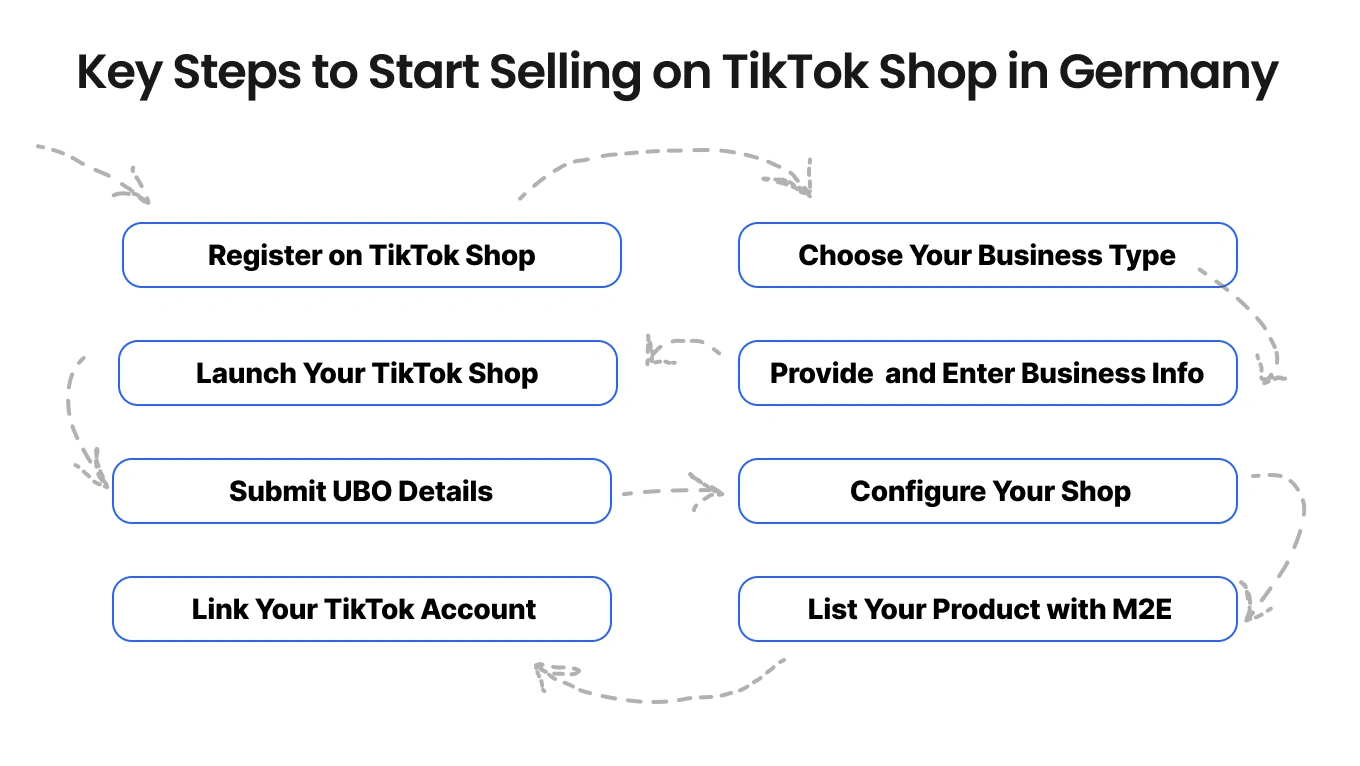
Step 1: Register on TikTok Shop Germany
Begin by visiting the TikTok Shop Seller Center. You can sign up using your email, phone number, or by linking an existing TikTok account. Ensure that each email or phone number is associated with only one TikTok Shop account. Verification will be required through a one-time code sent to your chosen contact method.
By the way, we have a detailed TikTok Shop Germany seller registration guide, and for the fresh update, we recommend checking out the official TikTok Shop-Registrierung page.
Step 2: Choose Your Business Type
Select the legal structure of your business:
- Sole Proprietor (Einzelunternehmer);
- Registered Company (GmbH, UG, etc.);
- Partnership (GbR).
Your choice will determine the specific documentation and information required during the registration process.
Step 3: Provide Representative and Business Information
For legal entities:
- Company info: Enter your official registration number and confirm that your business address aligns with the country you’re applying from.
- Authorized representative: Provide the full name, position (such as Owner or Director), and specify if the person is a listed Ultimate Beneficial Owner (UBO).
- ID verification: Upload a valid form of ID (passport, national ID, or permanent residence permit), along with a short selfie video and front/back ID scans.
- Address confirmation: Provide a recent utility bill or bank statement (dated within 3 months) displaying your name and current address.
For sole proprietors:
- Identity verification: Similar to legal entities, provide a valid ID, a selfie video with the ID, and scans of both sides.
- Proof of address: Submit a recent utility bill or bank statement matching your business registration country.
Step 4: Enter Business Information
Enter your registered business name and registration number exactly as shown on your official trade documents. You can use your home, office, or warehouse address as your business location, just to make sure it matches the address on your proof of address.
You’ll also need to provide a complaint address, which will appear publicly on your TikTok Shop profile. This must be a valid, physical address within the EU.
Accepted proof of address documents include:
- Utility bills;
- Bank statements;
- Government letters (dated within the last 3 months);
Step 5: Launch Your TikTok Shop
- Store name: Pick a distinctive name that reflects your brand’s personality.
- Brand logo: Add your logo to build a recognizable visual identity.
- Contact details: Verify your email and phone number to receive key shop notifications.
- Company info: If registering on behalf of a business, provide official documentation to confirm your position.
- Submit application: Double-check your entries and send in your application. Approval usually takes 2 to 3 days.
Accurate and localized TikTok selling information is essential to attract and convert your target audience.
Step 6: Submit Ultimate Beneficial Owner (UBO) Details
If your business is a legal entity (like a GmbH or UG), TikTok Shop requires full disclosure of all Ultimate Beneficial Owners (UBOs), the individuals who ultimately own or control the business. This is part of TikTok’s KYC (Know Your Customer) and anti-money laundering compliance procedures.
You’ll need to submit the following information for each UBO:
- Full legal name;
- Nationality;
- Date of birth;
- Residential address;
- Type of ID document (passport, national ID, or residence permit);
- ID number and expiry date;
- Proof of ownership or control (if required, such as shareholder agreements or business registry entries);
A UBO is typically anyone who directly or indirectly owns 25% or more of the company shares or voting rights. If no one meets this threshold, TikTok may still require information on senior managing officials, like directors.
Step 7: Configure Your Shop
- Support setup: Include a dedicated email and phone number to manage buyer questions and concerns.
- Payout info: Submit your IBAN, BIC, country, and email, plus a recent bank statement if needed, ensuring all info aligns with your legal business name.
- Inventory launch: Upload your first product to activate your shop and begin selling.
If you’re experiencing TikTok Shop issues, check your account status, product compliance, or recent sync errors.
Step 8: List Your Product with M2E Cloud
For fast and effective product listing, you need a third-party tool. For this purpose, we recommend using the TikTok Shop integration from M2E Cloud.

Sellers can easily create new products for TikTok Shop Germany right from their store. The process is fully optimized to meet TikTok Shop’s requirements, M2E takes care of all mandatory fields like product categories, descriptions, package dimensions, GPSR attributes, and more. If any issues come up during listing creation, M2E offers clear guidance to help you fix them. Feel free to add a link to the troubleshooting guide for extra support.
Also, try TikTok Shop integrations by M2E Cloud, now available for Ecwid, WooCommerce, BigCommerce, and Shopware.
Sell with Shopify? Discover how to import products from Shopify to TikTok Shop through M2E Cloud in our blog.

Finally, if you have a store on Magento (Adobe Commerce), use the TikTok Magento (Adobe Commerce) integration by M2E.
Step 9: Link Your TikTok Account
After setting up your TikTok Shop, it’s crucial to connect your personal or brand TikTok profile to unlock the full power of content-driven selling.
By linking your TikTok account, you gain access to features that drive organic and viral engagement, such as:
- Shoppable videos: Tag products directly in your TikTok so viewers can click and purchase without leaving the app.
- LIVE shopping: Go live to showcase products, answer questions in real time, and convert viewers into buyers instantly.
- Creator tools: Use TikTok’s built-in tools to add product links, track performance, and boost exposure through interactive content.
To link your account:
- Go to the TikTok Shop Seller Center.
- Navigate to “Linked TikTok Account.”
- Choose the TikTok account you want to connect to.
- Authorize access and permissions.
Things to Consider to Start Selling on TikTok Shop Germany
Localization is a must:
- Use German-language product titles and descriptions.
- Adapt content to local culture, humor, and seasonal preferences.
- German buyers prefer clear, factual communication over hype.
Compliance with EU & German regulations:
- Follow GDPR rules for data handling.
- Ensure product labeling in German (materials, usage, care).
- Respect the 14-day return policy and display seller identity clearly.
- Register for German VAT and EPR (packaging compliance).
FAQs About TikTok Shop Germany
Q1: Why does TikTok Shop say my email or phone number is already in use?
Each seller account must be registered with a unique phone number or email. If you see this message, try registering with another email or number that hasn’t been used before.
Q2: Why am I not getting a phone verification code?
TikTok currently supports only mobile numbers for verification. Double-check that you’ve entered a valid mobile number, not a landline.
Q3: Can I change my TikTok Shop name later?
Yes, after completing your account setup, you can edit your shop name once a month. Frequent changes are discouraged, as they may confuse potential customers.
And one more thing:

If you’ve successfully completed this guide, here’s a quick reminder: as our client, you get exclusive free access to TikTok Shop Sales Analytics. Be sure to connect it, and soon you’ll receive a detailed analysis of your performance to help boost your sales even further.
Scroll Less, Sell More: TikTok Shop Germany
TikTok Shop Germany isn’t just another sales channel; it’s a content-powered commerce engine built for speed, storytelling, and scale. From shoppable videos to creator-led trust and localized logistics, the platform gives sellers everything they need to thrive.
Ready to start selling? Set up your TikTok Shop today with M2E Cloud TikTok Shop Integration and turn your scrolls into sales.
Remember to check out our blog for more eCommerce insights and tips.


