



Take your retail operations to the next level with Lightspeed Amazon Integration by M2E. Streamline inventory management, simplify order processing, and expand your reach to millions of potential buyers. Let’s dive into how to do so and why it’s essential for scaling your retail business.
Why Integrate Amazon with Lightspeed POS?
What is Lightspeed POS (X Series)?
Lightspeed POS (X Series) is a cloud-based, all-in-one point-of-sale solution tailored for retail and hospitality businesses. Lightspeed offers streamlined solutions for inventory control, sales tracking, and customer management as a retail POS system. Thus, businesses that shop Lightspeed gain access to a robust platform for efficiently scaling their retail and eCommerce operations. Check out our blog to learn about Lightspeed POS (X Series) and compare it with Square POS for Amazon Sales.
Who Needs Lightspeed Amazon Integration?
Lightspeed retail is perfect for businesses managing physical stores and Amazon sales, enabling them to sync inventory, track orders, and avoid overselling. Who are they?
There are only a few examples:
- Boutique Apparel Stores: Sync in-store and online stock levels while managing product variations, such as sizes and colors.
- Electronics Retailers: Simplify listing updates and track orders across Amazon and your brick-and-mortar shop.
- Home Décor Stores: Manage multiple SKUs and update product details effortlessly between platforms.
So, with Lightspeed POS Inventory management, sellers can sync stock levels across all sales channels in real-time.
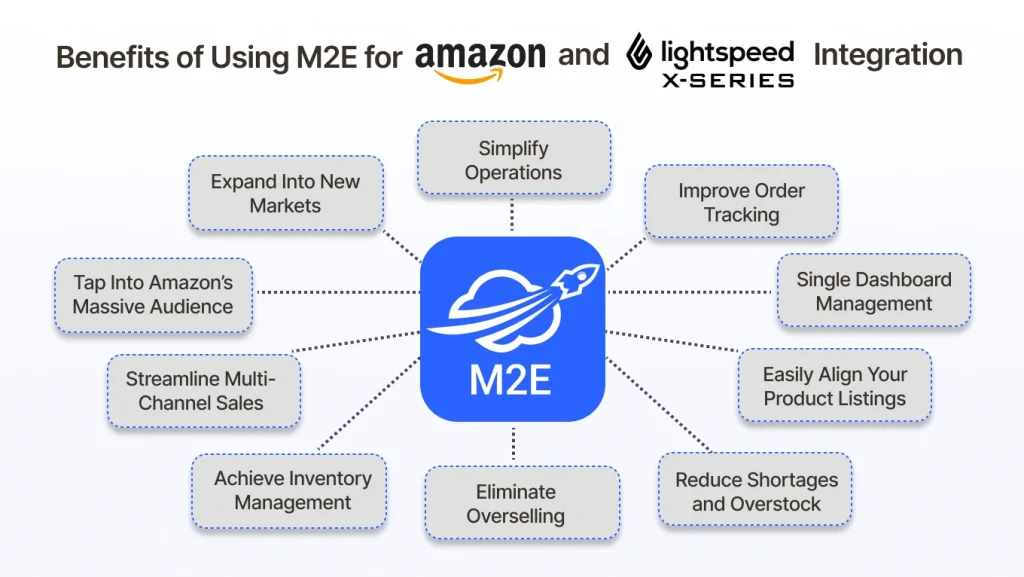
Benefits of Using M2E for Amazon and Lightspeed Integration
Expand Your Reach and Capture a Brand-New Customer Base
It’s time to enhance your business with M2E integration for Lightspeed POS. Remember that Amazon, one of the world’s largest online marketplaces, attracts millions of global buyers daily. So, by integrating Lightspeed with Amazon through M2E Cloud, you can:
- Tap Into Amazon’s Massive Audience: Instantly showcase your products to a worldwide customer base actively searching for items you sell. Amazon provides unparalleled visibility, whether you’re offering niche products or trending items.
- Expand Into New Markets: Enter international markets with ease. M2E Cloud simplifies managing inventory, pricing, and compliance for Amazon marketplaces across regions.
- Boost Brand Awareness: Strengthen your business’s online presence by leveraging Amazon’s trusted reputation, reaching customers who might not have encountered your store otherwise.
- Streamline Multi-Channel Sales: Manage in-store inventory and Amazon listings in real-time, ensuring accurate stock levels and avoiding overselling.
- Leverage Amazon Prime Buyers: By offering Prime-eligible products, you can attract loyal, fast-shipping-loving customers, increasing sales potential.
Stay Ahead with Real-Time Updates at Your Fingertips
Integrating your Lightspeed POS with Amazon M2E Cloud provides real-time synchronization for all product data. With all your sales channels managed from one centralized platform, you can:
- Eliminate Overselling: Keep inventory accurate in real-time to prevent stockouts and unhappy customers.
- Simplify Operations: Avoid manual updates and errors by automating data synchronization across platforms.
- Stay Competitive: Quickly adjust prices and listings to match market trends without delays.
- Improve Customer Satisfaction: Ensure product availability and accurate information across all channels.
Simplify Operations: Manage All Your Orders from One Dashboard
With M2E Cloud’s integration for Lightspeed POS, you can centralize order management from Amazon and your physical store into one seamless system.
- Avoid Errors: Minimize mistakes caused by manual entry or inconsistent data across platforms.
- Boost Productivity: Free your team to focus on fulfillment, customer service, and scaling your business.
- Improve Tracking: Gain clear visibility of order statuses and real-time channel updates.
- Enhance Customer Experience: Process orders faster and more efficiently to meet buyer expectations.
Achieve Seamless and Efficient Inventory Management Today
Achieve smarter, more efficient inventory management with M2E Cloud’s solution. By integrating your Lightspeed POS with Amazon:
- Reduce Shortages and Overstock: Maintain optimal inventory levels by syncing stock in real-time across all sales channels.
- Gain Full Visibility: Track inventory across multiple locations and platforms from one centralized system, eliminating blind spots.
- Streamline Reordering: Use data-driven insights to forecast demand and restock strategically.
- Save Time: Eliminate manual inventory updates and focus on growing your business.
Step-by-Step Guide to Linking Amazon Store and Lightspeed POS via M2E
This step-by-step guide links your Amazon store with Lightspeed POS using M2E. Install our eCommerce Amazon integration with a few clicks and unlock streamlined multi-channel operations.

Step 1: Integrate Your Lightspeed POS System Seamlessly
After creating your account, the next step is to link your Lightspeed POS system. Please note that only the Lightspeed X-Series is compatible at this time. Click the Connect button, which will redirect you to the Lightspeed website. Provide your store’s URL and authorize the app to access your store’s data. Once access is granted, you will be redirected back to the app. If the connection is successful, a confirmation message will appear.
Step 2: Bridge Your Channel Accounts Effortlessly
Click Connect Account to integrate your Amazon seller profiles with the app seamlessly. After choosing a channel, you’ll be taken to its respective platform. This step allows the app to sync your data and streamline operations across multiple marketplaces.

Step 3: Set Up Tailored Order Handling Rules
Go to the Manage Orders section and click on the Order Settings button. Switch on the “Create Orders in Lightspeed” feature to let the app automatically process orders in your Lightspeed system whenever a marketplace sale occurs.


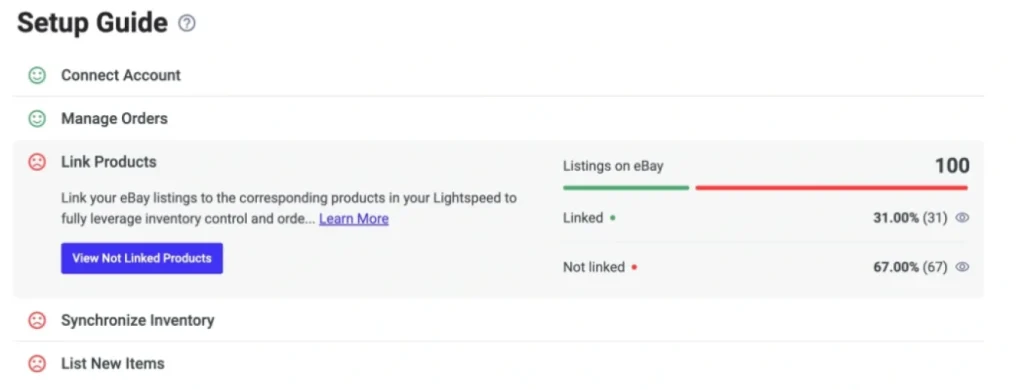
Step 4: Match and Align Your Product Listings
You can manually establish the connection if an automatic match isn’t found. Click on the “View Not Linked Products” option under the Link Products section to be directed to the Listings tab, where you can manually link your products to ensure seamless integration. Unlinked products will prevent the app from synchronizing inventory levels and accurately processing orders.
Step 5: Streamline Product Synchronization Across Platforms
Keep your inventory current across all marketplaces by enabling synchronization for linked products. This feature lets Lightspeed POS automatically update product details on platforms like Amazon, eBay, Walmart, and TikTok Shop for seamless consistency.
To activate, go to the Synchronize Inventory section, click “View Not Synced Products,” and use the Listings tab to sync items individually or in bulk.

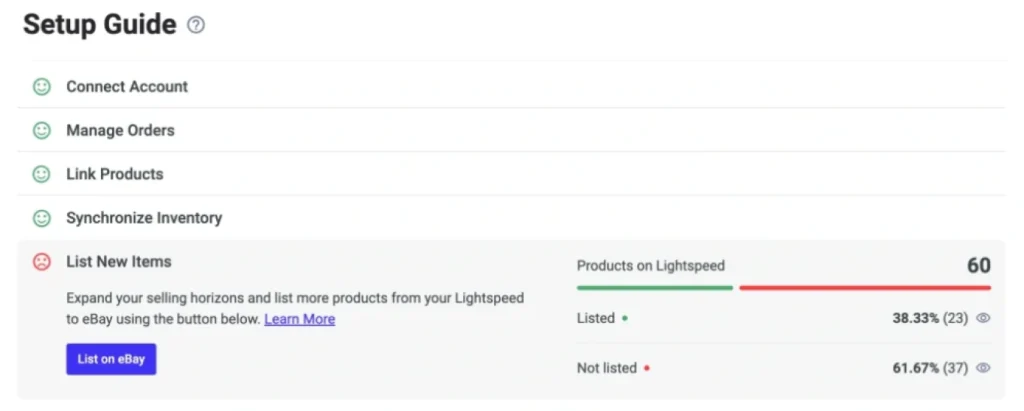
Step 6: Publish Your Products to Channels with Ease
M2E Multichannel Connect simplifies listing synced Lightspeed POS products on Amazon and other marketplaces. Just click “List New Items” and follow the steps to expand your reach.
That’s it! You’re ready to leverage M2E Multichannel Connect to optimize your inventory management.
For more information, check out our tutorial on how to list simple products on Amazon.
Conclusion
Expand your online presence effortlessly with Lightspeed eCommerce and M2E Cloud, designed to integrate seamlessly with your retail operations. Don’t just manage your sales—master them and unlock your growth potential with a system built for the modern retailer. Remember to stay ahead with our blog for more eCommerce insights.
