Product identifiers are everywhere in e-commerce. Some come from manufacturers, some from barcodes, and some exist because a marketplace needs a way to match listings to a catalog. In this article, we break down which identifiers matter and what to put in those fields.
What Are Product Identifiers on eBay?
A product identifier is just a code tied to a product under a specific system. Different systems assign codes differently (barcode standards, manufacturer codes, marketplace catalogs), but the goal stays the same: standardized identification.
On eBay, listings are built around product identifiers. In most categories, eBay expects at least one valid identifier to describe what you are selling. For branded retail products, this is usually a barcode-based identifier (GTIN, such as UPC or EAN), often combined with a brand and MPN. If a product does not have a barcode, sellers can typically list it using a brand and MPN instead. Books are the exception, where the ISBN is the primary identifier.
Below is a clean breakdown of the main identifiers you’ll see on eBay, what each one is for, and when it matters.
Quick Guide for Sellers to eBay Product Identifiers
- GTIN (Global Trade Item Number)
A GTIN is an internationally recognized product code – essentially the number on a product’s barcode label that uniquely identifies the item and its manufacturer. It’s a broad term that encompasses codes like UPC, EAN, and ISBN. eBay requires GTINs for most new branded items because they help match your listing to the exact product in the eBay catalog and improve search visibility. If you are selling a branded item and the manufacturer has printed a barcode on the packaging, you already have a valid GTIN (such as a UPC, EAN, or ISBN) to use on eBay.
- EAN (European Article Number)
EAN is a type of GTIN commonly used outside North America. Many retail products in Europe, Asia, and other regions carry an EAN barcode on the label. Sellers should use an EAN on eBay when listing products originally sourced from Europe or any product that comes with an EAN on the box.
- UPC (Universal Product Code)
UPC is a 12-digit barcode identifier, most common in the US and Canada. Functionally, it plays the same role as EAN on eBay: it’s a precise product match signal and can improve listing discoverability.
- ISBN (International Standard Book Number)
ISBN is a unique product identifier used for books, ebooks, and other published media. An ISBN corresponds to a specific edition or version of a book. Always enter the ISBN when listing a book or any item that has an ISBN.
- ePID (eBay Product ID)
ePID stands for eBay Product ID, a unique identifier that eBay assigns to products in its own catalog. ePIDs are not something printed on the product – they are generated by eBay. If you upload your product data to eBay or use the “Sell a product like this” feature, eBay will create or match an ePID for that item.
If you want a deeper explainer on barcodes and GTIN formats (UPC/EAN/ISBN) with practical ecommerce context, you can link to this M2E Cloud article. Today, we will take a detailed look at what an MPN (Manufacturer Part Number) is on eBay, where to find this code, which product categories require it, and how to add an MPN.
MPN (Manufacturer Part Number)

MPN is a unique code given to a product by its manufacturer. Unlike GTINs, an MPN is an internal part or model number specific to a particular brand or manufacturer.
An MPN is usually a combination of numbers and letters (determined by the manufacturer) that identifies a product variant or part. For example, a printer ink cartridge might have an MPN like “ABC-12345” which differentiates it from similar cartridges for other models.
Keep in mind, MPNs are not globally standardized – different manufacturers have their own formats, and the same MPN code could potentially be used by two different companies for different items. eBay’s rules in most categories require at least a brand and part number if no UPC is provided. In fact, for Google Shopping and eBay alike, if you don’t have a GTIN, providing the Brand and MPN is strongly recommended to identify your product.
How to Find the Right MPN
The correct MPN isn’t always obvious. In most cases, the MPN can be found on the product packaging, the printed label on the item itself, or in the official product documentation. Manufacturers often list it near the barcode or in a technical spec section labeled as “Part No.” or “MPN.”
If you sell through a supplier or dropshipping platform, check that your product feed includes the MPN field. Some suppliers include it in CSV files or invoices – if so, store it alongside your SKU data to speed up future listings.
For items with variants, always verify whether the MPN changes across sizes, colors, or models. One incorrect code can mislead buyers or lead to returns. And if you’re unsure, check the brand’s website or contact their support directly. A wrong guess can cost you more than checking with the brand or supplier.
When to Use MPN and How to Do It Right
- Use MPN if the product has an official part number
If your item comes with a manufacturer-assigned part number – whether it’s from your supplier or your own private label – enter it exactly as provided, without changing the format. Add it to the MPN field under item specifics when creating or editing your listing.
- Always pair MPN with Brand
These fields must reflect the actual product identity. If you’re selling under your own brand, use that brand name consistently and pair it with the correct part number (MPN). This tells eBay and buyers exactly what the item is and helps group your listings correctly.
- eBay recommends using GTINs and MPNs whenever possible
GTIN (like a UPC or EAN) is the primary identifier for most retail products, but MPN is especially important in some categories. If you don’t have a GTIN, a valid Brand + MPN combination often becomes the fallback for listing compliance and catalog matching.
Categories Where MPN Is Commonly Required or Recommended
- Auto Parts & Accessories (Brake pads, filters, engine parts, electronics, etc.)
In this section, MPN is used to precisely identify parts and avoid cross-model confusion, link to eBay’s ePID system, and appear in search filters and keyword matches.
- Consumer Electronics (Speakers, headphones, remotes, audio systems)
In this category, MPN acts as a model identifier, not a compatibility check. Its role is to improve catalog structure, listing precision, and buyer search accuracy.
- Computers/Tablets & Networking (Motherboards, graphics cards, internal components)
MPN is a critical technical identifier here. Without it, eBay can’t reliably categorize the component or match it to a known product. It’s essential for buyers looking for specific chipsets, revisions, or board layouts.
- Mobile Phones & Accessories (Batteries, chargers, replacement parts)
In this category, MPN is most important for batteries, internal components, and high-risk accessories like chargers. These items rely on technical matching for safety and performance. While it’s less critical for cosmetic accessories like cases, including an MPN where possible, helps reduce returns and improve buyer trust.
- Home & Garden – Appliances (Spare parts for kitchen and home appliances)
MPN is often mandatory for components like heating elements, control boards, pumps, motors, and sensors. These parts usually look generic but vary significantly by appliance model. Without an MPN, eBay can’t surface your listing in compatibility-based searches or match it to replacement queries from buyers.
- Business & Industrial (Machinery components, tools, equipment parts)
In industrial categories, MPN ensures clarity when selling technical parts like bearings, power supplies, valves, or PLC modules. These products often have long lifecycles and minor differences between versions. Providing an MPN reduces the chance of errors and makes listings usable for buyers who search by exact code.
- Toys & Hobbies – Remote Control Parts & Accessories (RC car motors, propellers, control boards)
MPN is especially important in hobby electronics. Buyers often need to match motors, ESCs, or parts by exact spec – things like KV rating, voltage, firmware, or shaft dimensions. Since product titles like “RC motor” or “drone propeller” are vague, the MPN acts as the only reliable reference point.
- Musical Instruments & Gear – Parts & Accessories (Guitar parts, pedals, audio cables)
Instruments and gear often come with nuanced differences between revisions or production batches. MPN helps buyers locate the exact version of a pedal circuit, pickup coil, or audio component – which can affect tone, voltage behavior, or overall compatibility.
- Video Games & Consoles – Replacement Parts (Controllers, internal boards, chargers)
For console repair and replacement items, MPN is critical. Small differences in board design, port layout, or firmware across generations make part number accuracy essential. Buyers often search for specific SKUs or manufacturer references when replacing damaged internal components, and eBay relies on MPN to match those queries correctly.
How to Assign or Manage MPNs Using M2E Cloud
You can manage MPNs on eBay manually – but if you’re listing more than a few items, M2E Cloud gives you better control, faster workflows, and cleaner data. Whether you’re importing branded goods, working with private-label stock, or building listings from scratch, M2E Cloud supports multiple ways to handle MPNs correctly.
Option 1: You Already Have MPNs in Your Catalog
If your store catalog or marketplaces (Shopify, Magento, BigCommerce) already include MPNs in a field like Manufacturer Part Number, SKU, or a custom attribute, you can reuse that data.
What to do:
- During listing setup in M2E Cloud, map the source attribute from your store to eBay’s MPN field.
- The value will sync automatically to each eBay listing – no re-entry required.
- You can preview or override MPNs at the product level if needed.
This is ideal for sellers or if your supplier already provides part numbers.
Option 2: You Don’t Have MPNs – Assign Your Own
If you’re selling private-label products or your stock doesn’t come with a manufacturer part number, M2E Cloud lets you create and assign one yourself via a custom attribute.
Steps:
- Go to the Catalog section in M2E Multichannel Connect, where all your imported store products are listed.
- Click the gear icon in the upper-right corner to access Catalog settings.

3. Click + Add Custom Attribute, name it MPN, and set the type as Text.
4. Enter a structured code (e.g. BRAND-PRODUCT-VARIANT) – make sure it’s unique per item.

5. Map this custom attribute to the MPN field in the category-specific item specifics section of your eBay listing policy. See how to set item specifics.
You can create consistent MPNs even if you’re the manufacturer or assembler. Find detailed information in our documentation.
Option 3: You Need to Update or Assign MPNs in Bulk
Managing hundreds of SKUs manually isn’t practical. M2E Cloud allows bulk MPN management through product export/import.
How to do it:
- Go to the Catalog and export your catalog to a CSV.
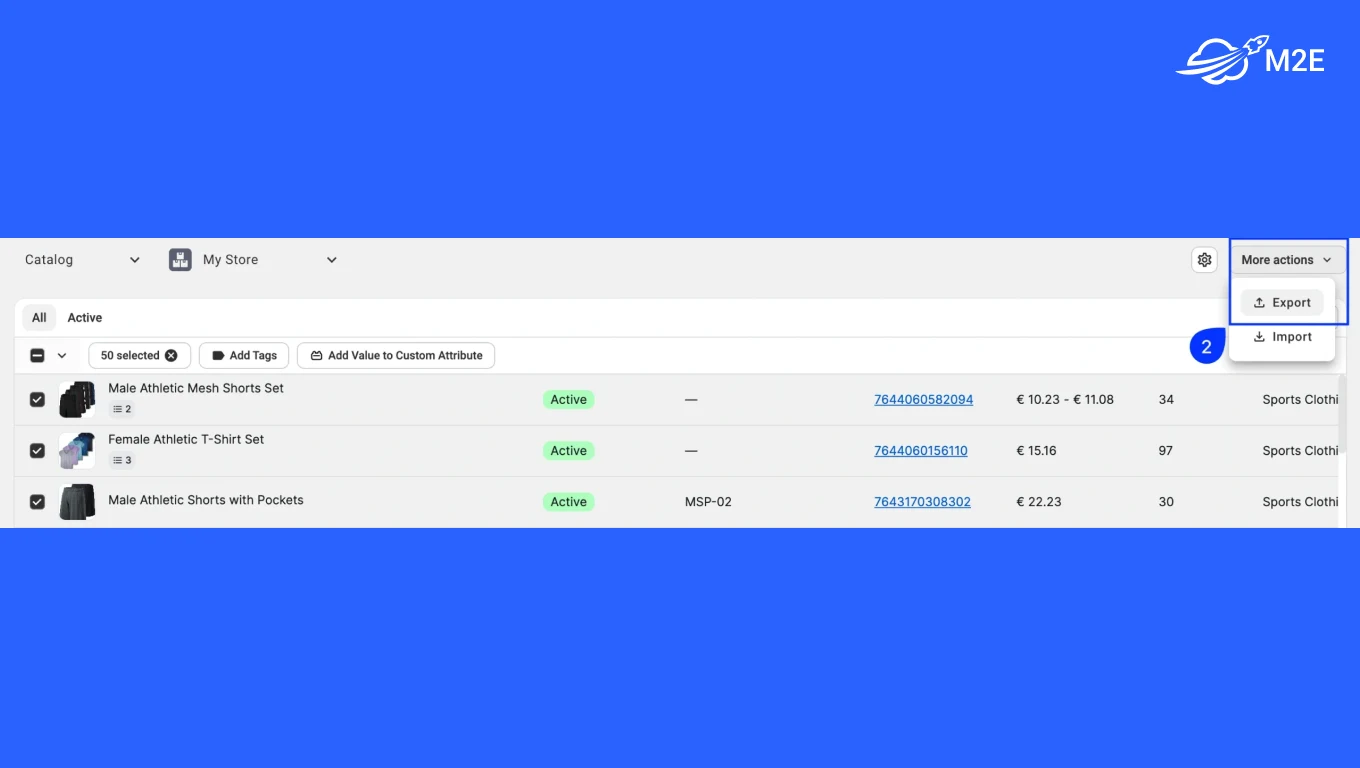
2. Choose Custom Attributes as the export type. In the Editable Fields section, select the eBay MPN custom attribute. Then, click Export.

3. In the exported file, fill in MPNs for each item (or leave blank if not applicable).
4. Import the updated file back into M2E Cloud – your catalog updates instantly.
5. Ensure the MPN attribute is mapped in your eBay category specifics.
This is especially useful when importing bulk products from suppliers or prepping new stock for publishing.
Detailed guide on product Custom Attributes
Why MPN Matters for eBay Listings
- MPN gives eBay a clear, structured signal about what you sell. When you assign part numbers to your items and include them in listings, you make it easier for eBay to categorize and match your offer correctly, especially if there’s no barcode.
- Buyers use MPNs to search for exact models or compatible parts. When they can verify the code, you get fewer “wrong item” complaints and fewer returns tied to mismatch or confusion.
- eBay pushes listings toward a catalog-style structure. A valid MPN helps eBay match your offer to the right product record and treat the listing as more complete, especially when a barcode is missing or not applicable.
- Many buyers search outside eBay using part numbers. If your listing includes the MPN, it can match those queries more effectively and attract additional traffic from Google-type searches.
- MPNs help you keep your catalog consistent across many listings and versions. When manufacturers update products and codes, MPN makes it easier to separate stock, avoid shipping the wrong variant, and maintain clean data in bulk workflows.
What if there’s no MPN? Using “Does Not Apply”
If your product truly doesn’t have a manufacturer-assigned part number, and you haven’t assigned one, you can use “Does not apply” in the MPN field. But this option should only be used when no part number exists at all – not as a shortcut to skip item specifics.
Acceptable scenarios include:
- Used, vintage, or collectible items – e.g., an antique vase, a vintage toy from the 1950s, or a used car part from decades ago. Older items often predate modern barcoding, or their codes are long gone. In these cases, “Does not apply” is acceptable.
- Handmade or custom goods – e.g., hand-crafted jewelry, artwork, custom-built PCs, private label goods you created in-house. Products you manufacture or assemble yourself may not have standardized MPNs or GTINs. That’s fine – as long as they aren’t labeled or cataloged by any third-party source.
- Unbranded generic items – e.g., no-name accessories or parts bought in bulk that have no brand identity or code. If you’re selling no-name accessories or items bought in bulk (e.g,. chargers, cables, parts) with no visible identifiers, mark the Brand as Unbranded and use “Does not apply” for MPN and UPC.
When you use “Does not apply,” be sure that the item truly has no identifier. eBay warns that if a product does have an identifier and a seller chooses “Does not apply” anyway, the listing can lose search visibility.
In contrast, if the identifier truly doesn’t exist, using “Does not apply” won’t hurt your search standing. It’s also good practice to fill in other specifics thoroughly for such items to compensate, e.g., describe the item’s origin, era, or unique attributes in detail, since there’s no UPC/MPN to rely on.
Scaling eBay Sales with M2E Multichannel Connect
M2E Multichannel Connect helps you list products on marketplaces in line with Ebay or other platforms’ requirements – from GTINs to category specifics. It also centralizes inventory and order management across all connected channels, so you can scale without losing control.
Here’s how M2E Multichannel Connect helps streamline your eBay operations:
- Prevent overselling. Real-time inventory sync keeps stock levels accurate across eBay, Amazon, your store, and more.
- Maintain identifier consistency. MPNs, GTINs, Brands, and other item specifics are pulled from your store’s catalog and applied automatically to listings – no manual duplication.
- Handle variations and pricing from one place. Easily control prices, quantities, images, and options for all your multi-variation eBay listings.
- Automate fulfillment workflows. Orders and tracking data flow between eBay and your store without manual updates or missed statuses.
- Manage multichannel from one system. Through M2E eBay Integration, you can manage your eBay store along with other marketplaces. Build optimized eBay product descriptions from store or catalog data, track order and shipment status updates, get tracking details synced with your e-commerce platform, track performance across multiple channels from one dashboard, and create and list variation products effortlessly.

Using M2E Cloud’s Validator to Keep Your eBay Listings Compliant
For eBay sellers, incorrect or missing product identifiers like MPN, Brand, or GTIN often lead to listing errors, suppressed visibility, or full rejection. Manually catching these issues across dozens or hundreds of SKUs isn’t scalable.
That’s where M2E Cloud’s built-in Listing Validator Assistant comes in. It automatically checks your listings against eBay’s category-specific requirements before anything goes live.
- When a required field like MPN or Brand is missing, the Validator flags the issue instantly.
- It understands the specific rules of each eBay category, so you’re prompted to fix only what matters for your listing type.
- For each issue, the Assistant tells you exactly what’s missing or incorrect and shows you how to fix it. You get clear guidance to meet eBay’s requirements and publish listings without second-guessing.
- This improves your listing success rate, reduces downtime, and ensures your items show up in buyer searches as expected.
Whether you’re publishing one item or hundreds, the Validator acts like a quality gate – catching gaps in your data and guiding you to a compliant, search-optimized result.
Together with product mapping, bulk editing, and multichannel sync, it’s one of the key M2E Cloud features that keeps your catalog sharp and eBay-ready without manual clean-up later.
Final Thoughts
MPNs may look like just another field in your eBay listing, but they play a key role in how buyers find your products, how eBay ranks them, and how smoothly your listings go live.
If your item has an MPN – use it. If it has a GTIN – even better, use both. And if neither exists, follow eBay’s rules and apply “Does not apply” only when appropriate. Clean product data means fewer errors, better visibility, and a stronger buyer experience.
Managing this manually works at a small scale. But once you’re handling more products, variations, and channels, the risk of mistakes increases fast. That’s where M2E Cloud helps – syncing product identifiers from your catalog, validating listings before they go live, and keeping everything consistent across marketplaces.
Accurate identifiers aren’t just a compliance box to check – they’re how you stay visible, competitive, and scalable on eBay.