If you’re selling items that are too large, fragile, or simply not worth shipping, eBay Local Pickup is the perfect solution. It allows buyers to collect items in person, help save on shipping costs, and avoid potential damage during transit.
Let’s take a closer look at how it works, who can benefit most, and how to set it up through your Shipping Policy in M2E Multichannel Connect.
What is eBay Local Pickup and who is it for?
Before you learn how to select local pickup on eBay, it’s important to understand when this feature makes the most sense.
eBay Local Selling is ideal for merchants who:
- Sell fragile items that can be easily damaged in shipping (e.g., glassware, ceramics, antiques).
- Offer large or bulky goods, such as furniture, home appliances, or gym equipment.
- Have products with high shipping costs relative to the item’s price.
- Want to organize a local warehouse sale or offer direct collection from their storage.
If your products fall into any of these categories, eBay Local Pickup lets you list them as Pickup only. Your items will appear in local search results and attract nearby buyers who prefer collecting in person.

How does eBay Local Pickup work?
When you choose the Local pickup only option, your listing will appear on eBay without any delivery options. Buyers in your area will see that the item is available for in-person collection. During checkout, they won’t be asked to select or pay for shipping. Instead, they’ll be prompted to arrange pickup with you directly.
As for eBay local pickup fees, there’s no extra charge for enabling local pickup, and you don’t pay any shipping costs. However, eBay’s standard selling fees still apply as usual.
This makes eBay in-store pickup or warehouse collection a smart choice for sellers who want to keep operations simple and local.
Configure eBay Local Pickup in M2E Multichannel Connect
You can configure local pickup for eBay listings using your M2E Shipping Policy. Here’s how:
Step 1. Create or edit a Shipping Policy
You can do this when creating a new eBay listing in M2E Multichannel Connect.
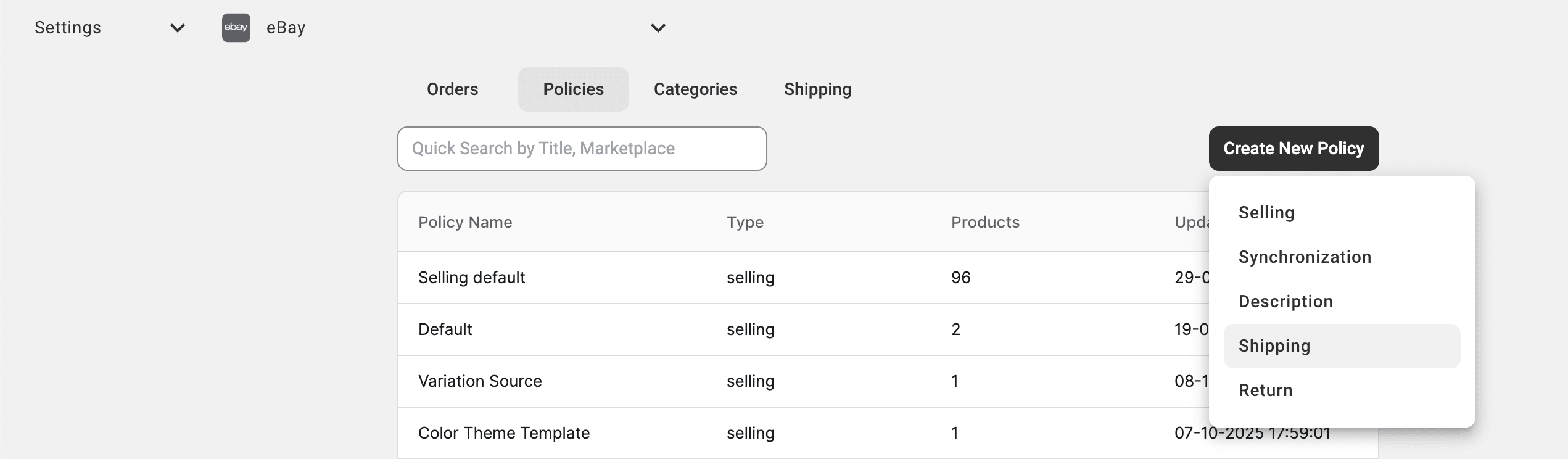
Or go to the Settings page and choose your eBay account. Switch to the Policies tab, and click Create New Policy > Shipping. Then, assign this policy to your items in the Listings tab.
Step 2. Set shipping to Local Pickup only
1) In your M2E Shipping Policy, go to the Domestic shipping section. From the dropdown, select No shipping: Local pickup only.

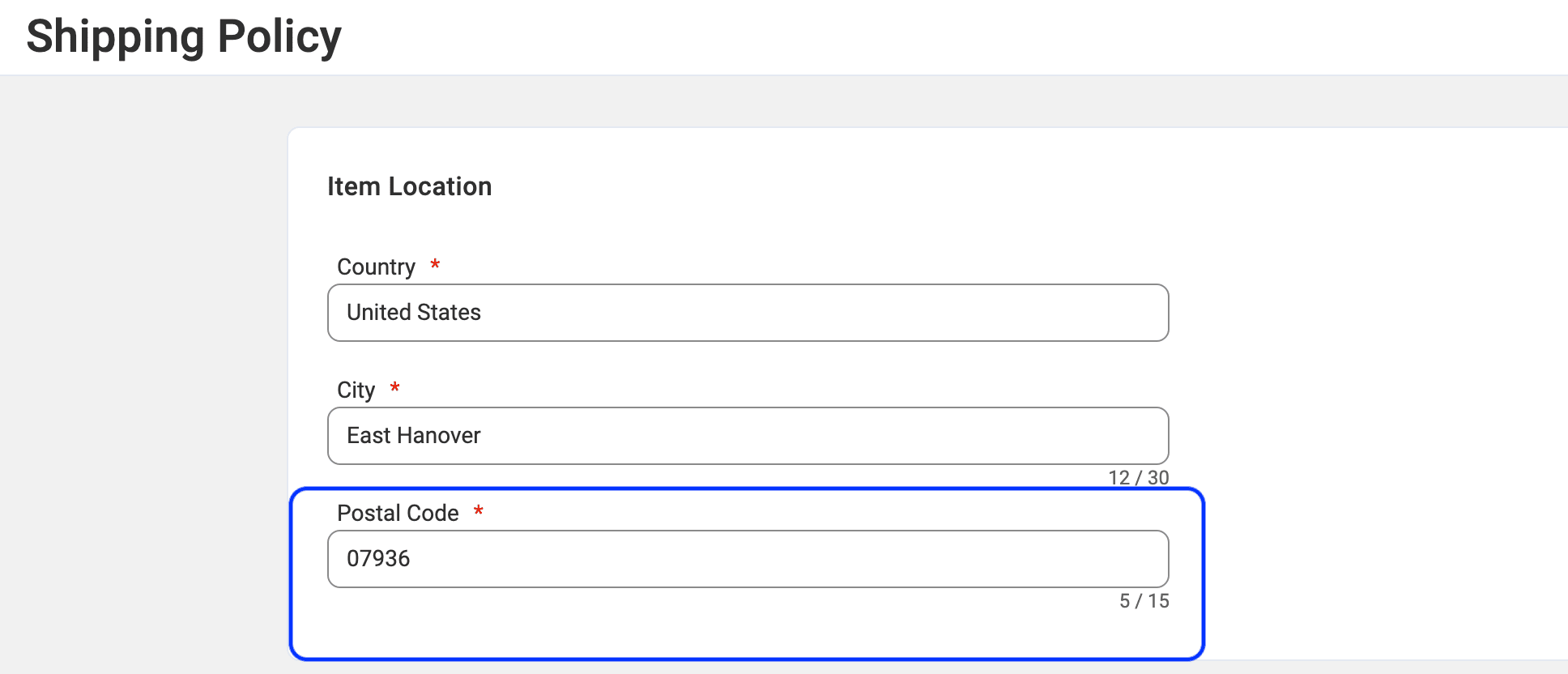
2) Check that you’ve entered a correct Postal Code in the Item location field. This will appear in your listing and help eBay display your items to nearby buyers.
Step 3. Add pickup instructions in the description
In your M2E Description Policy, briefly describe how and when the buyer can collect the item.
Avoid sharing your full address publicly; just specify the area or city.
Once the order is placed, you can contact the buyer directly to confirm pickup details.
Tip: Don’t forget to review payment options in eBay Seller Center. If you’re offering local pickup, enable Pay on pickup and at least one electronic payment method (like PayPal or credit/debit card). It keeps the transactions easy and secure for both parties.
For more tips, check out eBay’s help article on local pickup.
Summary
eBay Local Pickup is an excellent way to optimize your local sales strategy. When managed through M2E, setup is effortless, and you’ll enjoy smoother operations, lower costs, and better engagement with nearby buyers.
Have questions? Contact our support team anytime for guidance.