A size value that reads “Small” or “See description” used to be good enough for an eBay fashion listing. Since August 2026, it isn’t. eBay now accepts only standardized values in the Size item specific for Apparel and Footwear. Listings with custom, missing, or unusable values can be blocked or placed on hold.
This guide covers what eBay changed and which size values the marketplace accepts now. You’ll also learn how to send the correct values to eBay without rewriting the size data in your store catalog.
What’s Changing With eBay Size Values
Since August 2026, eBay accepts only standardized values in the Size item specific for Apparel and Footwear. Values it can recognize, like “Small”, are converted to the standard equivalent.
Values eBay can’t interpret, for example, “See description”, stop the listing from being submitted or revised. The listing comes back with an error: “See description is not a valid value for Size. Select a value from the available options.” A missing Size value also affects the listing.
The reason behind the change is search. eBay’s size filters only work with standard values. If your Size field says “Medium” instead of “M”, buyers who filter by “M” won’t see your listing at all. The listing is live on the site, but the customers searching for it can’t find it. For example, on the eBay US marketplace, 17 to 21% of Apparel and Footwear listings used non-standard sizes, so a lot of stock was missing from the filtered search results.
The change covers new and existing listings alike, and applies whether you list on eBay directly or through a third-party tool.
Which Size Values eBay Accepts
eBay defines the allowed value list per category, so a footwear category accepts different values than a women’s tops category. Supported values also differ by marketplace, so if you sell Fashion on several eBay sites, check the values each one accepts.
Among the supported formats are:
- Alpha sizes: 2XS, XS, S, M, L, XL, XXL.
- Numeric sizes: where the category supports them.
- Region-specific formats: US, UK, EU.
Here is how eBay handles size values in different listing scenarios:
| Size value in your catalog | Example | Result on existing listings | Result on new listings |
|---|---|---|---|
| Standard for the category | S, M, L | Accepted | Accepted |
| Recognizable but not standard | Small, Medium | Converted to the standard value | Can’t be submitted |
| Missing or unusable size | N/A, See description, Does not apply, empty field | Listing blocked or held | Can’t be submitted |
Automatic conversion may look like a simple fix because it can keep existing listings live on eBay. The problem is that it creates a mismatch between the two systems: your store says “Small”, while eBay shows “S”. When the original catalog value is sent again during the next sync, eBay converts it again.
Note that the new requirement concerns the Size item specific only. eBay descriptions and titles have no such restriction, so you can keep describing sizes there in your own words.
Which Catalogs Need Attention
Sellers listing directly on eBay now choose sizes from a drop-down list. But if you list on eBay through your store catalog, review your Size attribute carefully. It may contain values created for your storefront or other sales channels, not for eBay’s standard size list.
Check the Size attribute in your catalog for any of the following:
- Non-standard labels. Your store uses “SM”, “UK Size 12”, or “Ladies M” rather than the standard values eBay accepts.
- Mixed formats in one value. “Small (UK Size 8)” has the alpha size and the region-specific size together, while eBay expects one value.
- Size ranges. “S-M” or “6-12 months” covers two sizes at once, but eBay’s Size specific takes a single value.
- Supplier feeds. Every brand sends sizes in its own format, so one catalog can contain “M”, “Medium”, and “Mens M” for the same size.
- Placeholders. Some products have “N/A”, “See description”, or an empty Size field.
- Shoe sizes without a region. “42” means a different size in each region, and some footwear categories expect US, UK, or EU Shoe Size as a separate specific.
- Variant-level values. Every variant has its own size value, and one non-standard value can stop the whole listing.
If you’ve found the non-standard values used for your eBay listings, you need to fix them in a way that satisfies eBay and preserves the existing product data in your store.
How to Get Accepted Size Values onto eBay
There are two ways to bring your size data in line with eBay’s requirements. The right option depends on whether the current value contains real size information.
1) Change the Size Value in Your Catalog
This means replacing the size value in your store. For example, “UK Size 12” becomes “12”, and eBay receives an accepted value directly. For placeholders and empty Size fields, this is the only option. “See description” and blank fields don’t contain size information, so you have to enter the correct size in the store.
Values like “UK Size 12” that do carry a real size are worth keeping as they are. Your customers recognize this format on your storefront, your other marketplace listings rely on it, and your sales reports group products by it. If you change the size value to “12” only to satisfy eBay, you also change what your storefront displays and what your other channels receive.
2) Map the Size Value Specifically for eBay
With mapping, the current Size value on eBay is matched to a standardized value that eBay accepts. For example, “UK Size 12” can be mapped to “12”. This way, your store continues to show “UK Size 12” on the storefront, your other marketplace listings keep using the same source value, and your reports remain consistent. The eBay listing receives “12”.
Mapping is set per value, not per product. If the same invalid value is used in several listings, the same standardized value can be applied to all of them.
The rule is simple: if the Size field doesn’t give eBay a real size, update it in your store. If the size is real but written in a format eBay doesn’t accept, map it to the correct eBay value instead.
What If Your eBay Listings Use Size Ranges
Some eBay listings provide a range rather than a single size: “S-M”, “6-12 months”, “10/12”. This is common in children’s clothing and footwear, where sizing systems overlap and a garment fits more than one size.
eBay’s Size specific accepts one value, and ranges aren’t supported. In this case, you need to choose the single most appropriate size and map the range to it. “S-M” goes to eBay as “M”, “10/12” as “12”. The range itself stays in your catalog, and you can spell it out in the title and description, where no restriction applies.
You can set up the mapping in M2E Multichannel Connect, so the standardized size value is sent to eBay while your store keeps its original data.

How M2E Helps Standardize eBay Size Values
M2E Multichannel Connect makes it easier to find and correct non-standard Size values in your existing eBay listings without checking them one by one.
The Listings Validator Assistant checks the current Size values on eBay against the values accepted for each category. If the Validator finds an unsupported value, you can map it to the correct standardized option and apply the fix to the affected eBay listings in bulk.
The same process works for multi-variation listings. M2E checks each Size variation separately. For example, if a Size variation uses “UK Size 12” and eBay accepts “12”, you can map the invalid value to the accepted one and update the affected variations on eBay.
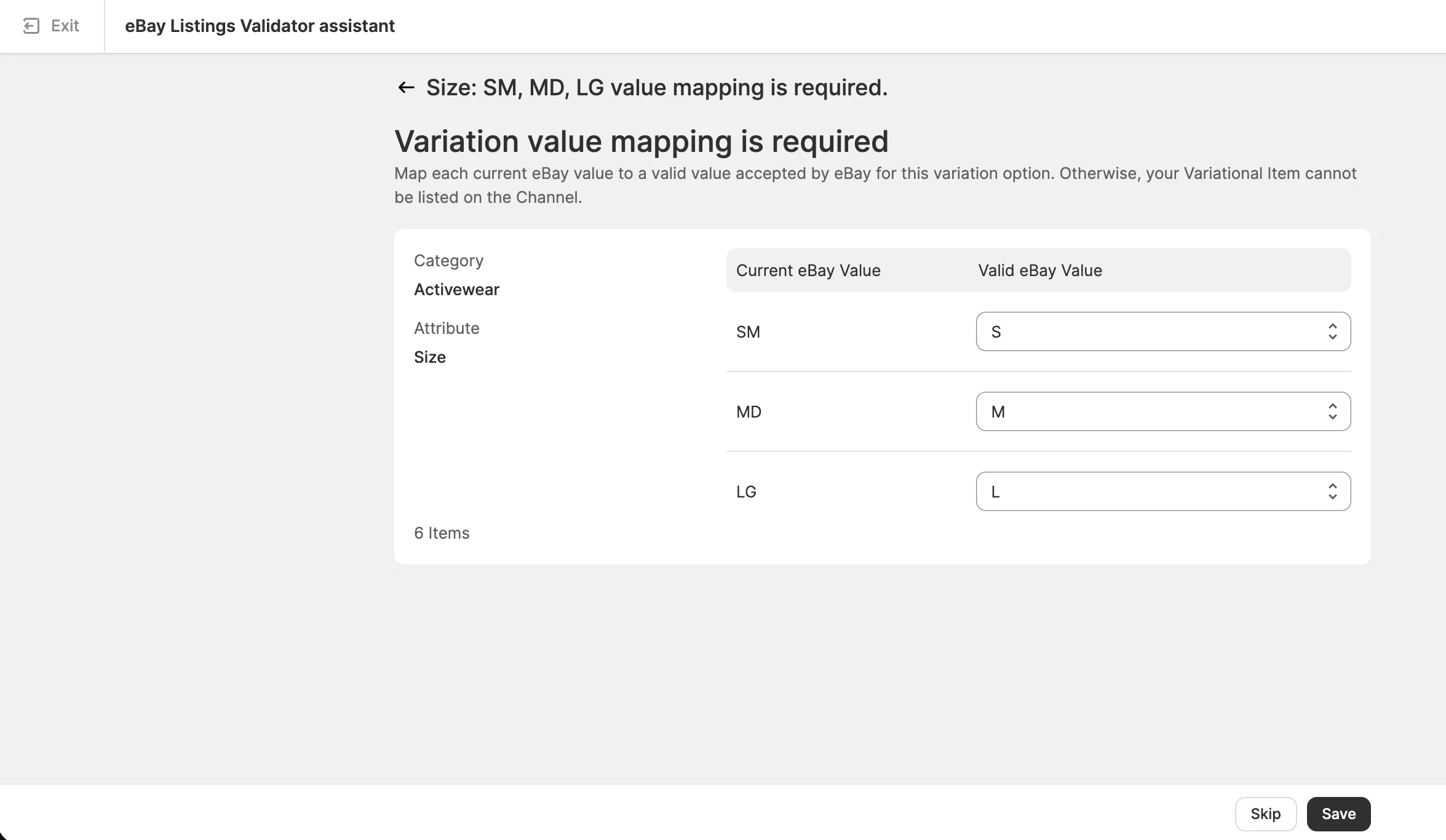
With the M2E Size Standardization tool, you can:
- Find invalid Size values in active eBay listings from one place
- Correct the same value in multiple affected listings at once
- Handle both Size item specifics and Size variations
- Update eBay Size values without changing the Size data in your store catalog
See the full validation and resolution workflow in the video below. Or follow the eBay Size Standardization guide for step-by-step instructions.
Conclusion
Size values are one part of a larger pattern. Marketplace requirements change, and Size may not be the last item that eBay standardizes. When requirements tighten, the sellers who can adapt their store data without rewriting the catalog will have an easier time keeping listings active and accurate.
M2E Multichannel Connect gives you that flexibility. You can find invalid eBay Size values, map them to accepted values, and apply the changes to your listings in bulk. Your store catalog remains unchanged, and your eBay listings align with marketplace requirements.